
Tint Meter v1.3.1
HighApps Mobile


About this app
Developer Description
Measure transparency levels. Get accurate tint darkness readings. Download now!
Instructions:
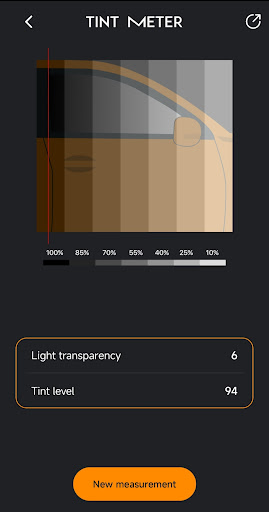
1. Press the FIX VALUE button and bring your device closer to the window within 3 seconds. The app will record data from the light sensor, and the screen will temporarily go black. Once recording is complete, the screen will reactivate with a signal.
2. For the second measurement, repeat the same steps, but this time with the window pulled down. Maintain the device's position for accurate results.
Tint Meter has undergone rigorous testing on various Android-powered devices, ensuring compatibility and reliability. The only requirement is a light sensor, making it accessible to a wide range of users. Start measuring light transparency levels for free with this intuitive tool, and stay tuned for our upcoming apps offering even more useful tools.
Key Features:
* Measure transparency levels of transparent or semi-transparent objects
* Accurately determine car window tint darkness levels
* Compare lightness values between different locations or situations
* Simple and user-friendly interface
* Tested on a variety of Android devices
* No cost or in-app purchases required
Download Tint Meter now to effortlessly measure transparency levels and obtain precise tint darkness readings. Enhance your transparency measurement tasks with this indispensable tool. Stay connected with us for future app releases, as we continue to bring you more valuable tools to simplify your everyday tasks.
Note: This app requires a device with a light sensor to function properly.
What's New
Version Information
- Version
- 1.3.1
- Downloads
- 10K+
- Updated on
- Aug 25, 2025
- Released
- May 28, 2023
- Requires
- Android 7.0
Statistics
Google Play Rating History
Rating Distribution
Downloads Over Time
Tint Meter has been downloaded times. Over the past 30 days, it averaged downloads per day.
Shaded area shows 30-day prediction based on historical trends
Historical data collection started recently. More data points will be available over time.
Tint Meter users say on Google Play
 Nawny Gilkes
pretty accurate if done right, remember to do it twice, once with the window up and once with the window down, or bring the window halfway down and make sure you know where the light sensor is located on your device, mine is on the front top side of my phone, so I had to place the phone facing the window for it to work. hope that helps In case you didn't know what the light sensor is, you know when you go from a bright room to a darker room the phone light automatically dims? that's it
 Micheal Wilson
Not quit accurate but iys close
 Tom Dawson
has pop ups after downloading app. not cool. uninstalled app. I`ll buy a meter if I need to check tint. very disappointed
ApkTrusted Ratings & Reviews
More from HighApps Mobile
See more apps








Scan this QR code to download

Forwarding you to the page at Google Play market in seconds...
Open Google Play market now