
NovelVoice - Novels read aloud v21.0.0
shinagawa.app



About this app
Developer Description
You can listen to novels published on web novel sites.
- Tap the link to the novel site from the home page.
- In WebView, navigate to the novel's episode page and tap ▶︎.
# Recommended for situations like this
- On a commuter train where it's hard to take out your phone.
- When you're driving.
- During housework or work when both hands are busy.
- While working out or running at the gym.
- Relaxing before bedtime.
- Use the translation function for language learning.
# Useful Features
- Adjustment of voice type and height
- Adjustment of reading speed
- Automatic page forwarding (if there is a link to the next story on the page, after the reading of the page is completed, it automatically moves to the next story and reads it out loud)
- User dictionary
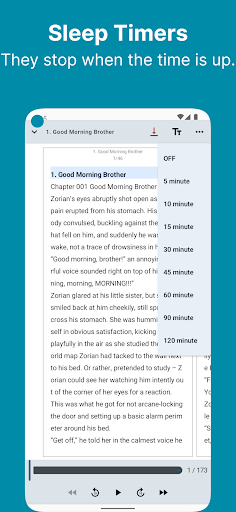
- Sleep timer
- Browsing history
- Bookmarks
- Translation(MLKit, DeepL)
- Download the novel (you can browse and read offline)
- File import (txt/pdf/epub/zip)
- You can import from the menu on the Bookshelf tab.
- Backup/Restore
- Music player
- HTML parser can be configured for unsupported novel sites
# Supported Novel Sites
- Wuxiaworld
- Royal Road
- Webnovel
- NovelBin
- Creative Novels
- MoonQuill
- Inkitt
- wattpad
- Scribble Hub
- Inkspired
- Archive of Our Own
- Grimms' fairy tales
- Wikisource
- Project Gutenberg
- Volare Novels
- Asian Hobbyist
- Genesis Translations
- Galaxy Translations
- TRAVIS Translations
- Fantasy World Online
- Foxaholic
- Moonlight Novels
- NovelBin
- Ranobes
- NovelFull
- FictionPress
What's New
In-app purchases
$2.99 per item
Version Information
- Version
- 21.0.0
- Downloads
- 10K+
- Updated on
- Jan 7, 2026
- Released
- Jan 14, 2023
- Requires
- Android 8.0
Statistics
Google Play Rating History
Rating Distribution
Downloads Over Time
NovelVoice - Novels read aloud has been downloaded times. Over the past 30 days, it averaged downloads per day.
Shaded area shows 30-day prediction based on historical trends
Historical data collection started recently. More data points will be available over time.
NovelVoice - Novels read aloud users say on Google Play
 colton smith
I have lots of fun using the app to read books to me. there are just a few problems I have encountered, but the developer has patched them out. my main issue is the number of ads and having them be opened every time I open up the app because it causes the app itself to break sometimes.
 Tei Takenaka
The new update is currupted. The developer is aware of the issue but does not fix the problem.
ApkTrusted Ratings & Reviews
More from shinagawa.app
See more apps




Scan this QR code to download

Forwarding you to the page at Google Play market in seconds...
Open Google Play market now