
Weeklo: Weekly Planner & ToDo v1.1.9
Unique Pixel Studio




About this app
Developer Description
Simple weekly planner app for your weekly schedule, tasks and personal week todo
Why Weeklo?
Experience the tactile feel of a paper planner with digital planner superpowers. Navigate your timeline with a unique 3D page-flip animation and organize tasks using the simple yet rich-in-features drag & drop interface. Also, Weeklo has no ads, even for free users, because Weeklo strives to save your valuable time.
Key Features:
📅 Intuitive and Flexible Weekly Schedule:
Visualize your entire week at a glance. Unlike standard todo list apps, our weekly view helps you manage your weekly timetable effectively. Drag tasks to reschedule instantly or long-press to reorder or delete tasks in our weekly organizer. Choose start day of your weekly timetable, or change text size.
🤖 AI Planner & Emojis:
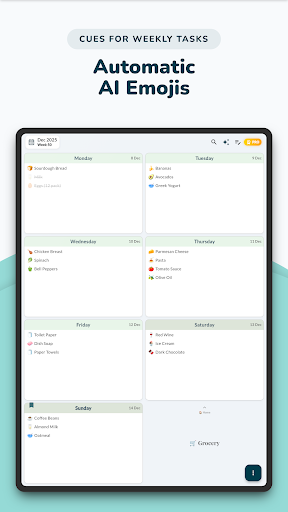
Tap the "Magic Wand" and let our AI weekly planner feature auto-generate relevant emojis for all your tasks at once! This provides instant visual clues, making it easier to scan your agenda—perfect for ADHD weekly planner needs.
🗃️ Multiple Planners:
Separate your concerns with dedicated and flexible personal planners. Create a Work Planner with five days plan, a Study Planner for students, Meal Planner, or a Personal Diary. Instantly switch between planners with a vertical scroll and differentiate your planners visually using distinct custom colors.
🔄 Smart Recurring Tasks:
Set habits and routines effortlessly. Whether it's a daily planner routine, weekly meeting, or monthly bill, Weeklo handles complex recurrence intervals.
📝 Rich Text Notes:
More than just a checklist tracker. Use the dedicated notes section for brain dumps, journaling, or keeping a digital diary. Format with bold, colors, and highlights.
🎨 Aesthetic & Customizable
Choose from Light or Dark modes and a pastel color palette. Customize your weekly organizer to fit your style.
📅 Calendar Import
Sync your schedules and plans from your device calendar to keep your daily planner and agenda planner perfectly aligned.
⏰ Powerful Reminders
Stay productive using flexible reminders with multiple notifications that keep your to-do list, routine plan on track.
🔒 App Lock
Protect your personal diary, and week plans with Face ID or Fingerprint security.
💾 Local & Cloud Backup
Safely back up and restore your weekly plan, daily notes, and to-dos locally or via Google Drive.
🗂 Planner Templates & PDFs
Print or export your weekly plan as a beautiful PDF file — choose from a variety of elegant templates.
📱 Interactive Planner Widget
Add our interactive widget to your Home Screen for a quick look at your daily tasks. Mark them as completed instantly without opening the app.
Whether you are looking for a fitness planner, meal planner, productivity planner or just a normal daily planner, Weeklo the most simple planner you will find for a productive life.
For support: support@weeklo.app
What's New
- New Yearly recurrence option added.
- General UI refinements and bug fixes.
In-app purchases
$2.49 - $23.99 per item
Version Information
- Version
- 1.1.9
- Downloads
- 5K+
- Updated on
- Jan 31, 2026
- Released
- Dec 19, 2025
- Requires
- Android 7.0
Statistics
Google Play Rating History
Rating Distribution
Downloads Over Time
Weeklo: Weekly Planner & ToDo has been downloaded times. Over the past 30 days, it averaged downloads per day.
Shaded area shows 30-day prediction based on historical trends
Historical data collection started recently. More data points will be available over time.
Weeklo: Weekly Planner & ToDo users say on Google Play
 TARANGINI KHOT
Very neat and perfect.. can you add daily expenses too ?
 Pravin Rajput
Weekly plan at glance.
ApkTrusted Ratings & Reviews
More from Unique Pixel Studio
See more apps
Scan this QR code to download

Forwarding you to the page at Google Play market in seconds...
Open Google Play market now