e-Processo v9.1.1
Serviços e Informações do Brasil




About this app
Developer Description
Consult and monitor processes at the Federal Revenue, CARF and PGFN
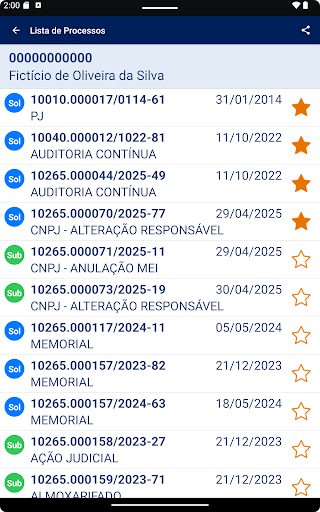
This version of the e-Processo app offers the following services:
- View cases by CPF/CNPJ (Individual Taxpayer Registry)
- View case number
- View basic case information
- View interested parties in the case (joint and subsidiary parties)
- View case history
- View documents attached to the case ***
- View and control the list of cases being monitored (favorites)
- Receive alerts about the progress and electronic acknowledgment of the case
- Receive alerts whenever a new document is attached to a case marked as a favorite
- Send a request to attach documents to the case ***
- Configure PUSH notifications
*** The document attachment request is only available for cases in RFB or CARF units. *** To view or copy documents and request attachments, you must:
- authenticate in the e-Processo app using your Silver or Gold GOV.BR account; or
- register your mobile device (smartphone or tablet) on the RFB's e-CAC portal and then activate it in the app.
To register your mobile device, log in to e-CAC with your Silver or Gold GOV.BR account. Select "Legislation and Procedure" / "Digital Procedures (e-Processo)" and then access the "Mobile Device Registration" service. When registering, enter a device name, activation code, authorization expiration date, and select the e-Processo service. After registering, view process documents in the e-Processo app using your CPF/CNPJ (Brazilian taxpayer ID) and confirm the same information (name and activation code). Your device will be authorized to access the documents. If you wish to cancel the service on your mobile device, log in to the e-CAC “Mobile Device Registration” again and delete the device.
What's New
Version Information
- Version
- 9.1.1
- Downloads
- 500K+
- Updated on
- Jan 8, 2026
- Released
- Aug 14, 2018
- Requires
- Android 4.4
Statistics
Google Play Rating History
Rating Distribution
Downloads Over Time
e-Processo has been downloaded times. Over the past 30 days, it averaged downloads per day.
Shaded area shows 30-day prediction based on historical trends
Historical data collection started recently. More data points will be available over time.
e-Processo users say on Google Play
 Mauricio Alencar
Muito bom.
 Lily
Lily
Cada app faz uma única coisa!! Quantos app preciso???? Kkkkk
ApkTrusted Ratings & Reviews
More from Serviços e Informações do Brasil
See more apps
Meu INSS – Central de Serviços
Free

Carteira de Trabalho Digital
Free

Receita Federal
Free

Cadastro Único
Free
Meu SUS Digital
Free
Clique Escola
Free

Hidroweb
Free
SisUAB - Consulta Pública
Free

Coren-SP +Fácil
Free

Calculadora do Investidor
Free

MonitoraSUS
Free

HidroObserva
Free

Declara Água
Free

Editora MS
Free

FPL BR - EFB
Free
Ajuda Auditor
Free
Scan this QR code to download

Forwarding you to the page at Google Play market in seconds...
Open Google Play market now