GPS Time Tracker - Logbook v20.1
Brunnlechner - Apps made in Germany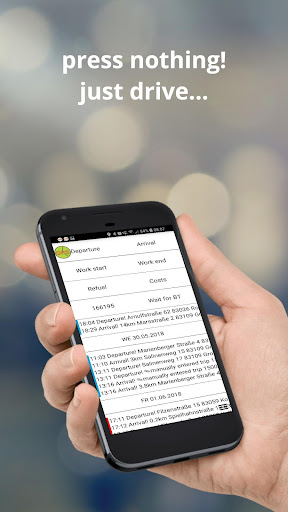


About this app
Developer Description
automatic logbook +mileage, intelligent GPS time tracking, GPS logger, taximeter
Special feature of GPS time tracking logbook:
✔ fully automatic departure and arrival detection (you don't must push a button - just drive) - The app needs access to the location in the background in order for automatic recording.
✔ move off and stop are automatically recognized with gps and logged as departure and arrival
✔ You can leave the smartphone in your pocket and in the background, all starts are u. stops incl. route and favorite places recorded automatically + automatically track mileage (even offline)
✔ Automatic determination of: starting point and destination, start and end times, mileage.
✔ You can easily record an entire year - always know when you were where.
✔ No registration required.
It is added by GPS online query the location (city, street, house number).
(Conversion with the Android Geocoder of the smartphone = free, conversion via HTTP = Pro-Version)
Description: (automatic logging of all trips)
(1) Manual time tracking at your fingertips
(2) Automatic time tracking by GPS
Departure, break and favorite places are automatically detected and recorded, even offline.
(3) Fully automatic logbook (choice miles or kilometers)
All trips are automatically logged. The reason for the trip can be added manually as note or automatically as favorite. Rides can be subsequently marked as business, private or other.
Low battery consumption because GPS just turns on every minute, records your location, and turns off again. The travelled distance and milage are added by arrival.
★ This app can be used for hiking, for travels and for time tracking.
★ Perfect for recording many short distances in a logbook
★ You can find a extended manual here: http://www.gpstimetracker.de
★ You can always have your smartphone with you and in a backround process all starts and stops are recorded.
★ The free version is not a trial version, it can be used as a full logbook!
★ Settings: Kilometers/Miles Liters/Gallones
Pro and Free-Version are identical except for the following functions:
- Bluetooth detection
- delete canceled + import saved lists
- speech input by a long press on a button
- send via e-mail or dropbox.
- in the Pro version as many favorites can be added
- 12 additional activity buttons
- AutoSync (PDF, CSV) (Dropbox, OneDrive, GoogleDrive)
- Export as Excel compatible CSV file
- On/Off-Timer
An electronic logbook is recognized by the tax office:
1. You must add the reason for the trip as a note.
2. You need to select the drives accordingly as a Business or Private.
3. When exporting as PDF, you can add the driver and the license plate as the name.
Data protection:
The activities are only stored locally on the phone, it has only the smartphone owner access the data.
No registration - the app runs independently on the smartphone
Needed Permissions:
Location (automatic logbook)
Storage (export PDF / CSV)
Activity (walking, cycling detection)
Network: conversion of coordinates into places
Internet-connection: Geocoding of locations and showing Google-Maps
Autostart: App starts automatically in backround after booting if Auto-Mode is activated
Copyright (c) 2013, Franz Brunnlechner. All rights reserved.
There is no liability for any direct or indirect damages arising from the use of GPS time tracker taken.
What's New
Version Information
- Version
- 20.1
- Downloads
- 100K+
- Updated on
- Aug 28, 2025
- Released
- Apr 20, 2013
- Requires
- Android 5.0
Statistics
Google Play Rating History
Rating Distribution
Downloads Over Time
GPS Time Tracker - Logbook has been downloaded times. Over the past 30 days, it averaged downloads per day.
Shaded area shows 30-day prediction based on historical trends
Historical data collection started recently. More data points will be available over time.
GPS Time Tracker - Logbook users say on Google Play
 A Google user
Sehr praktische und zuverlässige App. Ich habe viele Fahrtenbücher getestet, aber diese App ist mit Abstand die Beste. Ich verwende die App jetzt seit über einem Jahr in sie hat mir viel Geld gespart - werde jetzt such die Pro kaufen, obwohl die kostenlose für mich ausreicht.
A Google user
If I ever need a travel log, I'd seriously consider using this app. Getting around inside the app is a bit awkward, and it isn't going to win any beauty contests. On the other hand, the app can handle most of the work on its own. After installing, I set it to auto, then forgot it for a few weeks. Turns out the app was tracking and logging all my travels - time and place of departures/arrivals, mode and distance - all before I'd even looked at the settings. I like an app that's productive in spite of me. :D
A Google user
I used to love this app but it is becoming unreliable. GPS permission keeps turning off . Constant irritating toast notification "menu settings address resolution with http" with the setting checked and not checked.
A Google user
I want it to say regular time not military Time I Don't understand military Time
A Google user
Gas cost are liters not gallons
ApkTrusted Ratings & Reviews
More from Brunnlechner - Apps made in Germany
See more apps
simple dice app with no ads
Free
VRAugentraining Visualtraining
Free
GPS Time Tracker - logbook Pro
Paid
calendar week in status bar
Free

Danke! App
Paid

Danke! App
Paid
GPS Zeiterfassung Schneepflug
Paid
Uhrzeit mit Sekundenanzeige
Free

Three dice without advertising
Free

große Akku Batterie Anzeige %
Free

GPS Departure
Free

GPS Arrival
Free

two simple dice
Free
Similar Apps



Scan this QR code to download

Forwarding you to the page at Google Play market in seconds...
Open Google Play market now