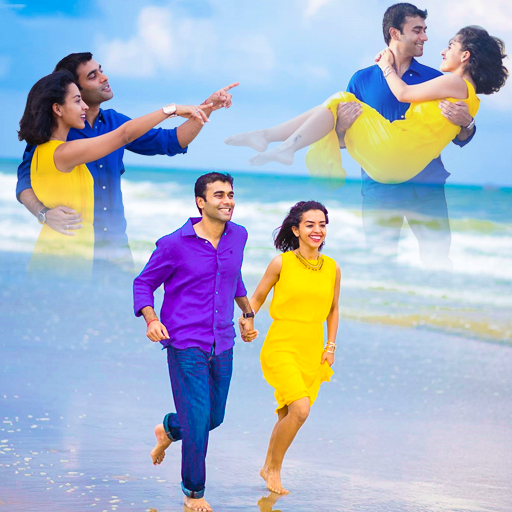
Blend Photo Editor Multi Frame vVARY
Benzyl Labs



About this app
Developer Description
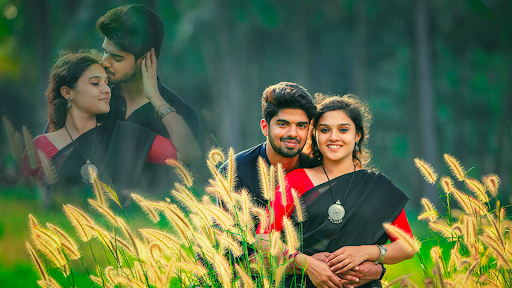
You can place your multiple photos with blend effect in Backgrounds and stickers
How to use this app?
Crop Option:
Take photo or selfie or select from the gallery in Blur Photo editor. Crop it first with the help of crop feature to remove unwanted portion from it.
Cut Option:
This app has cut option. Directly cut the desired image from the unwanted background with the help of cut tool and paste it on any background.
Erase Background:
With the help of background erase option you can remove unwanted photo background. Eraser size can be adjusted, undo, redo, Repair, Zoom in & zoom out option to erase carefully without erasing the main photo.
Auto Eraser:
It has auto background eraser option. It will help you to remove particular color object in the background with single touch.
None background:
Blend Photo editor has none background option. After remove background of your photo, if you don’t want to set any background to your photo you can choose none background option. Your photo will get white background with this option.
Single Color Background:
If you don’t like white background, select any single color to set as background color of your photo. Either light color or dark color, you have the control of on all colors.
Own Background:
This blend app has own background option. If you don’t like any of the background you can choose own background option, with this option you can take image from the gallery or can capture with the camera.
Change Background:
Set any beautiful background to your photo from the collections or select any picture from your gallery. Thereafter convert into blur photo.
Blur Background:
Multiple photo blend editor has background blur effect. To apply this effect to your background, just touch the background and adjust the seek bar as per your requirement.
Add stickers:
This photo blend app has many stickers. Add face stickers & photo stickers from the sticker collections. Select any sticker and drag it to the right position, zoom in or zoom out, rotate it, flip it and set it at the suitable position on the photo.
Add Text on Photo:
This Multiple photo blend app has text on photo option. Add quote or write text as per your choice on the photo. This option helps you to convey your message with picture to others.
Flip option:
Apply this flip option to your main photo or sticker. By changing the pose the picture may be more attractive. Flip option will help you to do it.
Cloning Effect:
This Blend effect Photo editor has cloning effect. You can duplicate your photo with this effect. Your photo will convert as a sticker format by this effect. En number of duplicate photos can be created with this option.
Blend Effect:
This Blend Photo editor has which you can apply blend effect on your photo, duplicate images and stickers. Beautify your photos with the help of this
blend effect. Enhance your photos by this multiple photo blend effect.
Set wallpaper:
Finally edited photo can be set as a wallpaper of your device.
Share option:
Modified photos can be shared with your friends & girlfriends or family members on any social media networks.
Version Information
- Version
- -
- Downloads
- 100K+
- Updated on
- -
- Released
- Mar 30, 2019
- Requires
- Android Varies with device
Statistics
Google Play Rating History
Rating Distribution
Downloads Over Time
Blend Photo Editor Multi Frame has been downloaded times. Over the past 30 days, it averaged downloads per day.
Shaded area shows 30-day prediction based on historical trends
Historical data collection started recently. More data points will be available over time.
Blend Photo Editor Multi Frame users say on Google Play
 Niranjan Jethy
Very good app,easy access to operate,some bg is necessary for more attractive,but more photos can not able to manage.what is wrong not able to crop,please help,otherwise one will get disgusted.
 Marg Joshi
Ok.
 Harnek Singh
Not good as it is shown here. Pics are not thoroughly blended and look weird . I request not to use it.
 steve Holbrook
Wouldn't blendinand it says get photo only thing left.cannot hand my gal her llooing like a sqareor your the money not like most apps they mostly do not lie.also youe gal in the is my grandaughter.she didn'tgetw dime from you. Or? rectangle.
 Indhu Pentakota
App showing..to collect pic from gallery...but it can't happening...im very disappointed..why..it happening...plz take care of it...
ApkTrusted Ratings & Reviews
More from Benzyl Labs
See more apps
CB Background Photo Frames App
Free

Women Police Suit Photo Frames
Free

Garden Photo Frames AI Cover
Free
Men Police Suit Photo Editor
Free
Girlfriend Photo Editor Frames
Free
Sunset Photo Frames & Editor
Free
Men Formal Shirt Photo Frames
Free
Heaven Photo Frames & Editor
Free

Rain Video Music -Photo Editor
Free
Women Formal Shirt Photo Suit
Free

Spiral Photo Editor - Pix Lab
Free

Photo Editor - Neon Art Echo
Free

Frozen City Photo Editor Frame
Free
Smarty Man Photo Editor -Maker
Free

Army Suit Photo Editor Frames
Free

Frozen Cave Photo Frames Edit
Free
Similar Apps


Scan this QR code to download

Forwarding you to the page at Google Play market in seconds...
Open Google Play market now