
Eyes Color Changer - Photo Edi vVARY
1B Studio Ltd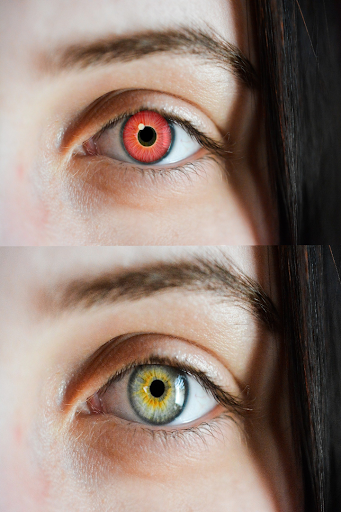



About this app
Developer Description
Eyes color changer can help you change the color of your eyes with real eyes.
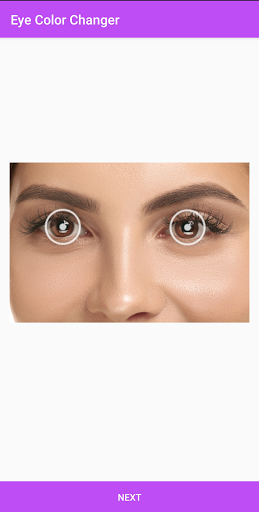
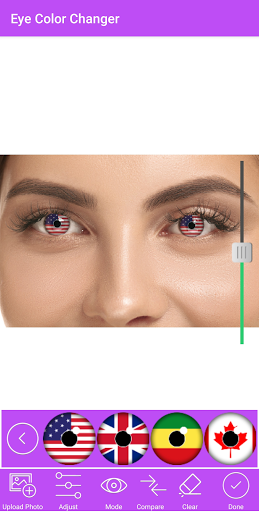
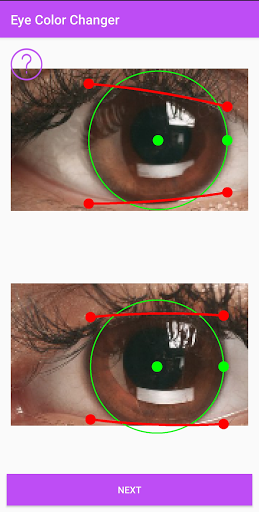
The app eyes color changer can detect your eyes place by adjusting the cursor and the circle to the right place in your photo above your eyes then choose the type you want to add, it seems real, and no difference between it and real.
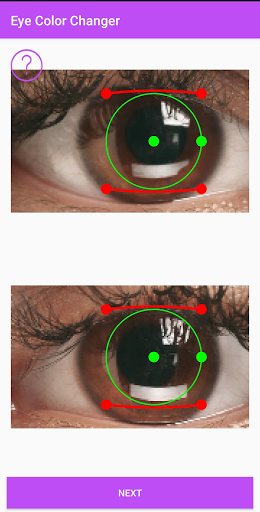
You can adjust the circle to be compatible with the pupil of the eyes,
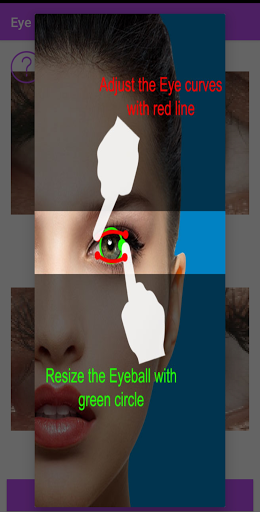
Then adjust the 2 red lines to be down the up eyelids and above the down eyelids, so that will make the application know the exact place of the change, Then an activity will appear, there where the change should be, you can change the pupil of your portrait to any type and color you want there is green color and gray red and too many colors that you will like.
There are also too many flags that's mean you can change the color of your pupil to be like the fag of your country or any country you like, we will add more soon.
You can also change the saturation of your new lenses by adjusting a cursor above and right.
The application eyes color changer can also help you edit right or left eyes only and let one as a normal. You can clear every change you did with a button clear, When you will finish you can click the button save and save the work you did and you will find it in your gallery.
Also, you can share it on social media directly from the application.
We are a team of developers and we spent too much time to develop it and make it real if you see that there's an error or something please feel free to send it to us via our contact email we try to fix it as soon as possible.
Version Information
- Version
- -
- Downloads
- 10K+
- Updated on
- -
- Released
- Aug 7, 2021
- Requires
- Android Varies with device
Statistics
Google Play Rating History
Rating Distribution
Downloads Over Time
Eyes Color Changer - Photo Edi has been downloaded times. Over the past 30 days, it averaged downloads per day.
Shaded area shows 30-day prediction based on historical trends
Historical data collection started recently. More data points will be available over time.
Eyes Color Changer - Photo Edi users say on Google Play
 Fleicap
You can't save, the ads keep appearing as in a loop! Uninstalling
ApkTrusted Ratings & Reviews
More from 1B Studio Ltd
See more apps
Eye Exercises - Eyes Daily Tra
Free
Butt and Leg Workout Exercises
Free
Jaw Muscles Exercises - Redefi
Free

Lower Back Pain Exercises
Free

Add Laser Eyes - Photo Editor
Free
Double Chin Exercises
Free
Chubby Cheeks Exercises
Free

Back Pain Relief Exercises
Free
تجميل الصورة الشخصية - مكياج س
Free

Daily Workouts Exercises
Free

Crypto Profit Calculator
Free

Yoga Daily Workout Routine
Free
Neon Light Effect - Photo Edit
Free
Waist Exercises At Home - Set
Free

Anti-aging Exercises
Free
تمارين اليوغا - تحدي 30 يوم
Free
Similar Apps


Scan this QR code to download

Forwarding you to the page at Google Play market in seconds...
Open Google Play market now