
코비하우스AR - 증강현실 인테리어 vVARY
코비하우스VR




About this app
Developer Description
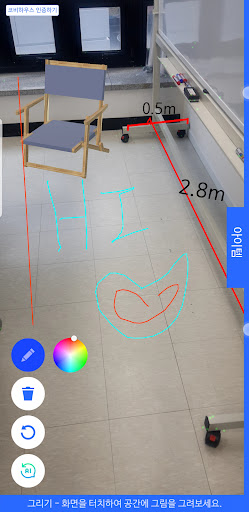
It is an augmented reality app that can create virtual space in real space and arrange items.
My space, which was difficult to decorate in person, can be easily created with AR!
Kobe House AR opens a new world to you.
• How to run Kobe AR
1. Face the flat surface and move it in a circular motion.
2. When the floor is recognized, the function selection/install/delete/reset button and item selection window on the left are activated.
• How to place items
1. After selecting the item placement mode, select the item to be placed in the selection window.
2. Touch and place the floor surface to be installed.
3. Select the placed item to edit its rotation and properties
• How to measure floor dimensions
1. Select dimension measurement mode
2. Align the starting point to be measured with the center mark on the screen and touch to measure.
• How to create walls
1. Select wall drawing function
2. Position the boundary between the floor and wall of the actual space at the center of the screen and touch the screen.
3. Draw a wall along the center of the screen and touch the screen to complete wall creation.
4. Automatic creation of floor and ceiling space when closed walls are completed
• AI Style Guide
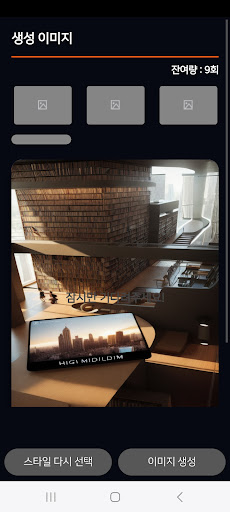
1. After installing and logging in to Kobi House VR, design the current screen with AI.
[Homepage]
https://kovihouse.com/
[Developer contact information]
kovihouse@kovi.com
[App access rights]
The Kobi House AR app requires the following system access permissions to access certain functions or data.
Even if you do not grant permission, you can still use the app itself, but there may be restrictions on some functions and services provided by Kobi House AR.
■ Selective access rights
- camera
*Photography
- Access to Kobi House AR is available starting from Android 6.0 or higher. If you are using a version prior to Android 6.0, selection permission cannot be granted individually, so we recommend checking whether the manufacturer of your device provides an operating system upgrade function and updating to 6.0 or higher if possible. After completing the update, you can edit the previously granted permissions in your device settings.
Version Information
- Version
- -
- Downloads
- 1K+
- Updated on
- -
- Released
- Apr 10, 2025
- Requires
- Android Varies with device
Statistics
Google Play Rating History
Rating Distribution
Downloads Over Time
코비하우스AR - 증강현실 인테리어 has been downloaded times. Over the past 30 days, it averaged downloads per day.
Shaded area shows 30-day prediction based on historical trends
Historical data collection started recently. More data points will be available over time.
ApkTrusted Ratings & Reviews
More from 코비하우스VR
See more apps
Scan this QR code to download

Forwarding you to the page at Google Play market in seconds...
Open Google Play market now