
Splitwise v25.11.1
Splitwise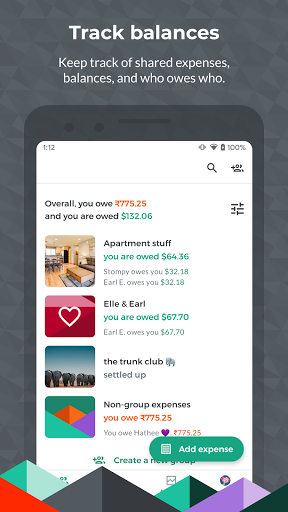
About this app
Splitwise solves the common problem of tracking and splitting expenses with friends, roommates, or during group trips, making it an essential tool for individuals who frequently share costs. This app benefits users who value simplicity and ease of use, as it provides a straightforward interface for managing expenses. Compared to alternatives in the Finance category, Splitwise stands out with its user-friendly design and seamless integration with various payment methods. However, its limited feature set and lack of investment tracking capabilities might make it less appealing to users seeking a comprehensive financial management solution.
Pros
- With over 10 million downloads and a 4.2-star rating, Splitwise has established a strong reputation for reliability and user satisfaction, making it a trustworthy choice for expense tracking.
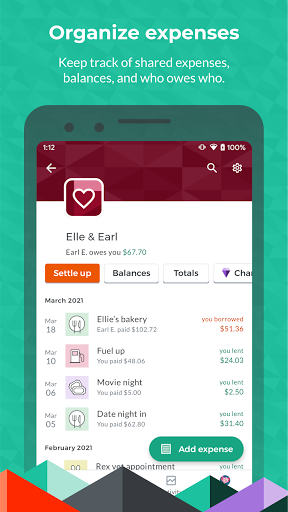
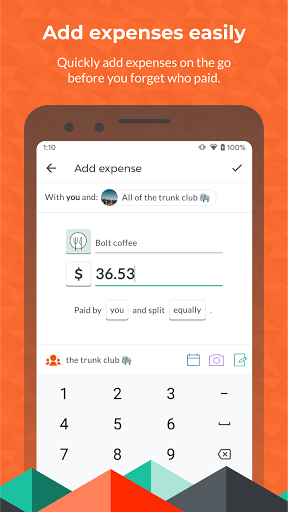
- The app's simple and intuitive interface allows users to easily add expenses, split bills, and track payments, reducing the complexity often associated with financial management.
- Splitwise's in-app purchase model, with prices ranging from $0.99 to $59.99, provides users with flexibility and control over their premium features, enhancing the overall user experience.
- The developer's commitment to regular updates, as evidenced by the frequent version releases, ensures that the app remains stable, secure, and feature-rich.
- The absence of ads within the app creates a distraction-free environment, allowing users to focus on managing their expenses without interruptions.
Cons
- Although Splitwise excels at expense tracking, its limited feature set might not cater to users seeking a more comprehensive financial management solution, such as budgeting, investment tracking, or long-term financial planning.
- The in-app purchase model, while flexible, may lead to additional costs for users who require premium features, potentially making the app less appealing to budget-conscious individuals.
- Some users might find the app's lack of offline capability to be a limitation, as it requires a stable internet connection to function, which could be a concern for those with limited or unreliable internet access.
- The app's focus on expense tracking and splitting might not address the needs of users who require more advanced financial tools, such as expense categorization, receipt scanning, or automated savings features.
Best for: The ideal user for Splitwise is an individual between the ages of 18 and 40, likely a student, young professional, or someone who frequently shares living expenses with roommates or participates in group trips, and has a basic understanding of financial management, seeking a simple, user-friendly solution for tracking and splitting expenses without requiring advanced financial tools or features.
Developer Description
Split expenses with friends, roommates, group trips, and more
Splitwise is great for:
- Roommates splitting rent and apartment bills
- Group trips around the world
- Splitting a vacation house for skiing or at the beach
- Weddings and bachelor/bachelorette parties
- Couples sharing relationship costs
- Friends and co-workers who go out to lunch or dinner together frequently
- Loans and IOUs between friends
- And so much more
Splitwise is simple to use:
- Create groups or private friendships for any splitting situation
- Add expenses, IOUs, or informal debts in any currency, with support for offline entry
- Expenses are backed up online so any everyone can log in, view their balances, and add expenses
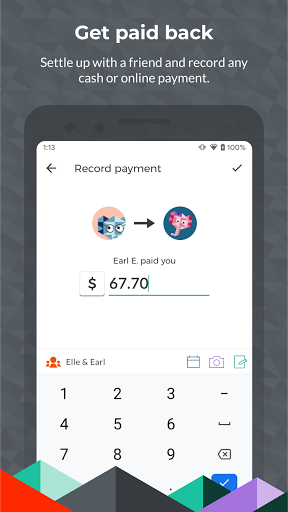
- Keep track of who should pay next, or settle up by recording cash payments or using our integrations
Endorsements:
“Makes it easy to split everything from your dinner bill to rent.” - NY Times
"Fundamental for tracking finances. As good as WhatsApp for containing awkwardness." – The Financial Times
“I never fight with roommates over bills because of this genius expense-splitting app”- Business Insider
“The Single Best App You Can Download for Group Trips of Any Kind” - Thrillist
Here are some of our industry-leading features:
- Multi-platform support for Android, iOS, and web
- Simplify debts into the easiest repayment plan
- Expense categorization
- Calculate group totals
- Export to CSV
- Comment directly on expenses
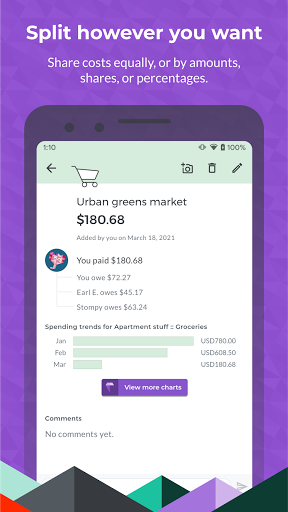
- Split expenses equally or unequally by percentages, shares, or exact amounts
- Add informal debts and IOUs
- Create bills that recur monthly, weekly, yearly, fortnightly
- Add multiple payers on a single expense
- See total balances with a person across multiple groups and private expenses
- Custom user avatars
- Cover photos for groups
- Activity feed and push notifications help you stay on top of changes
- View your edit history for changes to an expense
- Any deleted group or bill can be restored easily
- World-class customer support
- Pay back using our integrated payments: Venmo and PayPal (US only), Paytm (India only)
- 100+ currencies and growing
- 7+ supported languages
Get Splitwise Pro for even more amazing features!
- Convert expenses to different currencies using our Open Exchange Rates integration
- Access to “spending by category” budgeting tools and other charts
- OCR integration for scanning and itemizing receipts
- Store high-resolution receipts in the cloud (10GB cloud storage)
- Backups to JSON, downloadable from our website
- Search full expense history
- Save default splits
Privacy
As Splitwise does not request any permissions, users can be assured that their data is not being collected or shared without their knowledge. However, users should still be cautious when linking their payment methods to the app, ensuring they are using a secure connection and keeping their account information up-to-date. To maintain the security of their financial data, users should also regularly review their account activity and report any suspicious transactions to the developer.
Tips
To get the most out of Splitwise, users should start by setting up their profile and linking their preferred payment method, allowing for seamless transactions and expense tracking. Additionally, users can optimize their experience by regularly updating their expense records, using the app's reminders to stay on top of payments, and exploring the premium features to enhance their financial management capabilities. By doing so, users can streamline their expense tracking and splitting process, reducing stress and making it easier to manage shared costs.
What's New
In-app purchases
$0.99 - $59.99 per item
Version Information
- Version
- 25.11.1
- Downloads
- 10M+
- Updated on
- Dec 19, 2025
- Released
- Sep 12, 2011
- Requires
- Android 9
Statistics
Google Play Rating History
Rating Distribution
Downloads Over Time
Splitwise has been downloaded times. Over the past 30 days, it averaged downloads per day.
Shaded area shows 30-day prediction based on historical trends
Historical data collection started recently. More data points will be available over time.
Splitwise - Google Play Rankings
Top Rankings
| Rank | Country | Category | List | Change |
|---|---|---|---|---|
| — |
Ranking History in
No ranking data available yet. Rankings are updated daily.
#27 in Top Grossing Finance in United States


#3 in Top Grossing Finance in India


#3 in Top Grossing Finance in Philippines

#4 in Top Grossing Finance in Argentina

Splitwise users say on Google Play
 MOHAMMED SHAMEEM
nice app for calculating trip, food budgets and everything. very detailed.
 Karthik S
useful 😃
 Yen Velasco
If one person settles up an item, the other person can still click on Settle Up for the same item, causing DOUBLE ENTRIES which is confusing especially if there are large amounts! PLEASE FIX THIS
 Éric Bergeron
Used to work great. Now they put limits on many things to make you pay. Barely usable without paying
 Aniketh Krishnan
Ads are still okay. But putting a limit to the number of expenses per day? I can just keep notes of my expenses on my normal Notes app instead. Absolutely disappointing from the developer's side for the latest update. I already see countless reviews addressing the same issue. If this is the way the team thinks they'll make more money, they're so wrong. What a huge potential gone to waste. RIP to the actual Splitwise. 🙌🏼
ApkTrusted Ratings & Reviews
Similar Apps

Settle Up – Group Expenses
Free

Splid – Split group bills
Free

Cashew—Expense Budget Tracker
Free

Splitser - WieBetaaltWat
Free

MyMoney—Track Expense & Budget
Free

Budget App & Tracker: Spendee
Free

Money Manager Expense & Budget
Free

Money manager & expenses
Free

Daily Expenses 4
Free

Balance: Couple Budget & Money
Free

Wallet: Budget Expense Tracker
Free

Expensify - Travel & Expense
Free

Trackwallet: Budget & Expenses
Free

YNAB
Free

Monefy - Budget & Expenses app
Free

Timely – Bookings & payments
Free
Scan this QR code to download

Forwarding you to the page at Google Play market in seconds...
Open Google Play market now