
Graffiti Pro for Android v2.0.2
株式会社ACCESS
About this app
Developer Description
Tired of your on-screen keyboard? Try Graffitiーthe popular stroke input system.
Features:
-Replaces the Default Keyboard for Android
-Stroke-based text input - Uses the Graffiti™ alphabet text input method
-Easy to Learn
- Speeds up text input with Auto-Capitalization and Word Learning
-English and Japanese language support
-Faster and More Accurate that On-Screen Typing
-Advertisement Free
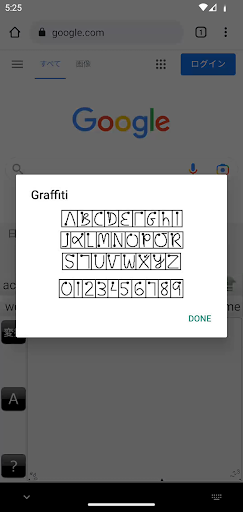
Graffiti™ is a replacement for the built-in on-screen keyboard, also called an input method. With Graffiti, you no longer type but you draw Graffiti characters with your finger or a compatible stylus. Graffiti characters are mostly single-stroke drawings that closely match the usual alphabet, but are simplified to make entry faster and easier. For example, the letter "A" is entered with a stroke that looks like an upside-down "V", saving time that you do not need to cross the "A" in the middle. Same for the letter "T", which is entered almost like a "7".
There are text and numeric input areas, improving the recognition of your input. Strokes drawn in the text area will only be interpreted as letters; strokes in the numeric area will be interpreted as numbers .
If you were a user of a PalmOS based PDA in the past, this will all be very familiar to you as the input method used by those devices was a stylus drawing Graffiti strokes in an input area at the bottom of the display. But even if you were not a Graffiti user before, you should give it a try now if you find that the on-screen keyboard doesn't suit your input style.
Don't know the Graffiti alphabet? After installing and enabling Graffiti, just draw a stroke up from the Graffiti input area into the main display area and the help screen appears. Tap to switch between the six stroke help screens.
Questions? Please see the FAQ at our website.
What's New
Small fix.
[2023/04/07 v2.0.1]
Support dark mode.
[2023/03/17 v2.0.0]
Now compatible with Android 13.
[2016/03/15 v1.0.5]
fixed the issue unable to translate to kanji
[2016/02/03 v1.0.4]
Fixed an install issue (Can't install the app, error code: -103)
[2016/01/29 v1.0.3]
High resolution support.
Version Information
- Version
- 2.0.2
- Downloads
- 10K+
- Updated on
- Jun 19, 2023
- Released
- Jan 20, 2011
- Requires
- Android 5.0
Statistics
Google Play Rating History
Rating Distribution
Downloads Over Time
Graffiti Pro for Android has been downloaded times. Over the past 30 days, it averaged downloads per day.
Shaded area shows 30-day prediction based on historical trends
Historical data collection started recently. More data points will be available over time.
Graffiti Pro for Android users say on Google Play
 Lawrence Lucier
Compared to regular Grafitti, the surface area of the writing area is much larger. I dont know whether it would be practical on a small phone. You would need to get the regular Grafitti. Grafitti is one of the great input inventions of tech. It's up there with the keyboard. It might be a little slower than gboard, but youll catch the errors faster. You can look at the words as you type, so you can correct them right away. You can look someone in the eye while you are taking notes. Fantastic.
 William Hostman
It works, but... It isn't great for tablet use... I'd love to be able to reduce to 1/3 height with the shorthand help to the side, and to make it a floating pallet. Would also be nice to have graffiti 1 & 2 selectable. Still, it's almost as good as it was on my old pda. It also needs a switch keyboard button. Adding thorn [Þþ], eth [Đđ], oek (oe ligature), and being able to turn the trace on/off would also be wonderful... most of this post entered with it.
 Alejandro Parraga
Still no respone from the developer. I used it in my first Palm and used to work very well in Android... Still having trouble rendering accents in Spanish. I use Google Pixel 4a(5g). It looks like it has trouble dealing with the larger drawing area.
 Greg Wotton
In 12 yrs this is a new issue! Input overlay opens when it shouldn't and it won't go away. I've missed calls because it sometimes opens when a call comes in and I can't get rid of it. Since it covers the Incoming Call buttons, I cannot answer. It also appears over the home-screen blocking 1/3 of the screen. The only way to get rid of it is to switch to an app with a text box and press the box. Only then does the minimize arrow appear and the overlay can be closed. Android 9 on Galaxy Note 8.
 Art Granzeier
I have been using this app for years, but this recent update has nearly ruined it. The writing area will often refuse to close, blocking the accept button for incoming calls and many other things. Also, the change to light mode from dark is hard on my eyes. The help system also does not show the help screen, only the bottom third of the screen is visible - not much help. Is there any way to go back to the previous version?
ApkTrusted Ratings & Reviews
More from 株式会社ACCESS
See more apps

Scan this QR code to download

Forwarding you to the page at Google Play market in seconds...
Open Google Play market now