
AT&T Cell Booster v1.25261.21
AT&T Services, Inc.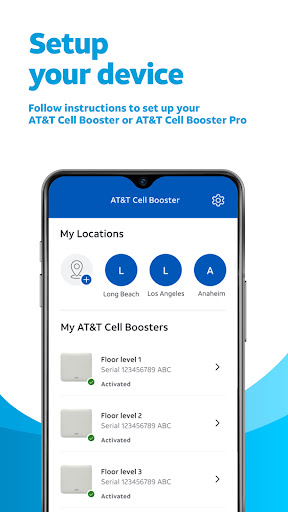
About this app
Developer Description
Easily manage, set up, and troubleshoot your Cell Boosters all in one place!
Sign in with your myAT&T, Premier or FirstNet User ID and password to get started!
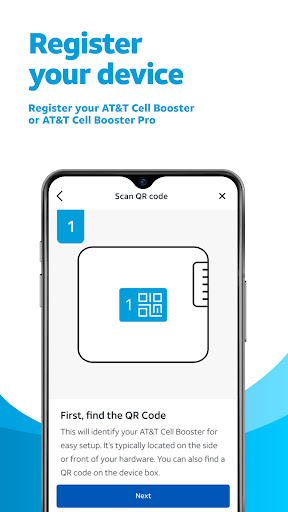
• Register your AT&T Cell Booster or AT&T Cell Booster Pro
• Follow instructions to set up your device
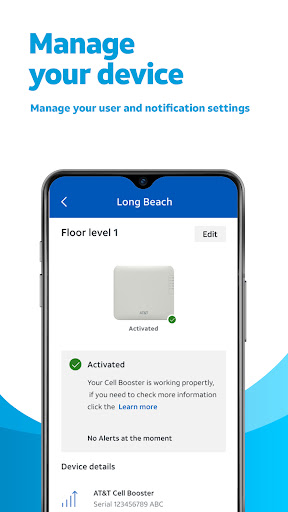
• Manage your user and notification settings
• Get real-time status and troubleshooting tips
• For Cell Booster Pro view performance reports
The AT&T Cell Booster app is available to AT&T Mobility customers who have the AT&T Cell Booster or AT&T Cell Booster Pro device.
What's New
Version Information
- Version
- 1.25261.21
- Downloads
- 50K+
- Updated on
- Oct 6, 2025
- Released
- Oct 26, 2021
- Requires
- Android 7.0
Statistics
Google Play Rating History
Rating Distribution
Downloads Over Time
AT&T Cell Booster has been downloaded times. Over the past 30 days, it averaged downloads per day.
Shaded area shows 30-day prediction based on historical trends
Historical data collection started recently. More data points will be available over time.
AT&T Cell Booster users say on Google Play
 Lee Rembert
Follow the instructions in the app, plug everything in and then prepare to wait an hour plus. You will receive an email when the booster is registered and then another when it is activated. I had to open a few ports on my router per the instructions on the website under troubleshooting, but it works without an issue now even right next to my router. Don't rush it, it takes a while to connect on the AT&T side.
 Glen Brooks
While I initially had difficulty setting my AT&T microcell up, caused by the QR code not calling up the serial number accurately, it was missing the last digit. Once I fixed it by adding the last digit which was written on a white label on the back of the microcell, the process worked fine through the app. The registration process to a few minutes and after about 5 minutes I have to unplug my unit wait 10 seconds and plug it back in. Worked well after that
 Adina Sippel (Dina)
The device works great but I don't understand the app because most of the time it says that the booster's info is unavailable even when there is nothing wrong and why isn't the app more helpful I mean it won't even tell you what the led stays/colors actually mean
 Karen Frost
They don't tell you that 3 ports have to be opened in your router by your internet service provider. You can only find out if you happen to get a tech support person who knows this, and then you're lucky enough to get a tech person from your ISP who knows how to do it. I've probably spoken with tech supports about 15 hours total!
 Bonnie Hedges
Ever since installed on March 2nd it has not worked properly, it's a piece of junk. I have been trying to be patient, but my patience is running short. Whereas it is still not working after several phone calls and rebooting, restarting, disconnecting and re-registering. If it does not work soon, I will be changing provider.
ApkTrusted Ratings & Reviews
More from AT&T Services, Inc.
See more apps
AT&T Photo Storage
Free

Smart Home Manager
Free

AT&T ActiveArmor®
Free

AT&T Connected Life
Free
AT&T Device Help
Free

AT&T Personal Cloud
Free
AT&T Device Unlock
Free
AT&T Enhanced PTT/ FirstNet RR
Free

AT&T Business Messenger
Free

AT&T Visual Voicemail
Free
myAT&T
Free

FirstNet Fusion
Free
AT&T ETP Mobile
Free

U-verse
Free
AT&T Secure Family Companion®
Free
AT&T amiGO™
Free
Scan this QR code to download

Forwarding you to the page at Google Play market in seconds...
Open Google Play market now