AT&T Office@Hand v25.3.20.560006
AT&T Services, Inc.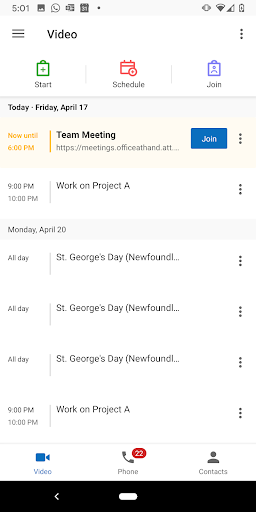





About this app
Developer Description
Simplify communications and unify employees with one phone and fax solution.
Use AT&T Office@Hand to:
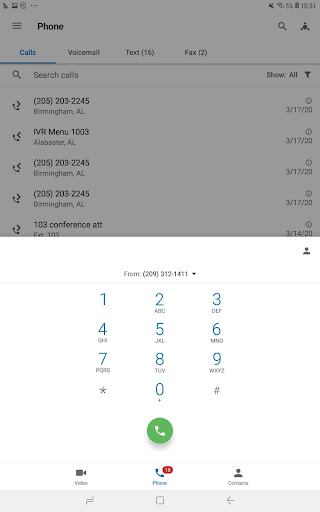
• Enable voice, fax and SMS on a single number
• Set-up and manage greetings and call handling preferences, right from your select smartphone
• Direct calls to any phone, mobile, office or home number
• Get visual voicemail for your business calls, separate from your personal messages
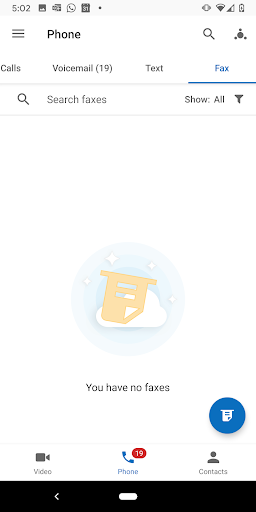
• View and forward faxes
• Order desktop IP phones*, preconfigured and Plug & Ring® ready for your office workers
• Display your business phone number as your Caller ID when making US and International calls
• Transfer live calls between mobile and desk phones
• Make and receive calls over WiFi
• Make HD Video Conference calls with Office@Hand Meetings for Enterprise Edition; share your screen and files with others
With no setup fees or complex system hardware required, plus instant activation, RingCentral Office@Hand from AT&T is available in three Editions - Standard, Premium and Enterprise and is billed conveniently to your AT&T bill.
Activate, set up, and manage a complete mobile business phone system right from your select smartphone in minutes. Start handling your customers’ calls professionally now with features such as **:
• Auto-receptionist
• Business SMS
• Toll Free, Vanity, Local voice and fax numbers for your business and employees
• Call forwarding, customizable by time of day
• Multiple department and user extensions
• Voice and fax email notifications
• Virtually unlimited local/long distance voice calling and faxes
• Send and receive faxes, by accessing photos, email attachments, and cloud storage.
• Dial-by-name directory
• Music on hold
• Inbound and outbound Caller ID
• Internal Caller ID
• Auto call recording***
• Conference calling for virtually unlimited audio conferencing****
• Start conferences with just one tap and easily invite attendees using email or Business SMS****
• View and forward faxes
• CloudFax™ allows you to attach local files, as well as cloud files, from popular services, including Box and DropBox applications on your PC
• Call screening and logs
• Salesforce.com® integration*** to click-to-dial contacts, log notes, match records
• Desktop IP phones* for office workers and softphones for MAC and PC users
• Call Park and Unpark
• Shared Lines
• HD Video Conferencing and Collaboration with Office@Hand Meetings*****
• Share your screen and files with anyone, anytime with Office@Hand Meetings*****
Visit att.com/officeathand to learn how AT&T Office@Hand can improve customer satisfaction, help manage costs and enhance your professional image.
*Purchased separately.
**Users of some phones will require online access to use some features.
***Included with Premium and Enterprise Edition user licenses only
****6-hour limit per conference call
*****Included with Enterprise Edition user licenses only
What's New
• User numbers in a consolidated list
• View all user licenses at a glance
• Let users resend their own activation email
• Reduce missed calls with smarter overflow routing
• Streamline Deskphone Pairing setup across users with bulk actions in Admin Portal
• Support Yealink WiFi Phone AX83H & AX86R
Version Information
- Version
- 25.3.20.560006
- Downloads
- 100K+
- Updated on
- Sep 29, 2025
- Released
- May 24, 2011
- Requires
- Android 8.0
Statistics
Google Play Rating History
Rating Distribution
Downloads Over Time
AT&T Office@Hand has been downloaded times. Over the past 30 days, it averaged downloads per day.
Shaded area shows 30-day prediction based on historical trends
Historical data collection started recently. More data points will be available over time.
AT&T Office@Hand users say on Google Play
 Zachery Frederick
AT&t best overall phone service 👍
 A Google user
The App seems to work fine so far but being able to change the ring tone so I can differentiate my personal phone from my RingCentral calls would be a simple, but appreciated feature. I'm actually surprised this already isn't an option? I'll rate it accordingly as I use it more.
A Google user
Since the last update Bluetooth headset doesn't work with the app any more, and need a fix, otherwise it's not very useful.
 Memo Rodriguez
App. Does not integrate with my Ford system. It needs to work with other apps. When my secretary forwards a call from a client, it comes under her extension. The caller info is what I need not her line. Please fix. Please fix. More issues. No time to list
A Google user
When talking on phone the app does not turn off screen so as your ear is touching screen it changes the volume. It needs to mimic the phone app and use proximity sensor to blank screen so accidental changes are not made. 2/20/19 still broken. As you are trying to talk the app turns your volume down. You turn it back up and it turns it down. Horrible, broken app. ZERO STARS.
ApkTrusted Ratings & Reviews
More from AT&T Services, Inc.
See more apps



Scan this QR code to download

Forwarding you to the page at Google Play market in seconds...
Open Google Play market now