Trident by Atlantis Partners v2.0.9
Atulsia Technologies


About this app
Developer Description
Trident for Technician (work timings & payroll), Customer (Projects & IM)
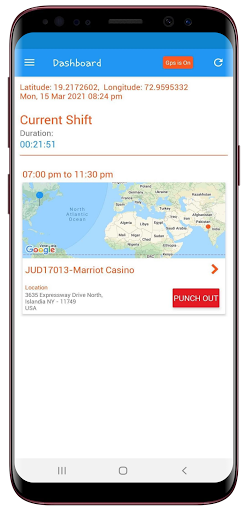
1. Technician: Dashboard
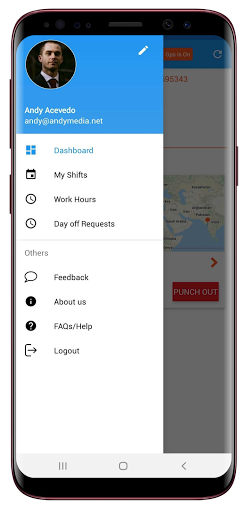
The dashboard will show the current shift for that day. It will show those projects on which technician has to work in next 2 hours. It will show all shift details like Project name, shift start and end time, work-location and Punch-In/Out button beside address detail. The technician will be able to do punch only in following conditions:
1. Technician must be within punch-in area
2. Internet connection is ON
3. GPS is turn ON
4. Also, technician can do punch-in on start time or 2 hours before the start time of shift
Also when the technician goes out the punch-in area then he/she will get punch-out automatically.
2. Technician: Work Hours
Work Hours will show the full list of shifts on which technician had worked. For each shift, the technician can see total work hours, date and shift timing. Also, it will show which all shifts are approved or unapproved by Administrator. A filter is provided if the technician wants to filter his work in between for any date. At the bottom, it will show the total hours technician has spent on projects.
3. Technician: My Shifts
Here technician can see the previous, current and future shifts/projects assigned to him. Also, he can see projects details, like work location, shift timing, co-workers, also session and payroll of previous projects. In details, it shows the contact person, email id and contact for each particular project. If technician clicks on the map then it will redirect them to google map. He can apply the filter to see projects of any particular dates assigned to them.
4. Technician: Profile
This screen shows the details of the technician, entered by them while registering or updated by Admin. It shows the profile picture and name of technician, contact and address information, and role of technician i.e Technical classification
5. Customer: New Enquiry
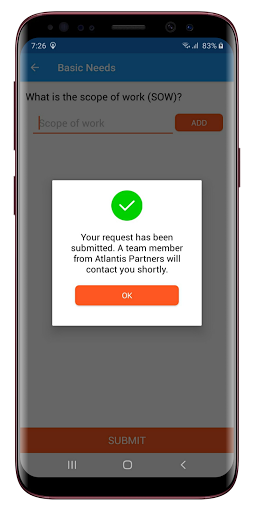
New customers can submit inquiries. To create a new project following information is needed:
Project name, Project date, Scope of the work and Tool's required for projects, Address of project location etc.
The created project will get added to My Projects.
6. Customer: My Projects
The customer can see projects created by them. The customer can filter them out either as 'By created date' OR 'By name'. Also, the customer can create the new project by clicking '+' button. Projects details are also provided. Each project details are having 3 tabs 'INFO', 'LOCATION' and 'MESSAGES'. MESSAGE tab will show the tickets created by customer or Admin. It is more like messaging tool which supports attachments as well.
7. Customer: My Profile
This screen shows the customer's information. It shows the profile picture, company name, job title, and other contact information.
8. Customer: Messages
Here the customer can create tickets and can chat with Admin in case of any query or doubts. In Messaging, the customer can also add attachment like images or documents. Whenever Admin creates new tickets or replies to existing ticket, the customer will get a notification.
What's New
Version Information
- Version
- 2.0.9
- Downloads
- 100+
- Updated on
- Oct 31, 2023
- Released
- Jan 20, 2018
- Requires
- Android 7.0
Statistics
Google Play Rating History
Rating Distribution
Downloads Over Time
Trident by Atlantis Partners has been downloaded times. Over the past 30 days, it averaged downloads per day.
Shaded area shows 30-day prediction based on historical trends
Historical data collection started recently. More data points will be available over time.
Trident by Atlantis Partners users say on Google Play
 Sharwin Mark DV
Superb! However, there are just a few bugs I've encountered. It's not a big deal since the game just came out today, and the developers are working to make it more seamless. It's working very well, and I really enjoyed playing it. Additionally, kudos to the developers and all the staff of Mirai who are working very hard to make this happen! 🚀🌒
 Kris Miller
I didn't see any mention of crypto, once playing the game I order to join a guild it's wants ETH.
 Anthony Woods
It's a great game foreal I can't lie just hate that none of the events poppin up until they are over with. The mailbox also not showing anything at all. The guild also is messing up showing error but I have done three updates an yet nothing has been fix
 A Google user
Major issues with the application on Galaxy SII. Even after doing an update the application crashes and/or stops working.
ApkTrusted Ratings & Reviews
More from Atulsia Technologies
See more apps
HSS US Sampark & Suryanamaskar
Free
HSS US Sampark & Suryanamaskar
Free

Atulsia AR
Free

Atulsia CRM
Free

Kare Doctor
Free

Kare Patient
Free

Megastores Everything Handmade
Free

Megastores Artisans & Sellers
Free

Mamu Fame RJ Vinod
Free
Sia - Virtual Assistant
Free

Stay Connected
Free

Atulsia WorkForce
Free
Similar Apps


Scan this QR code to download

Forwarding you to the page at Google Play market in seconds...
Open Google Play market now