PDF Reader: converter files v1.7.0
NovaApps Limited




About this app
Developer Description
PDF converter - convert document and files from photos to pdf, with pdf reader
📕PDF Reader
🖨PDF Scanner has many important features:
✔️ Reading pdf- you can read books, manuals, magazines, newspapers and store them all in PDF library.
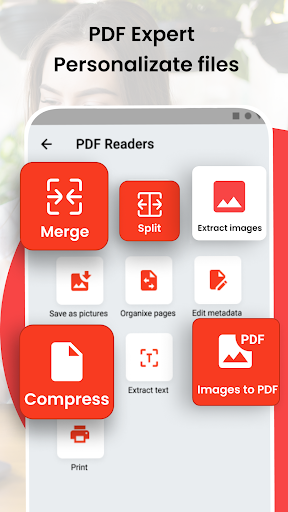
✔️ PDF Converter - with this function you can compress, and split PDF files📝.
Free PDF with the ability to change the structure of PDF files.
✔️Save image to pdf - save file as a picture and make scan text for convert them in file , the ability to sort all your documents. All these features of free pdf app will help you manage your pages, documents, files, images.
✔️ Convert image to pdf - converter allows the client to convert jpg to pdf if you want to create a pdf document from your photos or convert a single photo to pdf. Now you can convert any picture to pdf.
✔️ Print - you can print the PDF documents you need, connect to the printer and select the desired file for printing in the PDF reader.
📰 PDF Viewer
✅ Optimized PDF converter:
The image to pdf converter can work with any Android device, regardless of its brand.
✅ Design :
stylish design with the ability to switch light and dark modes for comfortable reading and working with files.
✅ Interface :
The interface for reading PDF files is quite easy to understand and you will learn it in five minutes of use.
✅Fast operation :
It can open all types of PDF documents. This option allows you to get information from any source you want. And if you want to jump to a page before you know where you are, you can do it quickly with this image to PDF converter.
Now you know everything about the new PDF Reader you've been looking for. And you have found the right Android program to help you read, manage, convert.
🖨PDF Scanner has many important features:
✔️ Reading pdf- you can read books, manuals, magazines, newspapers and store them all in PDF library.
✔️ PDF Converter - with this function you can compress, and split PDF files📝.
Free PDF with the ability to change the structure of PDF files.
✔️Save image to pdf - save file as a picture and make scan text for convert them in file , the ability to sort all your documents. All these features of free pdf app will help you manage your pages, documents, files, images.
✔️ Convert image to pdf - converter allows the client to convert jpg to pdf if you want to create a pdf document from your photos or convert a single photo to pdf. Now you can convert any picture to pdf.
✔️ Print - you can print the PDF documents you need, connect to the printer and select the desired file for printing in the PDF reader.
📰 PDF Viewer
✅ Optimized PDF converter:
The image to pdf converter can work with any Android device, regardless of its brand.
✅ Design :
stylish design with the ability to switch light and dark modes for comfortable reading and working with files.
✅ Interface :
The interface for reading PDF files is quite easy to understand and you will learn it in five minutes of use.
✅Fast operation :
It can open all types of PDF documents. This option allows you to get information from any source you want. And if you want to jump to a page before you know where you are, you can do it quickly with this image to PDF converter.
Now you know everything about the new PDF Reader you've been looking for. And you have found the right Android program to help you read, manage, convert.
What's New
- Fixed bugs with pdf reader & editor;
- Created best form for feedback;
In-app purchases
$1.99 - $2.99 per item
Version Information
- Version
- 1.7.0
- Downloads
- 100K+
- Updated on
- Jan 30, 2025
- Released
- Dec 28, 2020
- Requires
- Android 7.0
Statistics
Google Play Rating History
Rating Distribution
Downloads Over Time
PDF Reader: converter files has been downloaded times. Over the past 30 days, it averaged downloads per day.
Shaded area shows 30-day prediction based on historical trends
Historical data collection started recently. More data points will be available over time.
PDF Reader: converter files users say on Google Play
 Katie Lawrence
Great PDF file reader easy to use and understand how to do file tasks your self👍👍😊😊😊
 Namakajjo George
So far so good.
 shashank yeleswarapu
Hi team, Can you please remove the word "editor"!! Doesn't have an option to edit a pdf document. I've downloaded the latest version which shows 10% of app info and 90% of ads. Complete waste of time. I'd request everyone not to download this app. Team, If you really think that "your" app is up and running pretty cool, share some videos of how to edit a pdf file on the Google playstore page. All the best
ApkTrusted Ratings & Reviews
More from NovaApps Limited
See more apps





Scan this QR code to download

Forwarding you to the page at Google Play market in seconds...
Open Google Play market now