
Grocery shopping list: BigBag v14.4
Smart shopping lists



About this app
Developer Description
Shopping list, Pantry list, Recipe book, Loyalty cards All-In-One
✅ Shopping List: to remember everything you need to buy, plan where to buy and keep track of the total amount of your shopping cart.
🥫 Pantry List: to manage the items you have in the pantry, fridge, to remind you what to refill and what will expire.
🥣 Recipe Book: to keep your favorite recipes with customized ingredients that meet your family taste. You can put the ingredients to a shopping list to prepare your next meals.
💳 Card Scanner: To digitize your loyalty cards with barcode so you can get rid of heavy wallets filled with plastic cards.
🗄Data backup (only avaiable in Pro version): Your data is backed up and safely protected within your phone storage. You never have to worry about data loss.
👨🏻🍳 Since over 3 years, we have always kept BigBag reliably serviced, always ready to support and will continue to do so. You can trust BigBag completely in the long run.
👍 BigBag is made with love, users love BigBag because the following amazing functions:
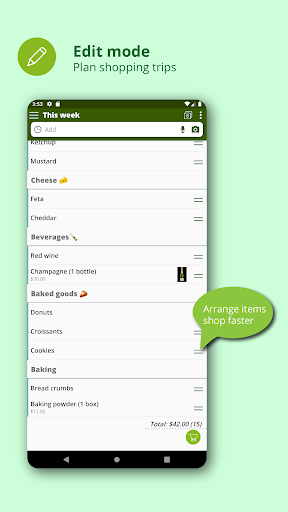
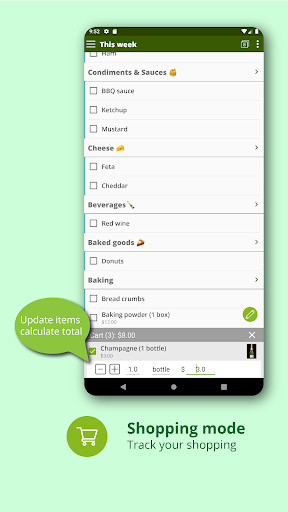
- A excellent shopping list with Editing and Shopping modes separated: The handy edit mode to plan your shopping strips. The shopping mode is optimized for shopping situations in the stores.
- History list: Remembers entered items for repeat purchase,
- Text import: Quick add items from text of a list,
- Drag & Drop: Reorder and change item's categories by drag & drop,
- Swiping: Swipe item to the left for deleting or the right for snoozing,
- Quick set quantity: Set needed quantity of item directly in the list view,
- Categories: To group items by categories, arrange items by shop aisles,
- Screen turned-on: Keep screen turned on while shopping,
- Multi-lists view: Mix some selected lists to view at one time,
- Color lists: To mark items by list's color in multi-list view,
- Share: Share list with other apps,
- Get shared: Import shared lists from other apps,
- Backup data: Backup data within your phone storage, keep your data safe,
- Dark theme: Reduce eye strain at night,
- Sorting: Sort list items alphabetically or by group,
- Coupon: Never forget coupons & promo codes,
- Photo: Remember product to buy with picture,
- Widget: Quickly view shopping lists on home screen of your phone.
- Cloud sync: Synchronize your data for use across multiple devices.
- Barcode scanner: Quickly save your card code and ready for scanning in stores.
We cannot explain all the beautiful features of BigBag by words, please download and experience BigBag for yourself.
*****
BigBag is free to use without ads, you can always support us by downloading Pro version at: https://play.google.com/store/apps/details?id=com.best.grocery.list.pro
What's New
Version Information
- Version
- 14.4
- Downloads
- 5K+
- Updated on
- Aug 13, 2024
- Released
- Oct 1, 2018
- Requires
- Android 5.0
Statistics
Google Play Rating History
Rating Distribution
Downloads Over Time
Grocery shopping list: BigBag has been downloaded times. Over the past 30 days, it averaged downloads per day.
Shaded area shows 30-day prediction based on historical trends
Historical data collection started recently. More data points will be available over time.
Grocery shopping list: BigBag users say on Google Play
 Android Robot
This is what I wanted as a replacement for the (apparently abandoned) Cinnamon grocery app. Excellent feature set! There's an annoying bug where items in the same category won't group together on the shopping list, but a workaround if you manually tell the list how to order the categories. Remember to sync your changes!
 A Google user
Great app for day to day shopping. Low feature is quite convenient for creating shopping list. Expiry date is another interesting feature, however it would be great if the expiring or expired goods notification in the app changes colour, say red & in bold fonts for quick notice. Better if a tab can be added showing expiring tomorrow and after a week. All in all, great job by the developers. Thanks
 B Campbell
I am so excited about this app and willing to upgrade to pro if I knew all my data would sync including recipes. It is much simpler to make a list by clicking on the recipe and adding it to my cart. However, not all of my recipes are syncing to my cell that were created on my tablet. I'm not always with both but wanted the convenience as if.
 sea.n
sea.n
After restored, all items disappear!
A Google user
It's all you need. But there should be a way of transferring a list in reverse into the Pantry list. Some of us dummies started on a list without reading the instructions/learning how this works, sorry! Hang on, it just wiped out my Pantry list. Fail! 2nd attempt, spent another hour; deleted Pantry list again. Going back to my pad & pencil. Epic fail!
ApkTrusted Ratings & Reviews
More from Smart shopping lists
See more apps
Scan this QR code to download

Forwarding you to the page at Google Play market in seconds...
Open Google Play market now