
Imaganize - Photo Organizer vVARY
Photo & Video Editors - Instant Solution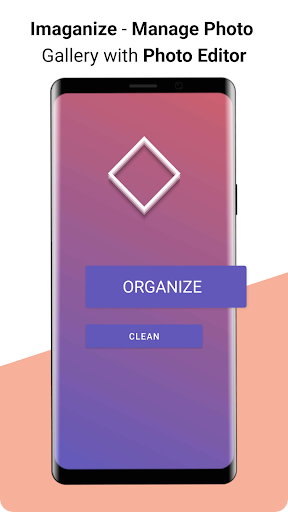


About this app
Developer Description
Photo organizer app with photo editor & easy cleaning of photo gallery
When you enter a specific photo album and select a photo in it, Imaganize photo organizer app will show you a bottom bar with different photo albums attached to it. Tapping on one of these photo albums will easily move the current showing photo to the album you tapped on; and move to the next photo in the album you entered in the first place. This gives you a very fast and easy way to manage the photos in the gallery.
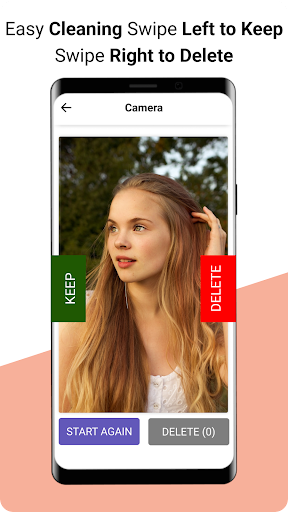
Other than that quickly move the photos around, Imaganize - Photo Organizer can help you to work with whole albums as well. You have the options to create your own albums, rename them, merge multiple albums in one, delete them and even completely hide them. When you hide an album in Imaganize, it will be hidden from rest of the photo gallery applications on your device. This way it works as a photo manager app, and managing photos in photo gallery will be easier. Imaganize also lets you scan for already hidden albums on your device and deleting them to create space will be easier with Imaganize. This photo manager app can help you out to quickly remove all the unnecessary photos, and it will keep track, of how much space have you freed since you started using it.
What are Photo Tags?
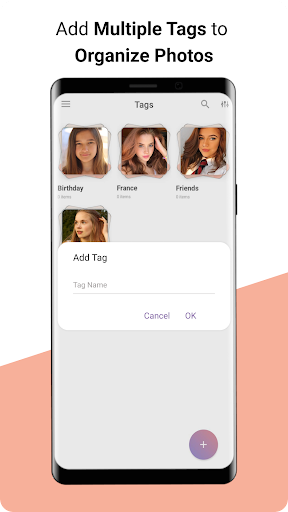
Photo tags or we can say image tags are just the categories of photos, which are used to categorize or separate photos to organize them in an easy way. With this Imaganize photo organizer app, you can easily tag your photos to separate them like categories such as photos for birthday party can have a birthday tag on it. Similarly, you can add tags of family, travel, and parties etc and can easily add multiple photos to organize them quickly.
Photo Editor:
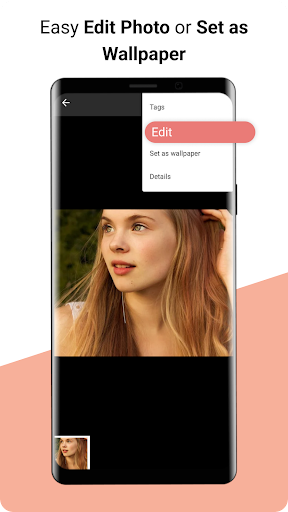
“Imaganize - Photo Organizer & Photo Editor” brings you another superb feature of photo editing within the app. Crop, Delete & Resizing image is not a problem now. Cropping ratio is also added in the app. Easily apply filters and frames on photos and save them with using photo tags.Mirroring photos is another feature of photo editor, it just need a single tap to mirror photos and mirror your selfies. With this photo editor feature exposure, brightness, contrast, saturation, temperature, tint and hue can also be easily edited.
Some of the awesome features of Imaganize - Photo Organizer:
- Move photos around with a single tap.
- Add tags to photos.
- Easily create albums.
- Smart photo editor feature is added.
- Create, rename, remove, hide and merge albums.
- Rotate, mirror, convert, and copy multiple photos at once.
- Photo compressor to compress photo size is also available.
- Statistics of your gallery to show you which albums are taking up the most space.
- Scanning for hidden albums on the device.
- Ordering photos by size, extension, date.
- Searching for photos by tags.
- Full SD card support.
- Moving photos from internal storage to SD card and vice versa.
After all these features, the main highlight of these features is that you can perform these actions on many photos at once. For example, you can select hundreds of photos that are in landscape mode and rotate them all at once to portrait.
“Imaganize - Photo Organizer & Photo Editor” is a complete photo organizer and photo manager app with complete support of photo editor feature. Download this complete photo organizer package and start managing your photo gallery in a professional way.
In-app purchases
$0.99 - $99.99 per item
Version Information
- Version
- -
- Downloads
- 10K+
- Updated on
- -
- Released
- Mar 12, 2017
- Requires
- Android Varies with device
Statistics
Google Play Rating History
Rating Distribution
Downloads Over Time
Imaganize - Photo Organizer has been downloaded times. Over the past 30 days, it averaged downloads per day.
Shaded area shows 30-day prediction based on historical trends
Historical data collection started recently. More data points will be available over time.
Imaganize - Photo Organizer users say on Google Play
 TheAgGaming 985
The organizer app i was trying to find. It's quick and easy and just fine, it's organizing options are great and the customizations are nice. The only few things would be a few optimizations like speed or making the auto move setting work without crashing the app after every choice. Otherwise, does it's job. And it's the best i've seen
 A Google user
This app does something wonderful found nowhere else on the Internet. It actually explains in clear English WHAT IT DOES! Extraordinary ! Unfortunately I ran into a buzzsaw trying to attach a tag to a photo. Pressing the red plus sign only brought up the previous tag with no way to change it or enter a new tag. Very frustrating .
A Google user
The tag creation option is a bit annoying, and to search for the created tags you have to scroll down a list. There is no search bar for tags and they appear in the order they were made.
A Google user
cannot change the order of the pictures which is all I want to do. I will be deleting.
 Njabulo Sibisi
What's the point of tagging images of you can't search for them/organise them by tag afterwards. Looked for the search button, it was nowhere to be found and yet there is one shown on the features of the app. Very misleading. I will change Rating when "search by tag" feature is added
ApkTrusted Ratings & Reviews
More from Photo & Video Editors - Instant Solution
See more apps
Beauty Makeup Editor & Camera
Free

DripArt: Photo Editor App
Free

Smarty Men Suit Photo Editor
Free

Art Filter Sketch Photo Editor
Free

Instasquare Photo Editor: Neon
Free

Gallery - photo & video album
Free

AI Photo Enhancer – HD, Unblur
Free
Camera Effects & Photo Editor
Free

Funny Camera - Photo Editor
Free

Black and White Camera App
Free

Deep Swap - Face Swap AI Photo
Free

Photo frame, Photo collage
Free

Anylight - Photo Editor
Free
Lomography App: Vintage Camera
Free

Background Remover: PNG Erase
Free
Face Swap Magic - Photo Editor
Free
Similar Apps

3D Photo: Imager
Paid

Text & Image to Video AI Gen
Paid

Video Recorder
Paid

Smart Video Downloader
Paid

Tattoo AI Design Generator INK
Paid

MindSync - Therapy Journal
Free

QR & Barcode Scanner
Paid

Quick Bill Admin
Free

Sleep Tracker & Cycle : Dirim
Free

DreamBuild: Sketch to 3D
Paid

Video Downloader Stream Saver
Paid

House Design : AI Home Design
Paid

Hamster News
Paid

Al Quran- Qibla & Prayer Times
Free

Stylish Name: Fancy Text Style
Paid

Status Saver App
Paid
Scan this QR code to download

Forwarding you to the page at Google Play market in seconds...
Open Google Play market now