
SPEKTRUM Health v3.2.0
Bizmatics Inc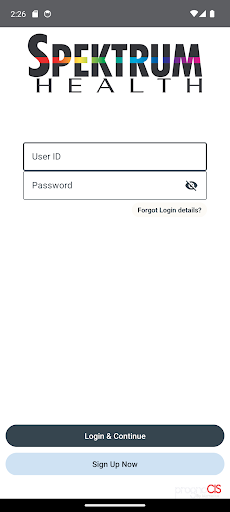


About this app
The SPEKTRUM Health app, powered by PrognoCIS, solves the problem of accessing and managing personal health information on-the-go, benefiting patients and healthcare providers alike. With an excellent user rating of 5.0/5, it stands out in the Medical category for its ease of use and comprehensive feature set. Compared to alternatives, SPEKTRUM Health's top-tier app status and lack of ads or in-app purchases make it an attractive choice for those seeking a seamless and uninterrupted experience. However, its limited download numbers and lack of publicly available information on its feature set may make it harder for new users to discover and evaluate its full potential.
Pros
- The app's excellent user rating of 5.0/5 suggests a high level of user satisfaction, which is a significant social proof for its quality and effectiveness.
- The absence of ads and in-app purchases ensures a distraction-free experience, allowing users to focus on managing their health without interruptions.
- The developer, Bizmatics Inc, has a professional website and provides a contact email, indicating a level of transparency and accountability.
- With no permissions requested, the app seems to prioritize user data privacy, which is a significant advantage in the Medical category where sensitive information is often involved.
Cons
- The limited number of downloads (500+) and total ratings (5.0) may indicate a relatively small user base, which could affect the app's visibility and community support.
- The lack of publicly available information on the app's feature set and functionalities may make it challenging for potential users to assess its capabilities and limitations.
- Without more detailed information on the app's offline capabilities, users may be uncertain about its usability in areas with poor internet connectivity.
Best for: The ideal user for the SPEKTRUM Health app is likely an individual with specific health management needs, such as patients requiring regular monitoring or those seeking to centralize their health information, who values a straightforward, ad-free, and privacy-conscious experience, and has a basic to intermediate level of technical skill to navigate the app's features effectively.
Developer Description
SPEKTRUM Health app powered by PrognoCIS(TM)
-- Take appointment and also view the statuses of your previously scheduled, requested, and tentative appointments.
-- Directly communicate with your Primary Health care provider by sending him or her messages through the app.
-- Send a request for the Refill of medication prescribed to you by your Provider in the Clinic.
-- Print Education Materials
Salient Features
Get access to your medical records instantly.
Keeps your information private and secure - You control who has access to your information.
Friendly and clean User Interface with simple and Meaningful Dashboard
Available on Android and iOS
Disclaimer:-
The patient’s Health Records information available in SPEKTRUM Health App powered by PrognoCIS™ is reflected as available on its Patient Portal and can be accessed by a user only after logging into the app using the clinic provided login credentials, thereby abiding to all safety and security measures. The information in this app is documented by a healthcare professional in the Electronic Medical Record ONLY after solicited consultation and is then selectively and carefully shared with the patient for their easy access.
Privacy
Given that the SPEKTRUM Health app requests no permissions, it appears to be a low-risk option in terms of data privacy. However, users should still be cautious when accessing and managing health information online, using secure networks and keeping their device's operating system and app up to date. It's also essential to review the developer's privacy policy for more insights into data handling practices.
Tips
To get the most out of the SPEKTRUM Health app, users should start by exploring all the available features and settings to understand its full capabilities. Setting up notifications for important health reminders can also enhance the app's usefulness. Additionally, ensuring that the device's operating system is compatible and up to date will help in maintaining the app's performance and security.
What's New
Updated Color Palette: Fresh green scheme for a vibrant look.
Redesigned Login Page: Improved usability and aesthetics.
Responsive Design: Optimized for desktops, tablets, and smartphones.
Landscape Mode: Supports landscape view for flexible interaction.
Redesigned Dashboard: Better menu organization for navigation.
Loader Icon: New loader enhances user experience.
Interactive Animations: Smooth animations for engaging navigation.
Version Information
- Version
- 3.2.0
- Downloads
- 500+
- Updated on
- Sep 5, 2025
- Released
- Jan 2, 2020
- Requires
- Android 9
Statistics
Google Play Rating History
Rating Distribution
Downloads Over Time
SPEKTRUM Health has been downloaded times. Over the past 30 days, it averaged downloads per day.
Shaded area shows 30-day prediction based on historical trends
Historical data collection started recently. More data points will be available over time.
ApkTrusted Ratings & Reviews
More from Bizmatics Inc
See more apps
PrognoCIS
Free

IPC Patient Portal
Free

PRRH Tele-Med
Free

Calexico Wellness Center
Free

ESE Telehealth for Schools
Free

HoyDOC
Free

HCS Onsite
Free

All Day TeleMed
Free

Our Village Pediatrics
Free

HV Patient Portal
Free

PAX Health
Free

mHealth Solution
Free

Vibrant Wellness Clinic
Free

Dr. Vinu Ganti MD
Free

Witman Med
Free

Akeso ACES Patient
Free
Similar Apps






Scan this QR code to download

Forwarding you to the page at Google Play market in seconds...
Open Google Play market now