
Verify Origify vVARY
Robert Bosch GmbH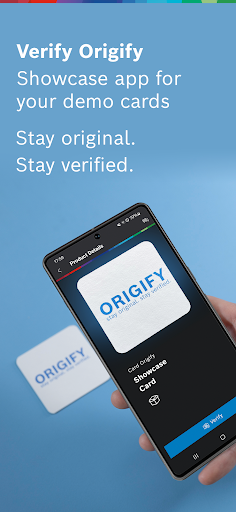


About this app
Developer Description
Stay Original. Stay Verified.
If you are a business user, interested in product authentication and want to try the app, please fill out our contact form: bosch-origify.com/contact-2.html. We will then send you the respective Verify Origify Demo Cards for free.
Once you have received the Verify Origify Demo Cards:
* Start the app and select Origify Demo Card from the list for verification.
* Be guided to capture an optimal image of the Origify Demo Card to be verified.
* Give your consent to upload the image to the cloud environment. The system generates an ID from it and matches it with the IDs generated at Bosch.
* The result will be displayed to you.
The following results are possible:
1. Match: "Authentic"
This result means that an identical ID was determined during matching by the system. The matched Origify Demo Card corresponds to a single item registered by Robert Bosch GmbH.
2. No match: "The material piece you scanned is not registered in the database."
This result means that a different ID was detected during matching by the system. The matched Origify Demo Card does not visually correspond to any of the individual pieces scanned by Robert Bosch GmbH. It could be that the scanned Origify Demo Card was not registered by Robert Bosch GmbH or it already has too much wear in the defined surface area.
Registered Origify Demo Cards feature a unique number on their reverse side, establishing traceability at the individual unit level. Non-registered Origify Demo Cards lack a number ("XXXX") and are highlighted by a red border. Upon scanning, a result labeled "Authentic" indicates previous registration by Robert Bosch GmbH along with the distinctive custom ID.
General recommendations to achieve the best possible scanning results:
* Ensure sufficient lighting
* Place the Origify Demo Card on a firm and neutral surface e.g. a table and hold the smartphone steady to avoid blurry images
* Make sure that no personal objects, people or body parts (e.g. fingers) are recorded during the exposure
* Works best on latest smartphones with a high resolution camera
A total recognition process time of a few seconds is targeted. This depends mainly on technical runtimes and the quality of the existing internet connection but is also strongly influenced by the environmental conditions (lighting, surface conditions and computing power of the smartphone). Therefore, please make sure that you follow the recommendations for optimal scanning results.
General notes: The manufacturer's instructions for the smartphone must be observed and should be used for the intended purpose.
Further information: www.bosch-origify.com
Questions, problems, suggestions? Contact us: authentication.service@de.bosch.com
Version Information
- Version
- -
- Downloads
- 1K+
- Updated on
- -
- Released
- Jan 2, 2026
- Requires
- Android Varies with device
Statistics
Google Play Rating History
Rating Distribution
Downloads Over Time
Verify Origify has been downloaded times. Over the past 30 days, it averaged downloads per day.
Shaded area shows 30-day prediction based on historical trends
Historical data collection started recently. More data points will be available over time.
Verify Origify users say on Google Play
 Mark Schroeder
Edit 1: each individual item needs to be photographed by the proprietary camera supplied by Bosch, so this will be a product that needs wide adoption by manufacturers or arthouses to reach critical mass and wide usage. But definitely a brand differentiator. Early days, this is really exciting technology. The ability to identify a brand from a sample and now unique artworks makes this extremely versatile and applicable. So many questions! Thanks Bosch team for sharing.
ApkTrusted Ratings & Reviews
More from Robert Bosch GmbH
See more apps




Scan this QR code to download

Forwarding you to the page at Google Play market in seconds...
Open Google Play market now