
Map Area Measure Yosapa v2.2.15.94
Yosapa


About this app
Developer Description
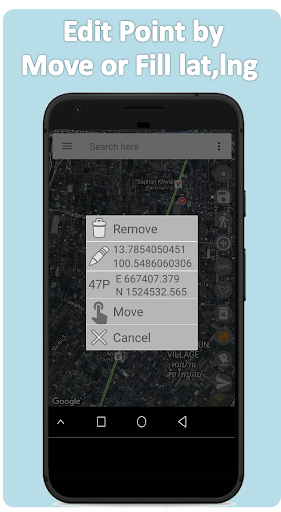
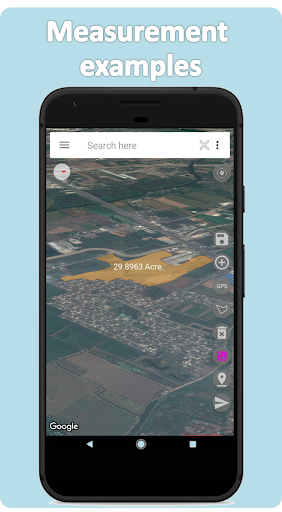
Measuring area of land, farm, field, home, distance, and length on the map.
How to use
https://yosapa.com/doc/area_meas_e.pdf
Function.
1. Measure the land area.
2. Measure the distance.
3. Share information through the app.
4. Save image data.
5. Save measurement data. Can be retrieved later.
Units of measurement Area.
1. ไร่-งาน-วา (Thailand)
2. Square Meter (m2)
3. Are (100m2)
4. Decare (1000m2)
5. Hectare (10,000m2)
6. Square Kilometre (km2)
7. Acre (United States)
8. Square Miles (mi2)
9. Square Feet (ft2)
10. Square Yards (yd2)
For more information Or report a crash at
bunjong.yosapa@gmail.com
https://yosapa.com
https://www.facebook.com/bysty/
What's New
In-app purchases
$0.99 - $29.99 per item
Version Information
- Version
- 2.2.15.94
- Downloads
- 500K+
- Updated on
- Sep 4, 2025
- Released
- Oct 3, 2017
- Requires
- Android 6.0
Statistics
Google Play Rating History
Rating Distribution
Downloads Over Time
Map Area Measure Yosapa has been downloaded times. Over the past 30 days, it averaged downloads per day.
Shaded area shows 30-day prediction based on historical trends
Historical data collection started recently. More data points will be available over time.
Map Area Measure Yosapa users say on Google Play
 Sandeep Singh
A good application for fields magerment...simple and easy to use all.....thanks for sapport team.
 A Google user
Very nice app! But it can be greatly improved by letting the app measure x minutes at the same point and then average the coordinates. Another improvement would be if 1 or more points with a known 'official' coordinate are known. The could be used to transform the points measured with the app and report on the accuracy. The thing with phone measurements is that no matter how nice the app looks and how good the user interface is, the phone accuracy is low. So that should be improved. I've never seen it done in a app, but it's stanard in with professional multi-thousand set. A base station that constantly talks with the GPS in the field. They both measure at the same time. The base station sends correction to the field station. This could be simulated by two phones. One on an accurately known coordinate and the other being used just like the app works now.
A Google user
You can use 2 time and than you must buy pro version.
A Google user
horrible user control There is no means of deleting several points at once there always seems to be a line popping from somewhere outside the area on the screen and if you tap the point to select it for deletion, you only get another line. Tried simple line measure, didn't work, tried area measure didn't work. Sorry I am uninstalling
 yeash jung
totally waste of data and time, area can't b trace and there is not delete option
ApkTrusted Ratings & Reviews
More from Yosapa
See more apps
Similar Apps



Scan this QR code to download

Forwarding you to the page at Google Play market in seconds...
Open Google Play market now