Text Editor v3.2.b164
Byte Mobile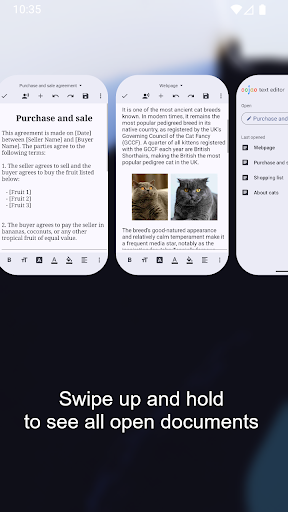



About this app
The Text Editor app solves the problem of needing a reliable and feature-rich text editing tool on Android devices, benefiting students, writers, and professionals who require a multi-document and multi-window interface. Compared to alternatives in the Productivity category, Text Editor stands out with its simple and intuitive interface, but falls short in terms of advanced features and customization options. With over 5 million downloads and a 4.0-star rating, it has established a strong reputation, but its lack of significant updates and limited developer support may raise concerns. Overall, it is a solid choice for basic text editing needs, but power users may find it lacking.
Pros
- The Text Editor app has a strong social proof with over 5 million downloads, indicating a wide user base and a certain level of quality and reliability.
- The app's multi-document and multi-window interface is a significant advantage, allowing users to work on multiple texts simultaneously and efficiently.
- The developer's reputation, although not extensively established, is supported by a clear website and contact email, providing a level of accountability and support.
- The app's offline capability and lack of required permissions ensure a private and secure text editing experience, which is essential for sensitive or confidential documents.
- The simple and intuitive interface makes it accessible to a broad range of users, including those who are not tech-savvy.
- The absence of in-app purchases and the free-with-ads model, although sometimes intrusive, provides a cost-effective solution for text editing needs.
Cons
- The Text Editor app's lack of significant updates and limited developer support may raise concerns about its long-term viability and ability to adapt to changing user needs and Android versions.
- The app's limited feature set and customization options may not cater to the needs of power users or those requiring advanced text editing capabilities.
- The presence of ads, although not excessive, may still be intrusive and distracting for some users, potentially affecting their productivity and overall experience.
- The app's compatibility with older Android versions (starting from 6.0) might not be optimal, potentially leading to performance issues or limitations on certain devices.
Best for: The ideal user for the Text Editor app is a student, writer, or professional who requires a straightforward, easy-to-use text editing tool for basic editing tasks, such as note-taking, document drafting, or simple writing projects, and values a clutter-free interface and offline capability, but may not need advanced features like collaboration tools, complex formatting, or integration with other productivity apps.
Developer Description
Multi-document (multi-window) text editor.
This app is ad-supported to keep it free, but ads are not annoying and can be quickly closed or temporarily turned off in Settings. And there are no ads while editing!
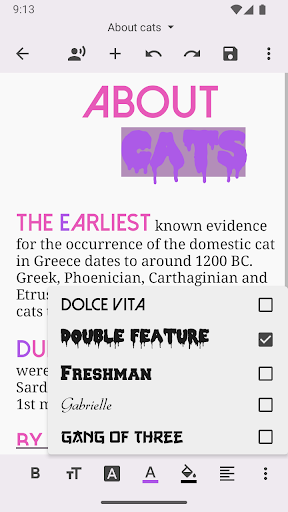
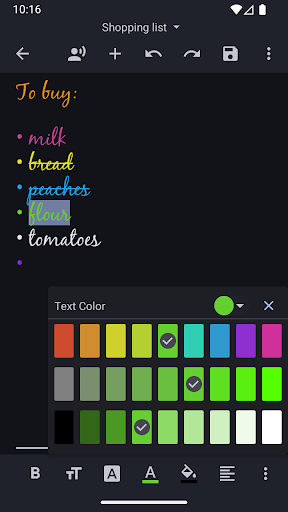
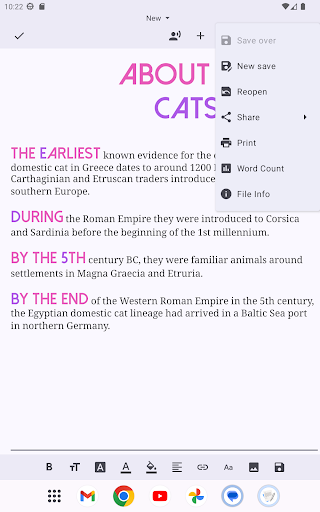
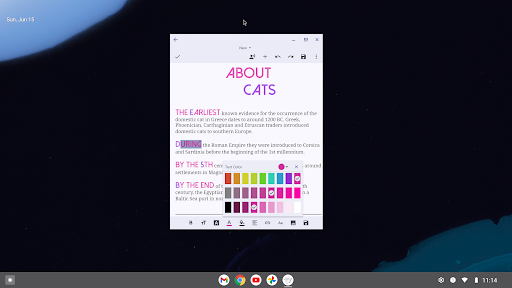
Added rich text styling options, so you can make your notes look just the way you want them.
FEATURES
• Create and edit documents
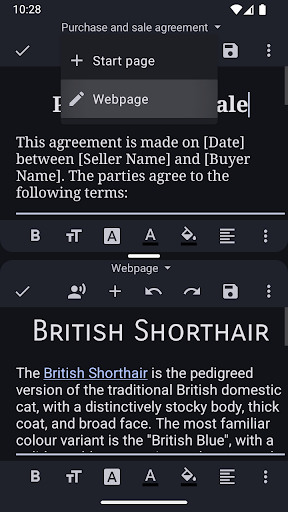
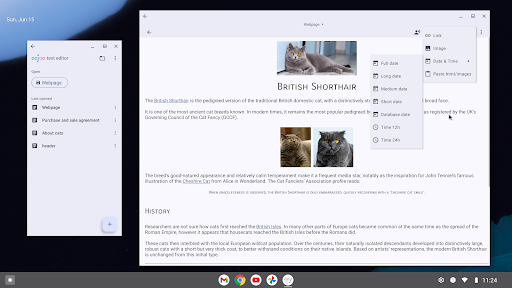
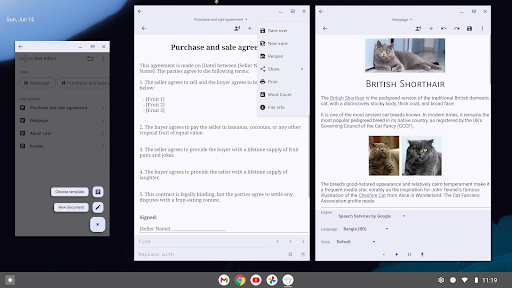
• Open more documents at the same time, each in their own window
• Edit 2 documents side-by-side in split-screen
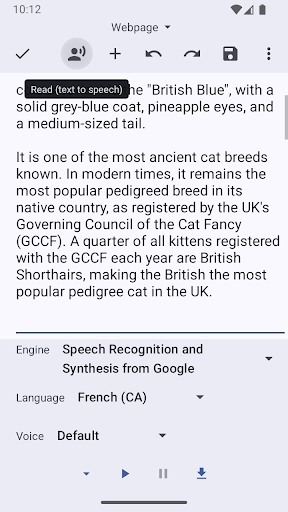
• Read selected text, or starting from cursor, using text-to-speech (TTS)
• Recently opened documents list, for quick access
• Open very large files with big file size
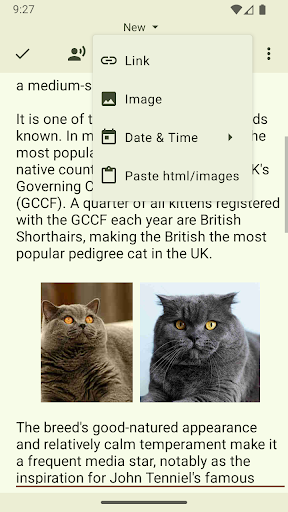
• Insert images and links
• Word count
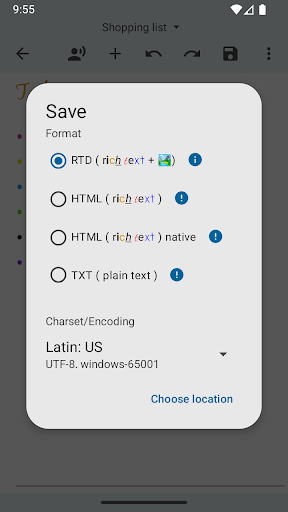
• Change charset /encoding
• Print option
• Dark theme (if Android is set to dark theme)
• Full screen
• Change selected text to uppercase or lowercase
• Change font bold, italic, underline, strike-through
• Change font size, color, highlight, typeface, alignment
And much more!
Privacy
Given that the Text Editor app does not require any permissions, it presents a low-risk option in terms of data privacy and security. However, users should remain cautious when clicking on ads, as they may lead to external websites or apps with different privacy policies. To ensure a secure experience, users should avoid clicking on suspicious ads and keep their device and apps updated.
Tips
For optimal performance, users should regularly clear the app's cache and close unused windows to conserve memory and battery life. Additionally, utilizing the app's multi-window feature can significantly enhance productivity by allowing simultaneous editing of multiple documents. First-time users should explore the app's settings to familiarize themselves with the available options and customization possibilities.
Version Information
- Version
- 3.2.b164
- Downloads
- 5M+
- Updated on
- Jul 21, 2025
- Released
- Nov 3, 2014
- Requires
- Android 6.0
Statistics
Google Play Rating History
Rating Distribution
Downloads Over Time
Text Editor has been downloaded times. Over the past 30 days, it averaged downloads per day.
Shaded area shows 30-day prediction based on historical trends
Historical data collection started recently. More data points will be available over time.
Text Editor users say on Google Play
 Soubhik Sen
EDIT - Thanks for the quick reply. Honestly, for the utility that I get out of this app, annual subscription sounds good too. Since you mention it as "very small", I would be totally subscribing for sure. PREV - I have been using this for a long time now and it's honestly great! However, instead of watching a 30 second ad for hiding ads for the next 7 days, if there was an option to pay once to disable ads completely, that would be even better. Hope you guys consider adding that.
 Satishchandra K S
Screen shot allow... We required options to attach image fm gallery in text edit page with text as usual ... its a big help if s/w team updated it soon...then we appreciate it by 5star sure...I'm using othr s/w text files till now, bt today which is more options available and easy to use. Thanks to sw team n developers efforts to provide public to make use of it. Hatsoff heartily.
 Kamruddin Ahmad
Can't find how to enable the split view shown before the last image
 Abraham Barnhart
i can't say I'm in love with the May 2025 update. the read-aloud feature is cool, but that's it. I really liked the pop-out side tray. Now, it's less convenient to go back to the documents page, from the editor. You can still have multiple documents open at once, but they all appear as different apps, and I have to switch between them, like I would between Facebook, and YouTube. That is pretty annoying. Also, a few buttons I am familiar with in the editor, have moved, or altogether disappeared.
 Om Ching Mah
It got worse ! Now it's clearing the usage frequency database ! Frequently used items get missing when I type the same initials in fuzzy input mode ! So too the new terms database ! Newly created terms go missing after using a few times ! You seem to force us to do full words typing ? It fails the most valuable function of any text editor, ie predictions....... A penny for your logic ?
ApkTrusted Ratings & Reviews
More from Byte Mobile
See more apps






Similar Apps
pdfFiller Edit, fill, sign PDF
Free

PDFelement-PDF Editor & Reader
Free
PDF Editor & Reader | Xodo
Free

Foxit PDF Editor
Free

touchnotes
Free

Smallpdf: Scanner & PDF Editor
Free

UPDF - AI-Powered PDF Editor
Free

PDF Merge: Scan, Sign & Edit
Free

PDFEsign.com PDF E-Sign
Free

JotterPad - Writer, Screenplay
Free
PDF Editor – Edit Everything!
Free
PDF viewer lite
Free

Docusign - Upload & Sign Docs
Free

Writer Journal - Text,Note
Free

Mobi PDF・Editor・Scanner・Reader
Free

OfficeSuite Pro + PDF
Paid
Scan this QR code to download

Forwarding you to the page at Google Play market in seconds...
Open Google Play market now