Machinist Calc Pro 2 v10.2.7
Calculated Industries



About this app
Developer Description
The Machinist Calc Pro 2 machining calculator, now with materials!
This machining calculator has more complete Thread data than the Machinery's Handbook, including step-saving Thread and Drill Size chart look-ups, speeds and feeds, right triangle solutions, bolt patterns and much more.
The Machinist Calc Pro 2 machining calculator is ideal for machining pros and machine shop owners who want to increase productivity and profits in the design, layout and set-up stages of production and reduce wear and tear on costly cutting tools.
Spend more time machining and less time looking up specs and data in books, on charts or in computer programs. A must-have for all machinists and machine shops.
FEATURES:
• Created by Calculated Industries, the originator of the award-winning Construction Master calculators
• Built-in help, just press and hold a key
• All the functionality and solutions of the handheld Machinist Calc Pro 2 calculators and optimized for the Android device user
• Entry Editing Backspace Key – with a swipe of a finger (left - to - right)
• A complete User’s Guide is available free at www.calculated.com
DEDICATED FUNCTIONS:
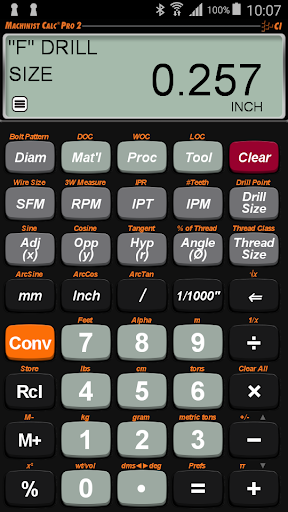
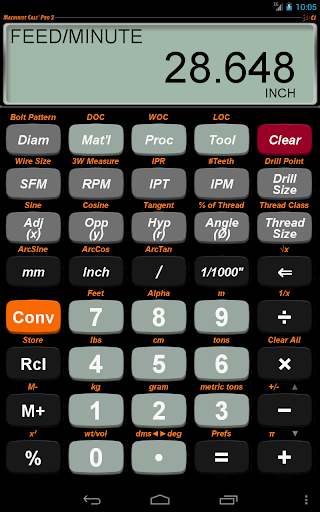
• NEW - Machining-specific keys to enter or calculate Surface Feet per Minute (SFM), Inches per Tooth (IPT), Inches per Minute (IPM), Inches per Revolution (IPR), # of Teeth, Depth of Cut (DOC), Width of Cut (WOC) and Length of Cut (LOC)
• NEW - Materials - Choose from 20 popular Materials
• NEW - Processes - Face Milling, End Milling, Slot Milling, Turning, Boring, Drilling
• NEW - Tools - High Speed, Carbide and High Performance
• Speeds and Feeds - Calculate for Milling, Turning and Drilling; Spindle Speed (RPM), Feed Rate (IPM), Cut Speed, Cut Feed, Feed per Tooth, Number of Teeth and Radial Chip Thinning (RCT) adjustment factor with the Speeds and Feeds functionality
• Thread Size - Enter numeric, fractional or metric thread sizes and display tap, roll tap, close and free fit drill sizes. Display pitch, major and minor diameters
• Drill Point - Enter the cutting angle and Drill Size and calculate the Drill Point cut depth
• Drill Size - Enter numeric, letter, fractional or metric Drill Size and display the closest fitting Drill Size and scroll through available drill sizes
• 3-Wire Measure - Enter Wire Size (or use calculated Best Wire size) and 3-Wire Measurement to calculate pitch diameter
• Trigonometric Functions - Sine, Cosine, Tangent, Arcsine, Arccosine, Arctangent
• Right Triangle Math - Enter, calculate Angle, Hypotenuse, Opposite and Adjacent side lengths
• Bolt Pattern Hole Layouts - enter start angle, number of bolts, diameter and optional x, y offset; calculate x and y coordinates. Find center-to-center spacing for bolt pattern layouts
ADDITIONAL FEATURES:
• Thread Classification Tables
◦ U.S.
- Internal (3) 1B, 2B, 3B
- External (3) 1A, 2A, 3A
◦ Metric
- Internal (14) 3G-9G and 3H-9H
- External (28) 3g-9g, 3h-9h, 3e-9e, 3f-9f
• U.S. and Metric Unit Entries and Conversions
◦ Decimal Inches/mils
◦ Feet-Inch-Fractions
◦ m, mm, cm
◦ Area, Volume and Weight
• Works as a Standard Calculator
• Calculate for Milling, Turning, Drilling & much more.
TRADEMARKS:
Machinist Calc® is a registered trademark of Calculated Industries, Inc.
What's New
Version Information
- Version
- 10.2.7
- Downloads
- 1K+
- Updated on
- Oct 14, 2025
- Released
- Dec 24, 2014
- Requires
- Android 5.0
Statistics
Google Play Rating History
Rating Distribution
Downloads Over Time
Machinist Calc Pro 2 has been downloaded times. Over the past 30 days, it averaged downloads per day.
Shaded area shows 30-day prediction based on historical trends
Historical data collection started recently. More data points will be available over time.
Machinist Calc Pro 2 users say on Google Play
 A Google user
I would love to have a Bend Allowance calc for sheet metal of varying gauges/thicknesses. Then this would be a completely complete app. Still the best yet, and well worth the money!
A Google user
Still figuring out the various features, but already liking the tapping drill size lookup. One feature I would like to have is an ability to select metric by default. E.g. I want "6" and "Thread Size" to mean metric M6 thread, not #6 imperial thread. Currently you have to press "6" "mm" "Thread Size" to set M6. As I work with metric system 99% of the time, defaulting to "mm" mode would be a great improvement in terms of reducing key taps. (Unit Format: Metric setting only applies to display, not entry).
ApkTrusted Ratings & Reviews
More from Calculated Industries
See more apps
ITI Calc
Paid
Pipe Trades Pro Calculator
Free
Construction Master 5 Español
Free
Concrete Calc Pro Calculator
Free
Construction Master 5 Calc
Free

Material Estimator Calculator
Free

Machinist Calc Pro Calculator
Paid
Measure Master Pro Calculator
Free

HVAC & Sheet Metal Calculator
Free

LDM Connect - Jobsite Sizer
Free

Real Estate Master IIIx Calc
Free

ElectriCalc Pro Calculator
Free

Canadian QP4x Loan Calculator
Paid

Qualifier Plus IIIx
Free
HeavyCalc Pro Calculator
Free

Ultra Measure Master
Free
Scan this QR code to download

Forwarding you to the page at Google Play market in seconds...
Open Google Play market now