
Yellowstone SPOTR v8.0-obb
C. Leadaman


About this app
Developer Description
Search & browse - sights & panoramas at selected pullouts of Yellowstone NP
Features:
• Sights identified at Pullouts or on Maps
• Maps showing Pullouts & allowing Pullout selection
• Search by name for a Pullout (a place to go) or for a Sight (a place to see)
• Interacts with Yellowstone Wolves apps to relate Pullouts & Wolf Packs
• Browse through Pullouts or Sights
SPOTR stands for Sights & Panoramas Observed Traveling Roads & alludes to the spotting scopes used by wildlife watchers. Pullouts are designated places where you may pull off the road. The Panoramas show what the wildlife watchers see using their spotting scopes. Sights are physical features that can be seen from Pullouts or on Maps & might be a large area (e.g., a mountain, meadow, river or forest) or might be a single object (e.g., a tree or a rock). Many Sight names were created by the wildlife watchers to communicate locations of wildlife. Some names used in this app are unofficial & not shown on approved NPS Maps.
Version 8.0 content:
- Northern Tier Base - 124 Pullouts, 304 Pullout Sights, 87 Map Sights, 12 Maps, 45 digiscoped images
- Antelope Valley - 34 Pullouts, 57 Pullout Sights, 22 Map Sights, 2 Maps, 3 digiscoped images
- Dunraven & Canyon - 20 Pullouts, 27 Pullout Sights, 30 Map Sights, 3 Maps, 4 digiscoped images
- Hayden Valley - 56 Pullouts, 112 Pullout Sights, 26 Map Sights, 3 Maps, 10 digiscoped images
- Yellowstone Lake East - 19 Pullouts, 28 Pullout Sights, 25 Map Sights, 3 Maps, 2 digiscoped images
- Swan Lake - 13 Pullouts, 16 Pullout Sights, 26 Map Sights, 2 Maps
You can select any Part on the Yellowstone NP Map & see its Section Maps. From the Section Maps, you can select a Pullout. Alternatively, you can Search for a Pullout by name. The app presents details for the selected Pullout, incl. Panoramas showing Sights & Latitude/Longitude. You can navigate from the selected Pullout to a different Pullout. There are a few named Pullouts, identified as "Lat/Lon only", where no photos were taken.
You can use the Spot Me function to show your current location (incl. GPS coordinates) on Maps used in the app. The Park Map tab shows your location in relation to the app's Parts & the Pullouts you've most recently viewed. If you're located in one of the Parts defined in the app, your location is also shown on the Section Map tab.
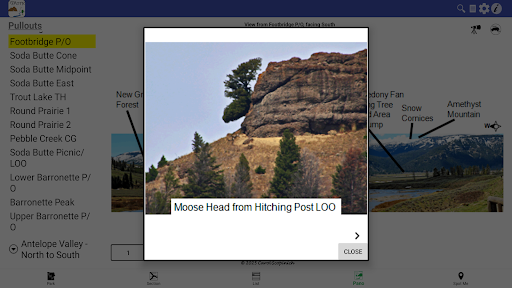
On the Pullout details, you can select the Spotting Scope icon to see digiscoped images of selected Sights. You can touch the Yellowstone Wolves: The Years app icon in the upper right corner. If it's installed, that app shows which Wolf Pack(s) might be seen from that Pullout for that year. Conversely, while viewing a Wolf Pack in the Yellowstone Wolves: The Years app, you can touch the Yellowstone SPOTR icon in the app bar. You see the Pullouts in Yellowstone SPOTR where that Wolf Pack might be seen.
You can Search for a Sight by name. The app shows the Pullouts from which the Sight can be seen. For example, you could Search for the Bear Meadow Sight & learn that it can be seen from several Pullouts. You could select one of these Pullouts & swipe through its Panoramas. You could then select any of the other Pullouts. The USGS Maps used in the app show features where wildlife might be seen. These features are called Map Sights. You can Search for these by name. The app shows the feature highlighted on a Map. Some Map Sights can also be seen from Pullouts so the Search result contains both.
First-time users, unfamiliar with the names of Pullouts & Sights, should start with the Browse function. You can Browse through Pullouts & Sights. Choosing each of these Browse functions & perusing the images presented provides familiarity for using the Search function.
Wi-Fi access is not needed to use the app.
What's New
- Revised user interface that's consistent across platforms
- Improved usability, navigation, size reduction
- New Pullouts, Panoramas, Sights & Digiscoped Images
- Route & Pullouts for new Yellowstone River bridge (Panoramas to be added later)
- Minor corrections
Version Information
- Version
- 8.0-obb
- Downloads
- 1K+
- Updated on
- Dec 7, 2025
- Released
- Mar 16, 2017
- Requires
- Android 6.0
Statistics
Google Play Rating History
Rating Distribution
Downloads Over Time
Yellowstone SPOTR has been downloaded times. Over the past 30 days, it averaged downloads per day.
Shaded area shows 30-day prediction based on historical trends
Historical data collection started recently. More data points will be available over time.
Yellowstone SPOTR users say on Google Play
 Doug MacCartney
I have lived and worked at Yellowstone N.P. for over 35 years. I use the app to help me remember the names of various pullouts and features that wildlife watchers use to discuss where they are seeing animals. I love the fact that the app doesn't ask for all kinds of "permissions" on your phone. Just GPS, so that it can give you relevant about where you are. A great product at a fabulous price, FREE!
 A Google user
Fails at the first hurdle. Searching for the Yellowstone falls - nothing. Same for Grand Prismatic and other major sights in the park. Clearly a lot of work gone in to it but not good for the first time visitor (I have been 3 times before).
ApkTrusted Ratings & Reviews
Scan this QR code to download

Forwarding you to the page at Google Play market in seconds...
Open Google Play market now