
Alarm Clock v1.1.6
kenT3



About this app
The Alarm Clock app by kenT3 aims to solve the problem of oversleeping and missing important events by providing a loud and reliable alarm system. This app benefits individuals who struggle with waking up on time, such as students, professionals, and anyone with a busy schedule. Compared to alternatives in the Productivity category, Alarm Clock stands out with its simple and intuitive interface, but falls short in terms of customization options and features. With a mixed user rating of 3.3/5, it's clear that the app has some room for improvement.
Pros
- The app has a moderate download count of 100,000+, indicating a level of social proof and trust among users.
- The developer, kenT3, has a dedicated website and email address, suggesting a commitment to supporting and updating the app.
- The app requires no permissions, which is a significant advantage in terms of user privacy and security.
- The app's small size and offline capability make it a great option for users with limited storage or internet connectivity.
- The free with ads monetization model allows users to access the app's features without paying a premium, although the presence of ads may be a drawback for some users.
Cons
- The app's mixed user rating of 3.3/5 suggests that some users may be experiencing issues or dissatisfaction with the app's performance or features.
- The lack of customization options and features may limit the app's appeal to users who are looking for a more comprehensive alarm clock experience.
- The presence of ads may be annoying or intrusive for some users, potentially disrupting the app's functionality or user experience.
- The app's compatibility with Android 8.0 and above may limit its accessibility for users with older devices or operating systems.
Best for: The ideal user for the Alarm Clock app is likely a busy individual, such as a student or professional, who needs a reliable and easy-to-use alarm system to wake them up on time and help them stay on schedule, and who values simplicity and ease of use over advanced features and customization options.
Developer Description
Unlock the potential of a smart alarm clock app with our loud alarms.
Are you tired of hitting the snooze button repeatedly and struggling to get out of bed in the morning? If so, we have the perfect solution for you. Say goodbye to those groggy mornings and hello to a smarter way to wake up with our app ☀️.
Customize Your Wake-Up Experience 🌅
With this alarm app, you have the power to customize your wake-up experience like never before. Our alarm clock app offers a wide range of features to ensure you wake up feeling refreshed and ready to take on the day. Here are some of the key features that make our alarm clock app stand out:
Smart Alarms:
Set multiple alarms with unique settings for different days of the week.
Choose from a variety of alarm sounds, including music options and custom alarm tones 🎵.
Create a personalized wake-up playlist by selecting your favorite songs 🎶.
Challenge Your Wake-Up Routine:
Break the habit of hitting the snooze button with our unique wake-up challenges.
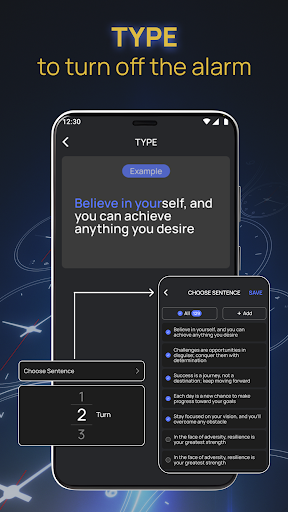
Select from various challenges such as solving math problems ➕, going for a short walk 🚶♂️, testing your memory 🧠, or typing exercises ⌨️.
The alarm will only turn off once you successfully complete the chosen challenge.
Customize Your Challenges:➕
Tailor the challenges to your preferences and difficulty level.
Mix and match challenges to create a unique wake-up routine that suits your needs.
Variety of Alarm Sounds:🎵
Choose from a wide range of alarm sounds to find the one that gets you out of bed.
From traditional bells 🔔 to soothing melodies, we have an alarm sound for every preference.
How It Works:
⏰ When you set your alarm with our app, you can select your preferred wake-up challenge. If you're tired of the same old routine, you can switch things up by customizing your challenge. Here's a breakdown of how it works:
✅ Math Alarm: Start your day by engaging your brain. Solve a math problem to turn off the alarm.
✅ Music Alarm: Wake up to the tunes that motivate you the most. Choose your favorite song to kickstart your day 🎵.
✅ Custom Alarm: Personalize your wake-up experience by selecting your own custom alarm sound or melody 🎶.
✅ Challenge Alarm: Challenge yourself with activities like walking a few steps 🚶♀️, recalling a series of numbers 🔢, or typing a short sentence ⌨️. Your alarm will stop once you complete the challenge.
Your Personal Wake-Up Companion 🌞
With our alarm clock app, it's not just another alarm app – it's your personal wake-up companion. We understand that everyone has their own unique preferences when it comes to waking up, and our app is designed to cater to those individual needs.
Imagine waking up to the sound of your favorite song, feeling mentally engaged with a math problem, or getting a little exercise to kickstart your day. This wake-up alarm app is all about making your mornings more enjoyable and productive.
Don't Miss Out on a Productive Day 🚀
Say goodbye to oversleeping and missed appointments. Our alarm clock app is here to ensure you never miss an important moment again. Whether you need to wake up for work, school, or any other commitment, it has the features to help you start your day right.
🌟 Get Alarm Clock - Loud Alarm Clock app now and experience the future of wake-up solutions. Customize your alarms, embrace the challenges, and transform your mornings into moments of productivity and success. Say hello to a smarter, more effective way to wake up and seize the day. ⏰
Privacy
Given that the app requires no permissions, it's likely that the developer is not collecting any sensitive user data. However, users should still be cautious when downloading and installing apps from unknown sources, and ensure that they are using the official version from a trusted store. To minimize potential risks, users should also review the app's terms and conditions and privacy policy before installing.
Tips
To get the most out of the Alarm Clock app, users should first set up the app by selecting their preferred alarm sound and volume. Additionally, users can optimize the app's performance by closing unnecessary background apps and adjusting their device's notification settings. Finally, users can integrate the app with other productivity tools, such as calendar or task management apps, to enhance their overall productivity and time management.
Version Information
- Version
- 1.1.6
- Downloads
- 100K+
- Updated on
- May 7, 2025
- Released
- Jan 9, 2024
- Requires
- Android 8.0
Statistics
Google Play Rating History
Rating Distribution
Downloads Over Time
Alarm Clock has been downloaded times. Over the past 30 days, it averaged downloads per day.
Shaded area shows 30-day prediction based on historical trends
Historical data collection started recently. More data points will be available over time.
Alarm Clock users say on Google Play
 Houda Karkich
Good
 Michael
Good
 Anthony “Tony” Manzano
wake up everyday...
 jayalakshmy anand
very bad app
ApkTrusted Ratings & Reviews
More from kenT3
See more apps
Spin Wheel: Fun
Free

BMI Bot: Calculator and answer
Free
BMI Calculator – Ideal Weight
Free

HD Camera 4K Ultra
Free

LiveScore – Football & Sports
Free

Photo and Music Video Creator
Free

Secret Diary - Write & Reflect
Free

120 FPS Booster - FPS Unlocker
Free

Auto Clicker – Automatic Tap
Free

Fast Video & Movie Downloader
Free

File Recovery: Photo and Video
Free

GPS Live Camera
Free

Drum Pad: Music & Beat Maker
Free

AI Voice Changer & Effects
Free

Prank Video Call: Prank Chat
Free
AMA Chatbot AI Smart Assistant
Free
Similar Apps




Scan this QR code to download

Forwarding you to the page at Google Play market in seconds...
Open Google Play market now