
comdirect photoTAN App v9.10.0
comdirect – eine Marke der Commerzbank AG




About this app
Developer Description
for free TANs
This is how the photoTAN process works via the computer:
You make a transaction on another device; e.g. B. a PC.
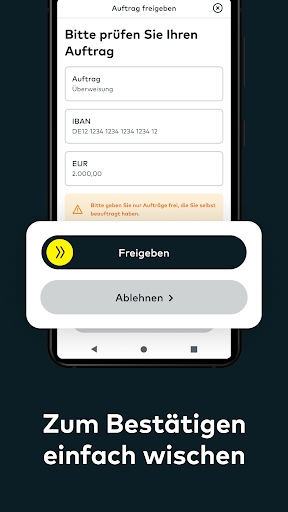
Your transaction will be automatically transferred to the comdirect photoTAN app and a notification will appear on your smartphone. When you tap on the message, the photoTAN app opens. Check the transaction and release the TAN by sliding the arrow from left to right.
The usual scanning function of the comdirect photoTAN app is retained. This is recommended, for example, if your smartphone is not connected to the Internet. To do this, select the photoTAN procedure “photoTAN graphic” on your computer and then open the scan function at the bottom left of the comdirect photoTAN app on your smartphone.
This is how the App2App process works:
You carry out a transaction in another comdirect app. The photoTAN app opens automatically during the approval process for your transaction. Confirm your order by sliding the arrow from left to right.
The following comdirect apps support the App2App process:
- comdirect app
- comdirect trading app
-comdirect Young
How to activate the photoTAN app before using it for the first time:
Log in to the comdirect personal area with your access number and PIN and follow the instructions “Activate photoTAN” until the activation graphic is displayed. Download the comdirect photoTAN app onto your smartphone and follow the instructions in the app. Once the app is activated, you can use the two methods mentioned above.
FAQ “What permissions does the app use?”
The “Camera” authorization is required in the standard procedure for scanning the photoTAN graphic.
FAQ “Does the app work with multiple comdirect accounts”?
You can connect the app to up to 8 accounts. You need a separate activation letter for each account.
Further information about photoTAN can be found at www.comdirect.de/photoTAN
If you have any questions or suggestions about photoTAN, we are happy to help you around the clock:
By email to info@comdirect.de
or by phone:
Customers: + 49 (0) 41 06 - 708 25 00
Interested parties: + 49 (0) 41 06 - 708 25 38
What's New
Version Information
- Version
- 9.10.0
- Downloads
- 1M+
- Updated on
- Nov 6, 2025
- Released
- Apr 3, 2013
- Requires
- Android 8.0
Statistics
Google Play Rating History
Rating Distribution
Downloads Over Time
comdirect photoTAN App has been downloaded times. Over the past 30 days, it averaged downloads per day.
Shaded area shows 30-day prediction based on historical trends
Historical data collection started recently. More data points will be available over time.
comdirect photoTAN App users say on Google Play
 Arman
Arman
The app doesn't work on GrapheneOS. Either change that or I'm changing my bank. A guid for the developrs: search the internet for “GrapheneOS Attestation compatibility guide” and click on the first link. Update: The problem is fixed👍
 Mohamed Chiheb ben Jemaa
Good app but it's not in English
 Maria Kharlamova
In letzter Zeit kann ich die App gar nicht öffnen.
 Ralf Bergs
Die App macht einen sehr "halbgaren" Eindruck. Wenn man bei einer wartenden Bestätigung die App "von Hand" öffnet, statt auf die Benachrichtigung in der "notification bar" zu klicken, dann wird diese Benachrichtigung nach Auslösen der Aktion/Bestätigung in der App nicht automatisch gelöscht. Das geht besser, wie andere Apps zeigen.
 Mihail Balanici
An update of the photoTAN app took place on the 22nd of July. Today, the 31.07 I try to use it, and it does not open whatsoever. Tried to uninstall it, restart the phone, install it again, cleared cash - nothing, the app simply doesn't start. With every new update, they fix some issue, but it crashes something else. I asked a friend to install it on his newer phone (mine is a Samsung S10+ from 2020) and it works on his. My Andoird is up-to-date. I guess Comdirect wants me to buy a new phone now.
ApkTrusted Ratings & Reviews
More from comdirect – eine Marke der Commerzbank AG
See more apps


Scan this QR code to download

Forwarding you to the page at Google Play market in seconds...
Open Google Play market now