INFINITE Official Light Stick v1.0.3
Arana Co.,Ltd.




About this app
Developer Description
It is an application for using the official support rope of INFINITE.
1. Wireless Control Mode
Run the app to connect with the cheering rods, enter the seat number of the purchased performance tickets into the app to register and turn on the cheering rods at the performance site, you can produce a variety of stages through the cheering rods.
Normal mode does not work in wireless control mode.
2. lighting control
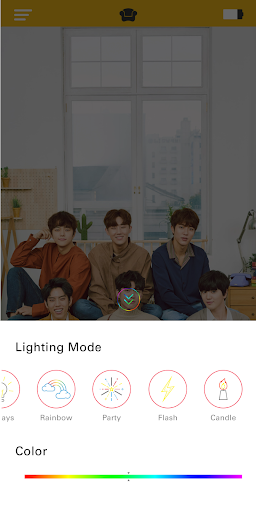
You can connect your INFINITE 2nd generation official cheerleader with your smart device through Bluetooth connection, and control the color and mode of the lights to create the atmosphere around you.
3. Apply INFINITE official image
You can decorate your own application by setting INFINITE's image as the application's wallpaper.
4. Battery level check
You can check the remaining battery capacity by using the icon on the top right of the main page.
* Precautions before performance
1. Please check your ticket seat information and enter your seat number on the cheering rod before viewing the performance.
2. Please watch the performance in the same seat as the seat information registered on the cheering rod.
Please note that if you move to another seat arbitrarily, cheering stage production may be changed.
3. Please check the battery level before the performance to make sure the power is not turned off during the performance.
* Contact
If you have any questions or inquiries about the cheering pole and the app, please use the contact information below.
Consumer Consultation and A / S Center A / S Inquiry: 031-819-8323-5
* MAIN FEATURES
1.Wireless control mode
After connecting the app with the Light Stick, enter the designated seat number you purchased through the smart phone App. Then, if you turn on the Light Stick at the performance site, you can produce various stages through the Light Stick.
Normal mode does not work when operating in wireless control mode.
2.Connecting with Bluetooth on your smart phone
You can connect the INFINITE Official Light Stick VER.2 with your smart phone via Bluetooth connection, and you can control the lighting color and lighting mode you like.
3.INFINITE official wallpaper image
You can customize your own application by setting the image of INFINITE as the wallpaper of the App.
4. Battery check
You can check the battery condition of your light stick through the icon at the top right of the main page.
* CONCERT GUIDELINES
1.Check your seat information on your ticket before the concert and enter it on the light stick in advance.
2.Please be seated in the same seat where you registered for the light stick.Moving to a different seat may cause different stage appearance.
3.Check the light stick battery in advance to prevent turning off during the concert.
* CONTACT
Please use the contact information below if you have any questions or concerns about the support rods and apps.
Consumer consultation and after sales service A / S inquiry: 031-819-8323-5.
What's New
Version Information
- Version
- 1.0.3
- Downloads
- 10K+
- Updated on
- Aug 12, 2019
- Released
- Jul 17, 2019
- Requires
- Android 4.3
Statistics
Google Play Rating History
Rating Distribution
Downloads Over Time
INFINITE Official Light Stick has been downloaded times. Over the past 30 days, it averaged downloads per day.
Shaded area shows 30-day prediction based on historical trends
Historical data collection started recently. More data points will be available over time.
INFINITE Official Light Stick users say on Google Play
 A Google user
Very good!!!!! Already have this!!!! Omg♥️♥️♥️♥️
ApkTrusted Ratings & Reviews
More from Arana Co.,Ltd.
See more apps
Scan this QR code to download

Forwarding you to the page at Google Play market in seconds...
Open Google Play market now