
Text On Photo, Photo text edit v1.52
MultiVerse Technologies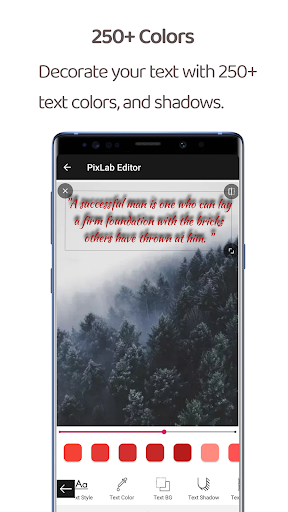




About this app
Text On Photo, Photo text edit solves the problem of adding text to photos for users who want to personalize their images without needing extensive photo editing skills, benefiting casual smartphone users who want to create memes, quotes, or simply annotate their photos. Compared to alternatives in the Photography category, this app stands out with its simplicity and ease of use, but falls short in terms of advanced editing features. With a moderate download count and a generally positive user rating, it indicates a dedicated user base. However, the presence of ads and in-app purchases may deter some users seeking a seamless experience.
Pros
- The app's simplicity and user-friendly interface make it accessible to a wide range of users, including those who are not tech-savvy, allowing them to easily add text to their photos without needing extensive editing knowledge.
- With over 100,000 downloads, the app has a moderate level of social proof, indicating that many users find it useful for their photo editing needs, which can be a significant factor for those looking for a reliable app.
- The developer, MultiVerse Technologies, provides a contact email for support, which suggests a level of commitment to user satisfaction and assistance, should any issues arise during the app's use.
- The app's small size and low Android requirement of 4.1 make it compatible with a wide range of devices, including older models, which is beneficial for users who do not have the latest smartphones.
- The option for in-app purchases offers users the ability to enhance their experience by accessing additional features or removing ads, providing a flexible monetization model that caters to different user preferences.
Cons
- The app's monetization model, which includes both ads and in-app purchases, may be seen as aggressive by some users, potentially disrupting the editing experience and causing frustration.
- The lack of advanced editing features may limit the app's appeal to users who are looking for more complex photo manipulation capabilities, making it less competitive against more comprehensive photo editing apps.
- The developer's website seems to be more focused on advertising rather than providing detailed information about the app or the company, which could raise concerns about transparency and trustworthiness.
- Some users may find the $17.99 price for in-app purchases to be steep, especially considering the app's basic functionality, which could deter users from making purchases and potentially affect the app's revenue.
Best for: The ideal user for Text On Photo, Photo text edit is a casual smartphone user, likely within the age range of 16 to 45, who occasionally wants to add text to photos for social media, personal projects, or messaging, and values simplicity and ease of use over advanced editing features, with a medium to low level of technical skill, making this app an excellent choice for those seeking a straightforward photo text editing solution.
Developer Description
Add Text to photo with PixLab Photo editor.
“Love is the most beautiful art in the world”. You can however, express your love by writing your deepest feelings on love images with photo text edit.
Text to photo is totally free and offline photo editor. Its all features are offline and easy to use.
Photo text edit is best in:
✔ Quickly to add texts on photos, easy to create quotes, memes, photo captions or creative typography design.
✔ Professionally designed interface and easy-to-use
✔ Lots of free fonts and font design, multiple text, font size, opacity, color, position, rotation and letter spacing, shadow, flip, mirror. Now you can create thousands of beautiful typography designs for yourself by inserting text on photos.
✔ Can customize color, size, control opacity, create shadow of text arbitrarily.
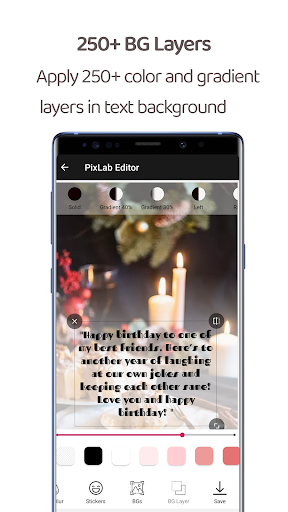
✔ Change the background with the possibility of making it : a color, a gradient or an image.
✔ enhance your pictures' look by applying beautiful photo filters on your photo, and blur your image to make your text more visible.
✔ Beautiful stickers of birthday, love, emoji and all categories to make your photos more attractive.
✔ Various backgrounds in many categories: good morning images, good night images, love images, religious images and a lot of free photos for you to choose to add text on photos.
✔ Special greeting cards to make wishes to your Loved ones.
✔ Blend your image to beautify more your photos.
✔ Browse quotes and insert anything you like, into what you're making !
✔ Share via your favourite messaging and social networking applications: WhatsApp, Instagram, Facebook, ... Or simply save it to your gallery.
Text to photo is still under development, so don't hesitate to provide us feedback at decentappsstudios@gmail.com
Privacy
Given that the app requests no permissions, it appears to be safe in terms of data collection, but users should still be cautious when making in-app purchases and ensure they understand what they are buying. Since the app does not access sensitive information, the risk of data breaches is minimized, but it's always advisable to monitor app updates and reviews for any potential security concerns.
Tips
To get the most out of Text On Photo, Photo text edit, users should experiment with different text styles and colors to find the combination that best suits their image. Additionally, utilizing the app in conjunction with other photo editing apps can enhance the overall editing experience, allowing for more complex and creative edits. For optimal performance, it's recommended to close other resource-intensive apps while using Text On Photo to prevent lag or crashes.
What's New
HD photos.
Much more is on the way. Stay connected with us
In-app purchases
$17.99 per item
Version Information
- Version
- 1.52
- Downloads
- 100K+
- Updated on
- Jun 22, 2022
- Released
- Sep 6, 2020
- Requires
- Android 4.1
Statistics
Google Play Rating History
Rating Distribution
Downloads Over Time
Text On Photo, Photo text edit has been downloaded times. Over the past 30 days, it averaged downloads per day.
Shaded area shows 30-day prediction based on historical trends
Historical data collection started recently. More data points will be available over time.
Text On Photo, Photo text edit users say on Google Play
 Khalid Harry
Excellent Enjoying working with it and I am so glad that you are among the process of continuous improvement. Keep it up and add some more templates. Thanks 👍
 kesana nagaraju
App looks and works wonderfully.Hope improves a lot better and becomes best.
 Fechi Learns (Fechi)
It would have been wonderful if the app had a feature to delete "my work". Otherwise the best app
 Influencer Daily Deals
Im not liking the sizing options at all. I expected another from this app based on score & I'm desperate for a great app, so waa hoping this was the one! I'm an influencer & design tons of content everyday. So had high hopes :(
 Khuhruzh Svéthmeorv
This app is trash. First of all, the text box's width can't be changed, meaning it's useless if you want to write long paragraphs. I managed to work around this by resizing the text, and then the box, but it was a pain. Secondly, it resizes your photos. I selected a square photo to write text over and then post on instagram. This app cut off the sides of the photo, meaning it would no longer fit. I spent 45 minutes on a post before realising this. I can't convey how rubbish this app is.
ApkTrusted Ratings & Reviews
More from MultiVerse Technologies
See more apps


Similar Apps

3D Photo: Imager
Paid

Geulgram - Text on Photo
Free

PixaGen: Ai image generator
Paid
Ink Cards
Free

Fonty - Draw and Make Fonts
Free

DesignEvo - Logo Maker
Free

AI Grammar Check: AI Writer
Paid

Greeting & Birthday Card Maker
Free

Add Text: Text on Photo Editor
Free

Photobook: Photo Books & Gifts
Free

Ai Logo Maker : Design Studio
Paid

PDFEsign.com PDF E-Sign
Free
StoryArt - story & reels maker
Free

StoryLab - Story Maker
Free

Prisma Art Effect Photo Editor
Free

Tattoo AI: Ink Design Try-On
Paid
Scan this QR code to download

Forwarding you to the page at Google Play market in seconds...
Open Google Play market now