Thumb-Key v5.0.14
Dessalines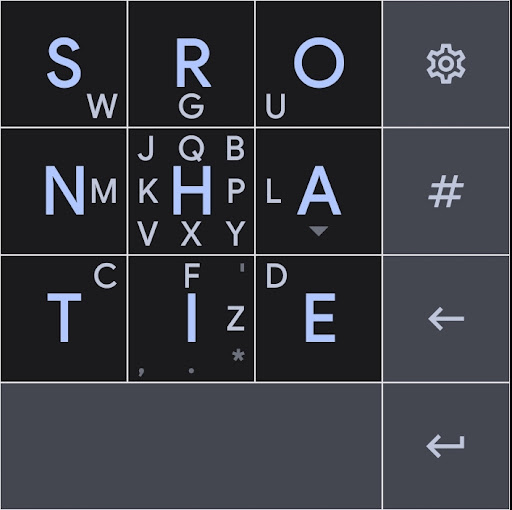

About this app
Developer Description
A privacy-conscious keyboard made for your thumbs.
It features a 3x3 grid layout, and uses swipes for the less common letters. Its easy to learn, and designed for fast typing speeds.
Instead of relying on profit-driven, privacy-offending word and sentence prediction for accuracy, as do most popular phone keyboards like Gboard and Swiftkey, Thumb-Key uses large keys with predictable positions, to prevent your eyes from hunting and pecking for letters.
As the key positions get ingrained into your muscle memory, eventually you'll be able to approximate the fast speeds of touch-typing, your eyes never having to leave the text edit area.
This project is a follow-up to the now unmaintained (and closed-source) Message Ease Keyboard, which is its main inspiration.
What's New
Version Information
- Version
- 5.0.14
- Downloads
- 100+
- Updated on
- Jan 8, 2026
- Released
- May 11, 2023
- Requires
- Android 7.0
Statistics
Google Play Rating History
Rating Distribution
Downloads Over Time
Thumb-Key has been downloaded times. Over the past 30 days, it averaged downloads per day.
Shaded area shows 30-day prediction based on historical trends
Historical data collection started recently. More data points will be available over time.
Thumb-Key users say on Google Play
 Skyler Madison
I've used Messagease for 16+ years now. But now that it's gone to a subscription model, I abandoned it completely. I tried a variety of other keyboards... but nothing could compare. After googling for a while, I found thumb-key. It has the same key configuration, but the letter, are arranged differently. I was so pleased to see that I could arrange the keys to be the same as messageease, in the settings. So... I didn't need to have a learning curve. There are minor differences, most good
 APHI FPV
I can't describe how happy I am, that this project is happening. Quickly found my old Messagease layout and am up and typing again. App is in early development but already shows improvements over ME: + Responds much faster + Settings UI much cleaner + New features like swiping over space/backspace to move the cursor like on a touchpad. What I'm really missing: - Circle gestures and the back-and-forth swipe to capitalize letters, directly access numbers and add alternative symbols
 Jason Herrmann
Former message ease user who refuses to pay for their subscription. I paid the $20 for this (which I would have done for ME). But make no mistake Thumb-key still needs to prove they are more awesome and innovative than Messagease. Good start though, I hope you learned from their mistakes. I'll give it 5stars after I've tried it out a bit. I would like you to consider adding in the swipe and swipe/loop to capitalize like ME. Most of us former ME users are used to it and would appreciate it.
 Kirsanov Dmitry
Update from december 2025 breaks things. Now all letters on my custom keyboard are hidden. How to downgrade app?
ApkTrusted Ratings & Reviews
More from Dessalines
See more apps


Scan this QR code to download

Forwarding you to the page at Google Play market in seconds...
Open Google Play market now