
대성마이맥 Player vVARY
Digital Daesung Inc.




About this app
Developer Description
Mobile web and player in one! The easiest and most convenient course! Updates continue for more convenient, easier players.
Maximize your learning efficiency with a structure optimized for lecture playback.
NEW Daesung MyMac Player✏
Compatible with smartphones and tablets, and seamlessly switch between landscape and portrait modes! ✨
Start studying for real with the MyMac Player, optimized for all mobile devices.
📌MyMac Player at a Glance📌
■Login & Device Registration
- Log in and authenticate your device in one go!
Automatic login makes it easy to log in.
■Home
- Check your information and learning statistics on the Home page.
- Use the Home editing feature to customize the screen to your liking.
■MyMac Teacher
- MyMac Teacher: Easily check a list of all MyMac teachers and go to their home pages to register for classes.
- My Favorite Teacher: Easily register and unregister teachers you're interested in, and access their homepages directly.
- View only the courses you want in one place from the Favorites list.
- Bookmarks: View all your bookmarked courses at a glance.
■Courses Currently Taking
- Mode Settings: Change the player mode to suit your preferred learning environment with the free Light🌞/Dark🌛 mode switch.
- Easily stream or download your enrolled courses anytime, anywhere through the dedicated player.
- Easily find courses by area or teacher using tabs.
- Play free mock exam commentary lectures directly on your mobile device. - The course favorites feature allows you to easily and quickly access your desired courses.
- You can download unlimited number of courses at once, and background downloading is supported even while you work on other tasks. (Downloaded courses can be accessed online or offline from the download box.)
- Focused Study Mode allows you to temporarily suspend distracting apps.
■Player
- Speed Function: With the same settings as your PC, you can efficiently study at your own personalized pace.
- Section Repeat: Repeat any sections you find difficult to understand or forget multiple times.
- Bookmarks: Save important sections during the course and resume them at any time.
- Index: Select key learning points to access.
- Playback Controller: With a user-friendly UI, you can adjust brightness, volume, and playback intervals with simple gestures.
- Resume: When a lecture ends, you can resume watching from where you left off.
- Section Navigation: Freely move between lecture sections from 1 second to 3 minutes.
- Learning Q&A: Get your questions answered right away! Ask questions and view answers right after class.
■Learning Timeline
- Upcoming Schedule: Manage your upcoming schedule thoroughly by registering for D-DAYs.
- Learning History: Manage your learning plan thoroughly with class attendance records by date/time, real-time announcements from your favorite teachers, and a simple memo function.
■Settings
- You can configure connection settings, such as automatic login and logout.
- You can turn push notifications on and off.
- You can turn gestures on and off.
- You can customize the app's start screen by setting the main screen.
- You can take classes even in locations without a wireless network using the 3G/LTE settings.
- You can check for the latest updates. --------------------------------------------------------------------------------------
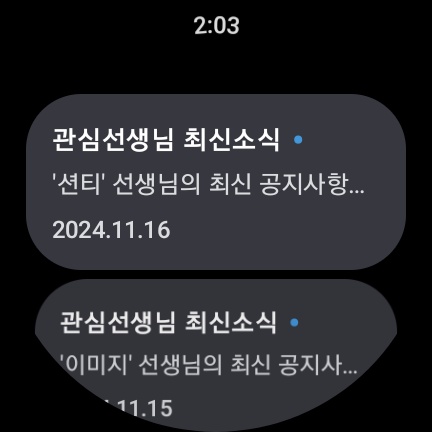
[Wear OS Device Support]
You can use the Daesung MyMac app on Wear OS.
- You can receive study-related notifications.
--------------------------------------------------------------------------------------
[Access Permissions]
• Required Access Permissions
- Phone: Used to identify your device and verify unique information.
• Optional Access Permissions (You can still use the service even if you do not agree to the access permissions.)
- Storage: You can download study materials.
- Camera: You can take and attach photos when writing profile or question board posts.
- Accessibility: Blocks other apps from running during intensive study mode.
- Notifications: You can receive informational/advertising notifications.
--------------------------------------------------------------------------------------
• Production and Development: Digital Daesung Co., Ltd.
• Improvement and Error Inquiries: 02-5252-110 / help@mimacstudy.com
Version Information
- Version
- -
- Downloads
- 500K+
- Updated on
- -
- Released
- Jan 17, 2026
- Requires
- Android Varies with device
Statistics
Google Play Rating History
Rating Distribution
Downloads Over Time
대성마이맥 Player has been downloaded times. Over the past 30 days, it averaged downloads per day.
Shaded area shows 30-day prediction based on historical trends
Historical data collection started recently. More data points will be available over time.
대성마이맥 Player - Google Play Rankings
Top Rankings
| Rank | Country | Category | List | Change |
|---|---|---|---|---|
| — |
Ranking History in
No ranking data available yet. Rankings are updated daily.
#32 in Top Free Education in South Korea


대성마이맥 Player users say on Google Play
 D K
D K
2022년도에 이어서 2023 대성패스를 끊게 되면서 대성마이맥 Player를 사용하게 되었어요! 이제 고3인지라...앱을 이용할 일이 더욱 많아졌는데요 ㅋㅋ 일단 기본적으로 끊김 현상이 없어서 너무 좋았어요 인강 시청 도중에 자주 끊겨서 짜증나는 기억이 아예 없습니다 제가 여러 강좌를 듣는 편이라 한 번씩 수강할 강좌를 찾기 힘들 때가 있는데 이 앱은 진짜 단번에 강좌를 찾을 수 있더라구요 선생님 별로 나열을 정리할 수도 있고, 과목 별로 나열할 수 있어서 바로바로 시간 들이지 않고 찾을 수 있는 게 진짜 장점인 거 같아요 그리고 인강을 다운로드해서 와이파이가 없는 곳에서도 들을 수 있어서 진짜 이 앱은 필수에요 그리고 목표 학교와 학과를 설정할 수가 있어서 매번 볼 때마다 동기 부여도 되고, 뿌듯합니다!! 다크 모드 생겨서 다크모드 잘 설정해서 씁니다 ㅎㅎ 통계랑 타임라인 생겨서 가끔 예전에 내가 이런 걸 들었구나 되돌아보기도 해서 재미있어요 대성 화이팅( ノ^ω^)ノ
 D0RI
D0RI
다 좋은데...앱 용량이 너무 커서 sd카드에 옮길 수 있었으면 좋겠어요..... 왜 안 옮겨지는 걸까요..?ㅜ 너무 간절해요..
 A Google user
다른 앱 다운에는 문제가 없는데 왜 이 앱만 다운이 안되나요? 설치버튼 계속 눌러도 먹통입니다..
A Google user
에러가 너무 많이 뜹니다. 그놈의 3005에러는 매일 뜨면 강의는 언제 들으라고..
ApkTrusted Ratings & Reviews
More from Digital Daesung Inc.
See more apps

Scan this QR code to download

Forwarding you to the page at Google Play market in seconds...
Open Google Play market now