
TexFer: Text Transfer vVARY
Susamp Apps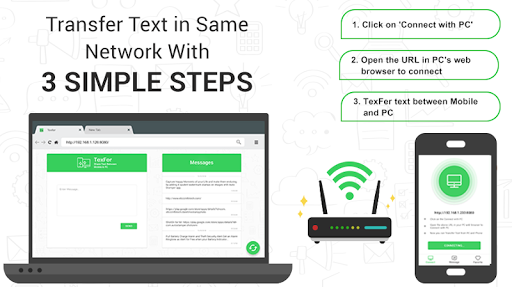



About this app
Developer Description
Quickly Transfer Important Texts/ Long URLs between Mobile Phone and Desktop
If you want to send that on different devices, mobile desktop, all you need to do is copy or type text, connect TexFer and press send. That’s it! Your text message will be displayed on your preferred platform’s screen straight away.
✨ Perks of Choosing us!
✌ Free to use App
✌ Only App to Swiftly Message Transfer between PC and Mobile
✌ Instant Copy, Paste and Share Text or URL
👉 Why and When to Use this application?
✔ Copying Long Text
We’d come across a situation where we wanted a copy and transfer a large amount of useful information from phone to your personal computer. And even need that text from desktop to your mobile phone! Even you might have faced that too!
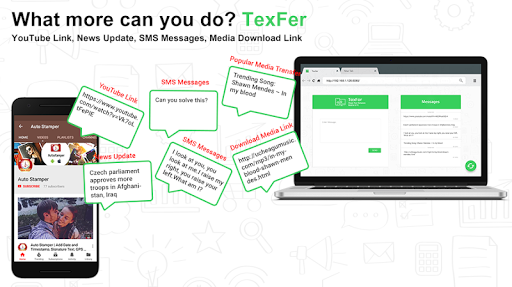
This is a hectic task provided that you don’t have TexFer! Sure, you must have tried different hacks of transferring that information, say a URL like images link, any media download link or a YouTube link if you want to check out the video in bigger screen than mobile. Isn’t it?
In such cases of text transfer, if you miss out even a character, that web page will not open. Worry not! With just a few taps transfer text between pc and mobile and vice versa!
✔ Graphic Designers
Graphic designers are always on a hunt for finding alluring images on the web. Going through hundreds of images it becomes very hard to bookmark them! So just TexFer it to your convenient device!
✔ SMS Messages
If you have made subscriptions to any message packages, and want to transfer text message to create something new out of it, you will definitely need TexFer! Marketers can relate to this!
✔ Important message to colleague
Many a time while surfing through mobile or desktop, it might have happened that you come across an important information which you might want to use later or send to your colleagues like Breaking news update, offers or any other information at the very moment.
Now, easily send important messages to your colleagues or friends without any hustle! All you have to do is Type > Connect TexFer > Receive!
👉 Who is it for?
✔ Content Writers/Marketers
Content writers have a cluster of text and images to manage. They keep writing irrespective of any platform. Transferring that content and image is a tough job. So now just TexFer it! With just a click transfer text from mobile to pc or reverse!
✔ Researchers
In the tech-savvy world, we keep surfing on the net all the time. From reading the news to watching videos we are always online on the web world. Now, you can share your favorite texts across devices also!
The list is endless! Check out the mockups for more!
◇ Fascinating Features and Functionality of TexFer!
➺ Rich User Interface
➺ Immediate Text Transfer PC to Mobile
➺ Multi-Platform Support
➺ Pin your Preferred Text to Favorites Tab
➺ Option to Edit & Share Text Free
➺ Unlimited Text Transfer
➺ Simple to Use App
✍ How to use this app?
Open “TexFer”
Click on “Connect With PC”
Note down the URL displayed on application home screen.
Type that URL on your PC’s browser.
Wait till the Connection is Successful
Note: PC and Mobile Phone Should be Connected to the Same Network to transfer text messages to computer & mobile phone.
That’s it! Now you can start text transfer between pc and mobile & reverse!
You can even add your selected text to favorites tab in order to effortlessly find your preferred important information later from the bunch. Following these simple steps, you can instantly get TexFer woking!
TexFer is a rare application on Google Play Store that facilitates to seamlessly text transfer mobile to pc and vice versa!
So, without a further due, download this application now and start TexFer your content irrespective of
the platform!
In-app purchases
$1.99 per item
Version Information
- Version
- -
- Downloads
- 10K+
- Updated on
- -
- Released
- Jul 25, 2018
- Requires
- Android Varies with device
Statistics
Google Play Rating History
Rating Distribution
Downloads Over Time
TexFer: Text Transfer has been downloaded times. Over the past 30 days, it averaged downloads per day.
Shaded area shows 30-day prediction based on historical trends
Historical data collection started recently. More data points will be available over time.
TexFer: Text Transfer users say on Google Play
 A Google user
Very useful app for professionals. It's very easy now to share important files or URLs from pc to phone in no time. Highly recommended texfer app ✌️
A Google user
One missing star . 1. I suggest pin for extra 🔐. 2.I also wish mobile data phone to pc (having other wifi ) in my office. 3. Everytime after receiving text message, one has to click below ok , then only one can copy it. Please shorten this step. Means, once received, direct select and copy text. 4. Autodisconnect after specified minutes of no use... Hope these my suggestions may add into further development, satety, power and usefulness of your app.
A Google user
Very useful app
A Google user
I want to transfer texts that are already on my phone, not just new texts I create. This is a simple app that allows you to transfer texts to pc easily, but I can't access any of my phone's texts, apparently it only works on texts I'm going to create.
A Google user
Useless
ApkTrusted Ratings & Reviews
More from Susamp Apps
See more apps
Piano Kids Music Songs & Games
Free
Real Gun Shot Sounds Simulator
Free

Moral Stories: English Shorts
Free

GPS Map Camera Lite: Geo Stamp
Free

Annoying Zombie Punch Game
Free

Full Battery Charge Alarm
Free
Timestamp camera: Add DateTime
Free

My Stuff Organizer
Free

Rangin: Gradient Status Maker
Free

GPS Camera: Proof Time Stamp
Free

Royal Number Match Game
Free

ShotOn Stamp on Gallery
Free

ShotOn Stamp Camera
Free

StreamyCam : Live Stream
Free

My Site Witness
Free
Scan this QR code to download

Forwarding you to the page at Google Play market in seconds...
Open Google Play market now