
Mathematical keyboard F vVARY
hosinoatusi



About this app
Developer Description
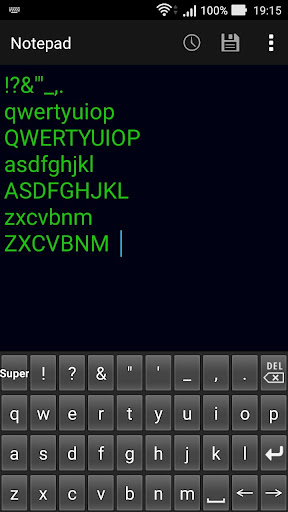
This is a soft keyboard that is convenient for writing math expressions.
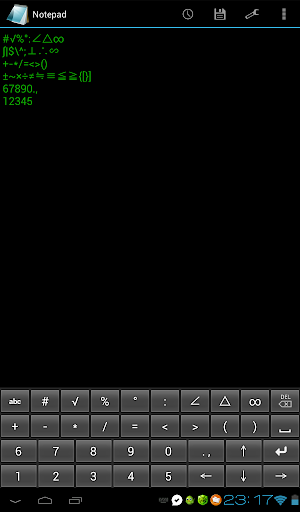
Numbers, symbols, all alphabets, Greek letters and superscripts can be entered without conversion.
You can enter digits from 0 to 9, all alphabets Greek letter "α,β,γ,δ,θ,λ,μ,π,ρ,σ,φ,ω", superscripts "⁰,¹,²,³,⁴,⁵,⁶,⁷,⁸,⁹,⁺,⁻,⁼,⁽,⁾,ⁿ" and mathematical symbols "!?√#|%$\°'"^:;∠⊥△∴∞∽∫&+±-~*×/÷=≠≒≡<≦>≧({[)}].,".
If you press the key of the symbol continuously, it switches to a different symbol.
If you press the key of the alphabet and Greek letters continuously, it switches from lowercase letters to uppercase letters.
The alphabet is a QWERTY array.
Please be aware that superscript may not be saved properly depending on the character code of the text file to be entered.
If it is UTF-8 of the standard character code of Android OS it can be saved correctly.
There is a possibility of garbled characters when saving with the standard character code of Windows PC.
Enabling Keyboards
01
Go to Settings > System > Languages & input > and tap Virtual keyboard in the Keyboard & inputs section.
02
You'll see a list of each keyboard you've installed.
Tap "Manage keyboards".
03
Toggle on the new keyboard.
You might see a warning that this input method may collect the text you type including personal information.
But this app does not collect any input content.
This is not a warning specific to this application, it will always be displayed if you select a character input application other than the keyboard that is standard on the device.
If you're satisfied with the explanation, tap OK.
Note: Instructions will vary depending on your Android OS.
Switching Keyboards
01
Launch the app you want to type in.
02
Tap to bring up the keyboard.
03
Tap the keyboard icon on the bottom right.
(On some devices this icon isn't present, in that case pull down the notification bar when a keyboard is active.)
04
Choose the keyboard from the list that pops up.
Version Information
- Version
- -
- Downloads
- 1K+
- Updated on
- -
- Released
- Jul 30, 2018
- Requires
- Android Varies with device
Statistics
Google Play Rating History
Rating Distribution
Downloads Over Time
Mathematical keyboard F has been downloaded times. Over the past 30 days, it averaged downloads per day.
Shaded area shows 30-day prediction based on historical trends
Historical data collection started recently. More data points will be available over time.
Mathematical keyboard F users say on Google Play
 A Google user
Good
 Rishabh Soni
Good but not giving the all in one experience.
A Google user
I can toggle this keyboard from my present keyboard . But thisr keyboard does not allow to toggle any other keyboard.
 Mohammad Ali Asgar
App didn't installed and money deducted. This hilarious. Atleast give my money back
ApkTrusted Ratings & Reviews
More from hosinoatusi
See more apps
Mathematical keyboard D
Paid

Chemical equation keyboard C
Paid

Tab keyboard
Paid

Mathematical keyboard B
Paid

Space saving ABC keyboard
Paid

Superscript numeric keypad
Paid

Shogi keyboard
Paid

Space saving QWERTY keyboard
Paid

Kanji numerical keypad
Paid

Hexadecimal numeric keypad
Paid

Flash mental arithmetic
Free

Janken Brain training
Free

Auto Scroll Text Prompter
Free

Baseball Positions Face Photo
Free

Bingo Card Only
Free

Count Moving Balls
Free
Scan this QR code to download

Forwarding you to the page at Google Play market in seconds...
Open Google Play market now