
Logistics Local vVARY
Gurtam Inc


About this app
Developer Description
The service specially designed for delivery, courier and distribution companies.
With Logistics Local Mobile on your smartphone, you get your interaction with the office up to a new level.
How do you get started? Just a create a driver in Wialon Local, add your phone number and a mobile key, assign the driver to a vehicle, launch the mobile app and authorize with the phone number!
Use the app to automate delivery process with the advanced features:
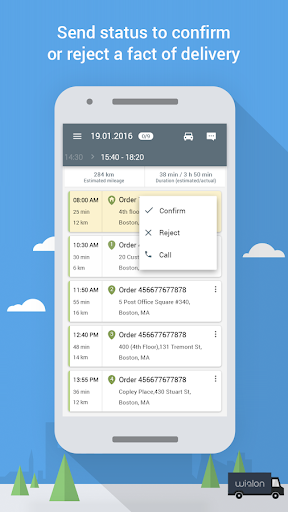
- easily accessible list of orders with detailed information on each;
- delivery progress evaluation in real-time;
- detailed map to view orders and estimated route;
- push-notification on orders, routes, and delivery progress to be immediately alerted;
- option to generate routes using external navigational applications;
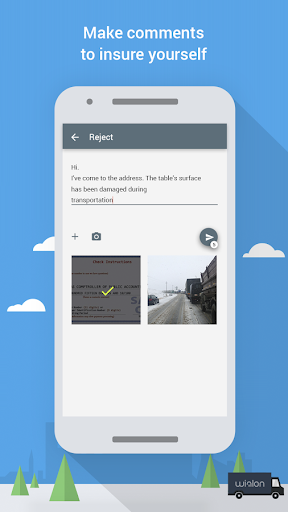
- order progress statuses (confirmed/rejected), comments and photos for each order;
- handy chat to notify operators on any events on the way;
- delivery confirmation with customer digital signature with data on customer name, delivery time and date indicated on a photo;
- tracker software functionality embedded into the app;
- optimization for tablets to view orders in tables and on the map simultaneously.
We offer advanced courier assistant on every stage of delivery.
Note:
If you have any questions, please feel free to contact our technical support team at support@gurtam.com
Version Information
- Version
- -
- Downloads
- 10K+
- Updated on
- -
- Released
- May 24, 2017
- Requires
- Android Varies with device
Statistics
Google Play Rating History
Rating Distribution
Downloads Over Time
Logistics Local has been downloaded times. Over the past 30 days, it averaged downloads per day.
Shaded area shows 30-day prediction based on historical trends
Historical data collection started recently. More data points will be available over time.
ApkTrusted Ratings & Reviews
More from Gurtam Inc
See more apps



Scan this QR code to download

Forwarding you to the page at Google Play market in seconds...
Open Google Play market now