Advanced EX for KIA v2.0
Dare Apps

About this app
Developer Description
Monitor specific KIA parameters by adding this plugin to Torque Pro.
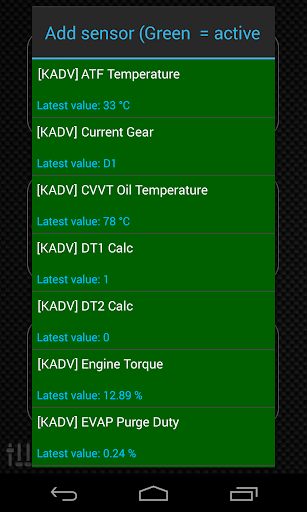
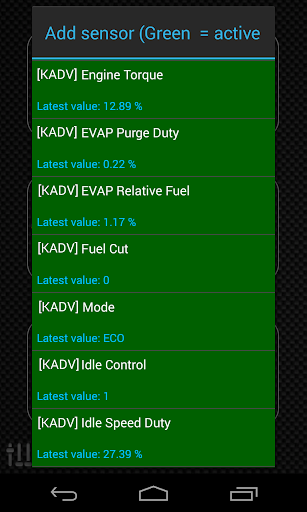
Advanced EX is a plugin for Torque Pro, extending the PID/Sensor list with more than 10 specific parameters from KIA vehicles, including:
* AT Turbine and Output Speed (*)
* AT Oil Temperature (*)
* AT Damper Clutch Lockup (*)
* AT Current Gear (*)
* CVVT Oil Temperature
* Fuel Injector Pulse Width / Duty Cycle
* Knock Retard (*)
* Wastegate Duty Cycle (*)
* Turbo Boost Pressure (*)
Sensors marked with (*) are not available on all cars, as it depends on special engine/parts like Turbo and/or Automatic Transmission.
For cars with automatic transmission, Lockup is really cool to monitor during a long road trip or even while driving in the city. As described on KIA Service Manuals, the Damper Clutch Lockup shows in real-time the actual Torque Converter lockup percentage, and as it approaches 100% the slip should be near zero.
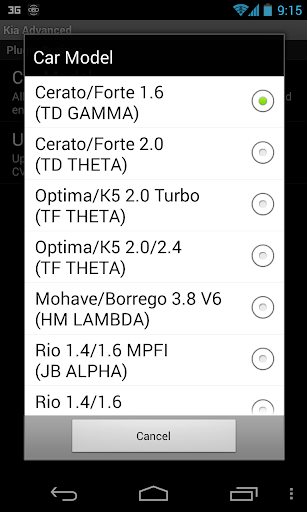
*PLEASE NOTE* that other KIA models/engines may be supported, but the plugin was tested only on the following models/engines:
* Carnival/Sedona 3.8 V6
* Carnival/Sedona 2.7 V6
* Carnival/Sedona 2.2 CRDI
* Cee'd 1.4/1.6 MPI
* Cee'd 2.0 MPI
* Cee'd 1.4/1.6 CRDI
* Cee'd 2.0 CRDI
* Cee'd 1.6 GDI
* Cerato/Forte 1.6 MPI
* Cerato/Forte 1.8 MPI/GDI
* Cerato/Forte 2.0 MPI/GDI
* Optima/K5 2.0 Turbo
* Optima/K5 2.0/2.4 GDI
* Mohave/Borrego 3.8 V6
* Mohave/Borrego 3.0 CRDI
* Rio 1.4/1.6 MPI
* Rio 1.2 MPI
* Soul 1.6 MPI
* Soul 2.0 MPI
* Sorento 2.4 GDI
* Sorento 3.5 V6
* Sorento 2.0/2.2 CRDI
* Spectra/Cerato 1.6 MPI
* Spectra/Cerato 2.0 MPI
* Sportage 2.0 MPI
* Sportage 2.7 V6
* Sportage 2.0 CRDI
* Sportage 1.6 MPI
* Sportage 2.0/2.4 MPI/GDI
* Venga 1.4/1.6 MPI
* Venga 1.4/1.6 CRDI
For more information about KIA engines, visit http://en.wikipedia.org/wiki/List_of_Hyundai_engines
Advanced EX requires the latest version of Torque Pro installed in order to function. This is *NOT* a standalone application and will *NOT* work without Torque Pro.
Plugin Installation
-------------------------
1) After purchasing the plugin on Google Play, make sure that you see the plugin listed on your Android device installed applications list.
2) Launch Torque Pro and click on the "Advanced EX" icon
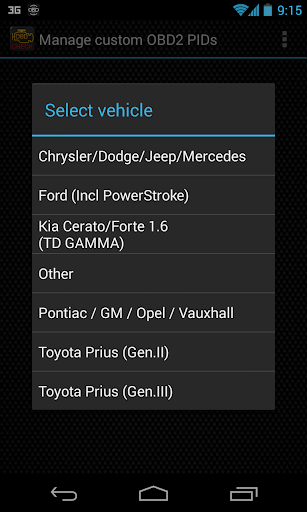
3) Select the appropriate engine type and return to Torque Pro main screen
4) Go to Torque Pro "Settings"
5) Make sure that you can see the plugin listed also on Torque Pro by clicking "Settings" > "Plugins"> "Installed Plugins".
6) Scroll down to "Manage extra PIDs/Sensors"
7) Usually this screen will not display any entries, unless you have added any pre-defined or custom PIDs in the past.
8) From the menu, choose "Add predefined set"
9) If your license is validated on Google Play you should see an entry for your engine. You may see predefined sets for other engine types, so make sure you pick the right one. If you don't see anything, probably you have an installation problem or validation error on Google Play. In this case, go back and repeat the installation procedure.
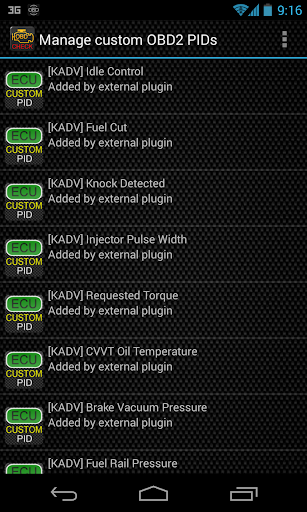
10) After clicking on the entry from the previous step, you should see several entries added to the Extra PIDs/Sensors list.
Note: Some sensors will be calculated real-time based on others. Make sure that you keep all sensors to avoid calculation errors.
Adding Displays
------------------------
1) After adding the additional sensors, go to the Realtime Information/Dashboard.
2) Press the menu key and then click on "Add Display"
3) Select the appropriate display type
4) Select the appropriate sensor from the list. Sensors provided by Advanced EX begins with "[KADV]" and should be listed right after the time sensors in the top of the list.
More features/parameters will be added in further releases. If you have comments and/or suggestions please just let me know.
What's New
Version Information
- Version
- 2.0
- Downloads
- 10K+
- Updated on
- Dec 13, 2019
- Released
- Jul 19, 2013
- Requires
- Android 4.1
Statistics
Google Play Rating History
Rating Distribution
Downloads Over Time
Advanced EX for KIA has been downloaded times. Over the past 30 days, it averaged downloads per day.
Shaded area shows 30-day prediction based on historical trends
Historical data collection started recently. More data points will be available over time.
Advanced EX for KIA users say on Google Play
 A Google user
It appears as though my car is lacking many sensors that my ten year older car had. Example: Air flow and fuel flow. I was hoping is be able to get the mpg readings back.
A Google user
Works great for my 2011 Kia Sedona 3.5L. Unfortunately, my 2012 Kia Rondo 2.4L is not supported. Like another reviewer, I got no response from the developer when I inquired about the possibility of adding support for my Rondo. It would at least be nice to hear back with an indication of whether or not the developer has any intention of expanding the number of Kia vehicles that are supported by this app.
A Google user
I have a 2015 Forte Koup SX turbo. The PID's for transmission temp and gear indicator do not work. I have tried all three engine options for the 1.6L, and none have worked so far. Please add correct PID's for this engine.
A Google user
Very sad that its not supported with newer android devices. wish I would've read before purchasing.
A Google user
Update the app for new android devices! add some actuation viewing like solenoids on transmission or relay circuits.
ApkTrusted Ratings & Reviews
More from Dare Apps
See more apps


Scan this QR code to download

Forwarding you to the page at Google Play market in seconds...
Open Google Play market now