
Cool Notification Sounds v2.5
CityApps Digital Services


About this app
Developer Description
Turn your mobile device to a fun machine!
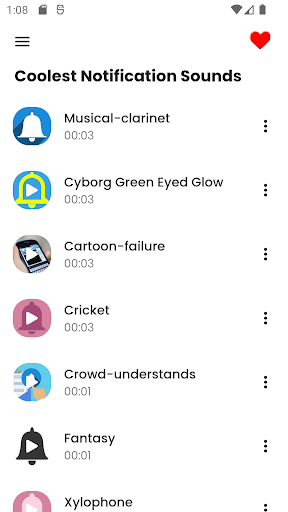
You can find your favorite notification or ringtone alerts in the following categories:
● Sci-Fi (Science Fiction)
● Animals
● Cartoons
● Human
● Musical Instruments
● Fantasy
Each of them can be set as:
✔ Ringtone
✔ Notification sound (for SMS text / Email message / Social apps)
✔ Default alarm sound
Every soundboard contains 20 tracks. Over time we’ll be adding more tracks and more categories. Best of all, the app is completely free!
To set a default sound, just tap and hold the desired track, and a pop-up menu will appear with all the options.
We’re always available for your questions or suggestions! You can drop us an email anytime and we’ll respond sooner than you expect.
What's New
Version Information
- Version
- 2.5
- Downloads
- 500K+
- Updated on
- Jul 21, 2025
- Released
- Feb 16, 2015
- Requires
- Android 6.0
Statistics
Google Play Rating History
Rating Distribution
Downloads Over Time
Cool Notification Sounds has been downloaded times. Over the past 30 days, it averaged downloads per day.
Shaded area shows 30-day prediction based on historical trends
Historical data collection started recently. More data points will be available over time.
Cool Notification Sounds users say on Google Play
 A Google user
good sounds. but, how do I set it to a specific thing? I only want a sound for my text messaging app.
A Google user
I liked it. For anyone who wants to use it for specific text/notification/phone sounds per contact do the following: 1) Save it to your general notifications/ringtone by holding the selection down (press & hold), then select save to alarms, notifications, or ringtone - usually any one is okay). 2) Go into the contact you want to edit. 3) Select Edit, then scroll down until you find what you want (ringtone, message notification, etc.), then change it. Once you've saved the sound you want to the general notifications, it should be there (among the sounds listed, when selecting specific sounds per contact).
A Google user
Drains my battery and i like to stay up late
A Google user
Love the sounds, but it doesn't let you do individual notifications per person, because it doesn't save directly to the phone and instead becomes your general notification sound through the app.
A Google user
Ok, installed it, and i can play the tones from in the app, but how do i add them so i can choose them in other apps? Nope. That doesn't help. I need to add them to the list that I can choose, for example, from the gmail app, or from other apps. All the long-press menu offers is the option to set one as the default ring or notification. Thats ok, I found a different app that actually allows me to save notifications tones and use them as I need.
ApkTrusted Ratings & Reviews
More from CityApps Digital Services
See more apps
Chocolate Cake Recipes
Free

Life Changing Bible Prayers
Free

Inspirational Bible Quotes
Free

Healthy Foods for You
Free

HD Motorcycle Sounds
Free

Smoothie Recipes
Free

Short Funny Jokes
Free

Quick and Easy Recipes
Free
Guess the Country - Quiz Game
Free

Car Sound Ringtones: Supercars
Free

Christian Music Ringtones
Free
Cool Human Voice Ringtones
Free

Tile Match: Animal Adventure
Free
Tile Match: Animal Adventure
Free

Bingo Ball Caller - Play Bingo
Free

IQ Test : Puzzles & Riddles
Free
Scan this QR code to download

Forwarding you to the page at Google Play market in seconds...
Open Google Play market now