
Photo Summary v2.0.16
Isaac Insoll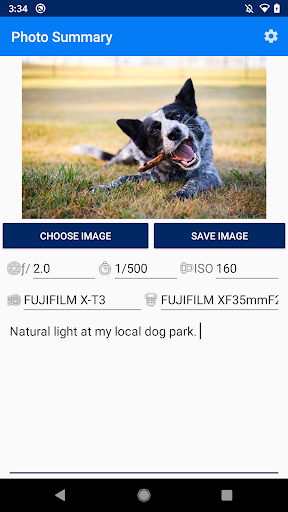
About this app
Developer Description
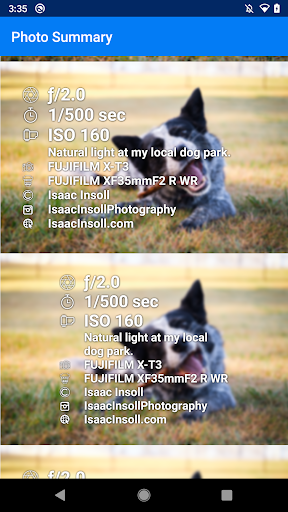
Add image information overlays
How to use:
1. Select a photo from your gallery (perhaps previously downloaded via Google Drive transferred from PC)
2. Add any notes or adjust settings if necessary then click 'Save'
3. Choose your favourite option from the list of designs and it will be saved to your gallery.
This app was inspired by the camera settings being shared in groups such as "Learn to Light - An OCF Lighting Community".
*PRICING NOTE:* This is a once-off purchase. I will never ever add any in-app purchases, subscriptions, advertisements or anything like that. I'm a photographer trying to give back to the community that has shared so much and will keep this app updated with new features as quickly as I can.
Ways that don't work:
The app reads the EXIF metadata in your image which is not part of the image if you:
- Use a screenshot of your photo
- Use 'Save For Web' in photoshop (normal 'Save' works)
What's New
Version Information
- Version
- 2.0.16
- Downloads
- 5K+
- Updated on
- Dec 10, 2025
- Released
- Oct 7, 2019
- Requires
- Android 11
Statistics
Google Play Rating History
Rating Distribution
Downloads Over Time
Photo Summary has been downloaded times. Over the past 30 days, it averaged downloads per day.
Shaded area shows 30-day prediction based on historical trends
Historical data collection started recently. More data points will be available over time.
Photo Summary - Google Play Rankings
Top Rankings
| Rank | Country | Category | List | Change |
|---|---|---|---|---|
| — |
Ranking History in
No ranking data available yet. Rankings are updated daily.
#71 in Top Paid Photography in Egypt


#71 in Top Paid Photography in Philippines
#71 in Top Paid Photography in Pakistan
#71 in Top Paid Photography in Saudi Arabia
Photo Summary users say on Google Play
 Kent Dolezal (Kendra)
So far I like what this app can do. Would be nice to be able to change the font color. White doesn't work real good on a image that is very bright or has a lot of white in it.
 A Google user
Over all the app does what it's supposed too. Se features that I wish you could add, depending on how hard it may be. 1. Resizing the info. (Comes out way to big) 2. Making the background image have a black slider. (To make the words pop out just a bit more) My website is too long so the words get placed underneath, when resizing. Allowing the words to re-adjust to one line. Other than that I like great work guys. Hopefully you all add some future updates. Thanks
 Ramachandran Kumar
I really loved the purpose of this app, so only I bought it. But on working perspective it could have been more user friendly, like selecting the fonts could have preview, changing font colours and when adjusting the texts at last it's just showing colour patches not the movement of texts. Also often it's crashing when I adjust the font positioning or size. Needs lot of improvements but still love this app. Reach out to me if more details on the crash required.
 Kate K.
The app used to work great, but I upgraded my phone to a Google pixel 6 and it keeps crashing when I try to save the photo, despite having my permissions on
A Google user
This a great app to use for social media but the Android version leaves a lot to be desired. Coming from there website I saw a great looking modern professional product. On the Android version however the text and spacing is very blocky and thrown together and not anything I'd want to use on social media. These versions of these apps are so wildly different from each other. I would like to see some love on the Android app so I can update this review and recommend this app to all my friends!
ApkTrusted Ratings & Reviews
More from Isaac Insoll
See more apps
Scan this QR code to download

Forwarding you to the page at Google Play market in seconds...
Open Google Play market now