Jetting Rotax Max EVO Kart Pro vVARY
JetLab, LLC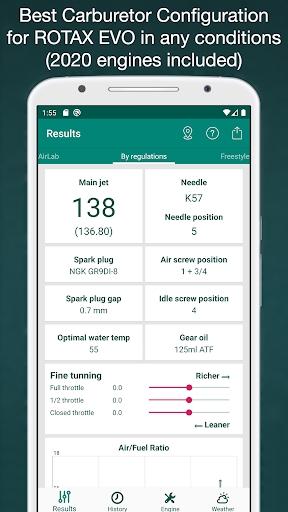




About this app
Developer Description
Main jet, needle, clip, air screw for Micro Mini Junior DD2 EVO karting engines
This app provides, using temperature, altitude, humidity, atmospheric pressure and your engine configuration, a recommendation about jetting and spark plug to use for karts with Rotax 125 Max EVO (Micro Max Evo, Mini Max Evo, Junior Max Evo, Senior Max Evo, Max DD2 Evo) engines, which use a Dellorto VHSB 34 XS carb.
This app can obtain automatically the position and altitude to get the temperature, pressure and humidity from the nearest weather station thought internet. Internal barometer is used on supported devices for better precision. Application can run without GPS, WiFi and internet, in this case user has to enter weather data manually.
• For Mini, Junior, Max, DD2 you can choose which cylinder you are using. At the Grand Finals 2016, the cylinders for the Mini and Junior classes were updated. At the Grand Finals 2017, the cylinders for classes Max and DD2 were updated. New cylinders require richer carburation
• Two different tuning modes: "By regulations" and "Freestyle"!
• In first mode, the following values are given: main jet, spark plug, spark plug gap, needle type and position (including intermediate positions with washer), air screw position, idle screw position, optimal water temp, gear oil recommendation
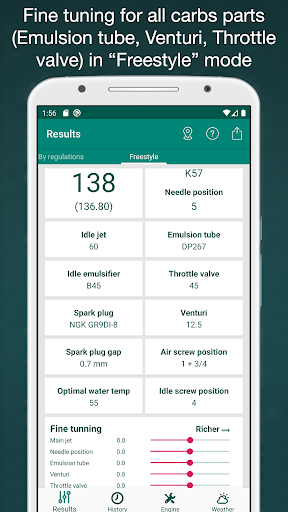
• In second mode (Freestyle), the following values are given: main jet, spark plug, emulsion tube, needle, needle type and position (including intermediate positions with washer), throttle valve, idle jet (outer pilot jet), idle emulsifier (inner pilot jet), air screw position
• Fine tuning for all these values
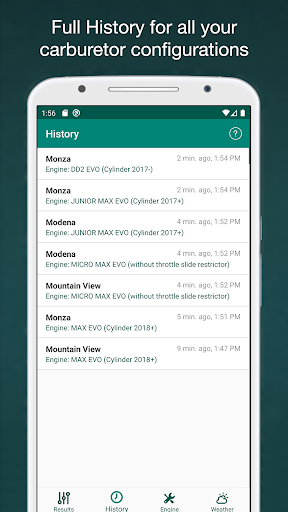
• History of all your carburetor setups
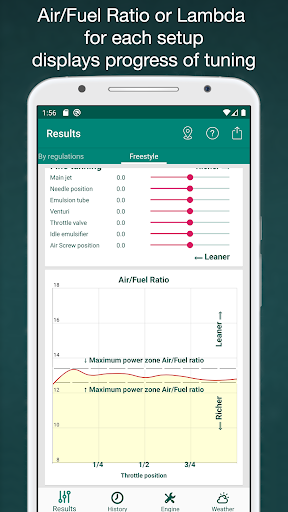
• Graphic display of fuel mix quality (Air/Flow Ratio or Lambda)
• Selectable fuel type (VP MS93, gasoline with or without ethanol)
• Adjustable fuel/oil ratio
• Adjustable floats height
• Mix wizard to get the perfect mix ratio (fuel calculator)
• Carburetor ice warning
• Possibility of use automatic weather data or a portable weather station
• If you don't want to share your location, you can manually select any place in the world, the carburetor setups will be adapted for this place
• let you use different measure units: ºC y ºF for temperatures; meter and feet for altitude; liters, ml, gallons, oz for fuel; mb, hPa, mmHg, inHg for pressures
The application contains four tabs, which are described next:
• Results: In this tab two jetting setups are shown ('By regulation' and 'Freestyle'). These data are calculated depending on the weather conditions and the engine and track configuration given in the next tabs.
Also this tab lets do a fine tuning adjustment for all values for each carburetor setup to adapt to the concrete engine.
Besides this jetting information, the air density, density altitude, relative air density, SAE - dyno correction factor, station pressure, SAE- relative horsepower, volumetric content of oxygen, oxygen pressure are shown too.
You can also see in a graphic form the calculated ratio of A/F (air and fuel) or Lambda.
• History: This tab contains the history of all jetting setups. If you change the weather, or engine setup, or fine tuning, the new setup will be saved in history.
• Engine: You can configure in this screen the information about the engine, that is, engine model, spark plug manufacturer, float type and height, fuel type, oil mix ratio and type of the track.
• Weather: In this tab, you can set the values for current temperature, pressure, altitude and humidity.
Also this tab allows to use the GPS to get the current position and altitude, and connect to an external services to get the weather conditions of the nearest weather station.
If you have any doubt about using this App, please, contact us. We answer every question, and we take care of all comments from our users to try to improve our software. We are also users of this application.
In-app purchases
$6.99 - $10.99 per item
Version Information
- Version
- -
- Downloads
- 1K+
- Updated on
- -
- Released
- Dec 31, 2021
- Requires
- Android Varies with device
Statistics
Google Play Rating History
Rating Distribution
Downloads Over Time
Jetting Rotax Max EVO Kart Pro has been downloaded times. Over the past 30 days, it averaged downloads per day.
Shaded area shows 30-day prediction based on historical trends
Historical data collection started recently. More data points will be available over time.
Jetting Rotax Max EVO Kart Pro users say on Google Play
 Jeremiah Kinney
Improved the average lap time by almost half a second with this app.
 Anders Seistrup
Completely wrong results. Wants s 135 when all other apps say 132
ApkTrusted Ratings & Reviews
More from JetLab, LLC
See more apps
AirLab: Air Density & Density
Paid
Jetting for KTM 2T Moto
Free

Chairgun Elite Ballistic Tool
Free
Jetting Kawasaki 2T Moto Bikes
Paid
Jetting for IAME X30 Karting
Free
Kart Chassis Setup Pro
Free

Jetting for Husqvarna Moto 2T
Paid
Jetting for GasGas 2T Moto
Paid

Jetting for LO206 Briggs & Str
Paid

Jetting Rotax Max Kart Pro
Free
Jetting TM KZ, KZ1, KZ2 Kart
Free
Jetting for Vortex ROK Kart
Free

Jetting for Yamaha 2T Moto YZ
Free
Scan this QR code to download

Forwarding you to the page at Google Play market in seconds...
Open Google Play market now