
Shkiper - notes, reminders v1.9.2
Efim


About this app
Developer Description
Shkiper: Nice notebook with tags and reminders. Organize information easily!
Welcome to ☄️ Shkiper - a convenient notepad with a plethora of features!
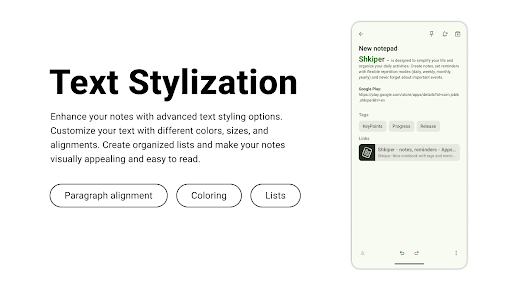
Shkiper is designed to simplify your life and organize your day-to-day activities. Create notes, set up reminders with flexible repetition modes (daily, weekly, monthly, yearly), and never forget about important events.
App Features:
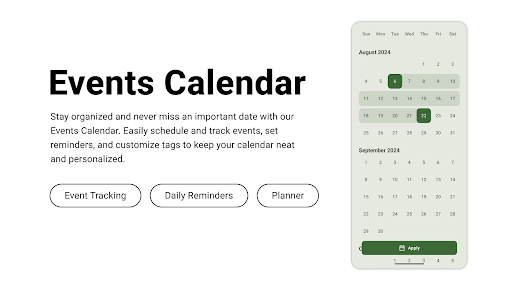
Events calendar: Notes with reminders for quick information about plans.
Styling text: Formatting helps make a note more readable and structured.
Stylish themes: Beautiful strict themes + Material You.
Simple statistics: View interesting statistics on the use of Shkiper.
Convenient tags: Group notes by adding tags, it's very simple.
Shkiper is still in development, so if you have any questions or suggestions, please feel free to contact me! We value all your feedback.
If you enjoy the app, support its development by making a donation right from the application.
Entire source code on GitHub:
https://github.com/Efimj/Shkiper
Telegram community:
https://t.me/efim_mobile_projects
What's New
In-app purchases
$0.49 - $9.49 per item
Version Information
- Version
- 1.9.2
- Downloads
- 1K+
- Updated on
- Sep 1, 2025
- Released
- Aug 30, 2023
- Requires
- Android 8.1
Statistics
Google Play Rating History
Rating Distribution
Downloads Over Time
Shkiper - notes, reminders has been downloaded times. Over the past 30 days, it averaged downloads per day.
Shaded area shows 30-day prediction based on historical trends
Historical data collection started recently. More data points will be available over time.
Shkiper - notes, reminders users say on Google Play
 Prokhor Butenko
Very useful especialy because of modern design and simplicity. + Stylish Dark Mode
 ASHUTOSH KUMAR
great smoothness and lovely animation, simple and good looking UI. bonus: if you add sync with the firebase account, note background colour changes, link preview when added to note, add an option to record meetings and calls along with transcription and save it.
 Brenda Sheldon
I tried it. It's very basic, which is fine, but you can't draw in it (like in a note) and you can add a picture.
ApkTrusted Ratings & Reviews
More from Efim
See more apps
Scan this QR code to download

Forwarding you to the page at Google Play market in seconds...
Open Google Play market now