
Ear Trainer Tool For Intervals v1.09
JustinGuitar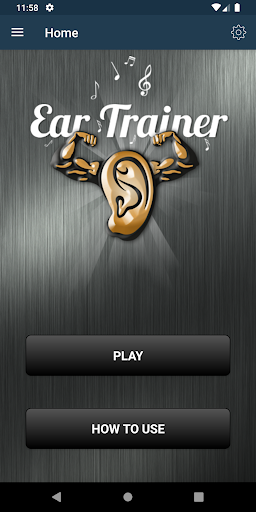

About this app
The Ear Trainer Tool For Intervals app solves the problem of developing one's ability to hear intervals on guitar and piano by providing fun games, making it an ideal tool for musicians, music students, and music enthusiasts who want to improve their musical ear. This app benefits music learners who need to identify intervals, a crucial skill for playing and composing music. Compared to alternatives in the Music And Audio category, this app stands out due to its focus on interval training and its lack of ads, making it a more immersive experience. However, its relatively low download numbers and limited user ratings may indicate a smaller community compared to more popular music learning apps.
Pros
- The app's paid model without ads ensures an uninterrupted learning experience, allowing users to focus on developing their musical ear without distractions.
- As a tool from JustinGuitar, a reputable source for guitar lessons, the app benefits from the developer's expertise in music education, potentially offering high-quality interval training exercises.
- The absence of any permissions requests suggests that the app does not collect user data beyond what is necessary for its core functionality, enhancing user privacy.
- Given its small size and offline capability, the app is accessible and can be used anywhere, making it a convenient tool for musicians and learners.
- The developer's website and contact email provide a clear channel for feedback and support, which can be beneficial for users seeking help or wanting to suggest new features.
Cons
- The app's relatively low number of downloads and limited user ratings may indicate a lack of community engagement or feedback, potentially affecting the app's ability to evolve and improve.
- Some users might find the $1.99 price tag too high for an app that focuses on a specific aspect of music education, especially if they are not sure about its effectiveness or are on a tight budget.
- The app's functionality might be too specialized for casual music learners, who might prefer more comprehensive music learning apps that cover a broader range of skills.
- Without frequent updates, the app might not keep pace with advancements in music education technology or address any emerging issues, which could affect its long-term usefulness.
Best for: The ideal user for the Ear Trainer Tool For Intervals app is a music enthusiast, either a beginner or intermediate learner, who is specifically looking to improve their ability to recognize musical intervals, possibly a guitar or piano student seeking to enhance their musical ear, and is willing to invest a small amount of money in a specialized tool for focused practice.
Developer Description
Use our fun games to develop your ability to hear intervals on guitar & piano
There are two types of interval listening, harmonic and melodic. In harmonic intervals the notes are played at the same time and in melodic the notes are played one after the other. Easy to remember: Melodic Intervals make melody, Harmonic Intervals make harmony!
Many of you will probably want to understand how the names are found and how to work out the interval note names in every key. For this info you probably want to check out my ebook Practical Music Theory (available from justinguitar.com) which will explain all the theory related to this.
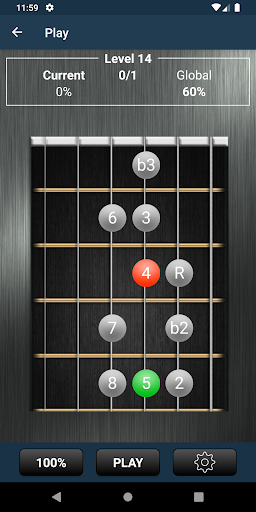
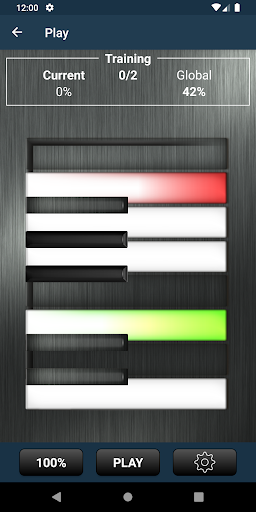
This app deals specifically with Interval Ear Training, both melodic and harmonic. It will start very easy and gradually get harder as you get more correct and can pass each stage. You can choose from Piano or Guitar Input for your answers, and you can chose to hear the notes and guitar or piano. Personally, I'd recommend getting used to both. In "Training Mode" you can select specific intervals to work on if you are struggling with just specific intervals or types of interval.
I'm sure you'll find this app very helpful, all you need to add is practice time!
Best wishes, Justin
Privacy
Given that the Ear Trainer Tool For Intervals app requests no permissions, it appears to pose minimal risk to user privacy. However, users should still be cautious when downloading any app, ensuring it comes from a trusted source like the Google Play Store. Since the app operates offline and doesn't collect user data, there are no specific safety tips beyond general advice to keep the app and device updated for security.
Tips
To get the most out of this app, users should start by familiarizing themselves with the different games and exercises offered, gradually increasing the difficulty level as their skills improve. It's also beneficial to set aside dedicated time to practice with the app, ideally in a quiet environment to maximize the effectiveness of the interval training. Additionally, exploring the developer's website can provide supplementary learning materials and tips to enhance the learning experience.
What's New
Added a setting to allow you to fix the root note
Added a setting to replay the note sounds if you don't identify them correctly
Fretboard tap detection is now more accurate
Settings buttons now show green when set
Fixed bug with the volume control causing a crash
Updated to target Android 29
Added a version number in the bottom left of the main screen
Default to guitar fretboard input and sounds when first used
Version Information
- Version
- 1.09
- Downloads
- 1K+
- Updated on
- May 30, 2024
- Released
- Dec 29, 2019
- Requires
- Android 4.2
Statistics
Google Play Rating History
Rating Distribution
Downloads Over Time
Ear Trainer Tool For Intervals has been downloaded times. Over the past 30 days, it averaged downloads per day.
Shaded area shows 30-day prediction based on historical trends
Historical data collection started recently. More data points will be available over time.
Ear Trainer Tool For Intervals users say on Google Play
 Eric Westphal
I can't recommend this app highly enough for ear training. It's easy to use and effective. I've noticed very rapid progress in my learning new intervals as I practice with the app, and it lets you customize it to what you personally need to work on. Also, there was a bug in the early versions of the app that caused settings to not be saved on some devices, which made it not really usable. The developer was very responsive in fixing it. I wish all developers were as responsive!
 Anne McEvoy
I love this app. It's not gimicky or hard to use. My ear has really improved in a very short time. It's addictive, trying to beat your last score.
 A Google user
I can see this app being useful, but the instructions and interface are unclear and unintuitive. The piano keys you see don't correspond to the notes you hear. You might hear an A and E, but the keys shown are always C, F and G. You can press the C piano key, but (on level one, at least) it's always a wrong answer. If the piano keys aren't going to correspond to the pitches, C should at least play the root of the interval you just heard. Ideally the keys should reflect the pitches.
 Michael Armbruster
I love JustinGuitar, but this app is a glitchy mess. The proverbial straw that made me return it: the descending intervals are depicted wrong on the fretboard. Justin, we expect better qualify work if it carries your name!
 SAURABH BASANTANI
Overall app is good but can you fix the bug which throws me out from the app frequently that is very shameful I pay for the app and i want the refund if you can't fix the bugs ! UTTERLY DISSAPOINTED
ApkTrusted Ratings & Reviews
More from JustinGuitar
See more apps
Similar Apps





Scan this QR code to download

Forwarding you to the page at Google Play market in seconds...
Open Google Play market now