SketchPad – Doodle & Draw v3.0.0
Kaffeine Software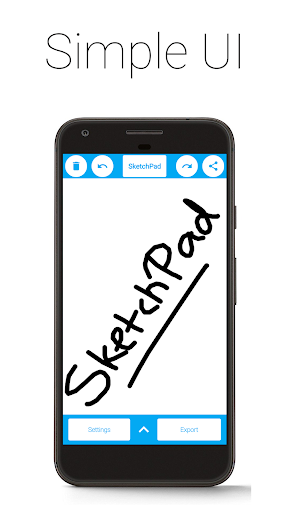
About this app
Developer Description
SketchPad makes it easy to sketch, doodle, or even just scribble, on the go.
The app is extremely lightweight, at a download size of just 5 MB.
SketchPad aims to provide a simple way to turn your screen into a canvas without any hassle. Unlike most other drawing apps, SketchPad keeps it clean. It's just a canvas and you.
You can get started on your Sketch pretty much straightaway after the app is installed. No setup required. It's really that simple.
Features:
• Simple UI
• No ADs
• No In-App Purchases
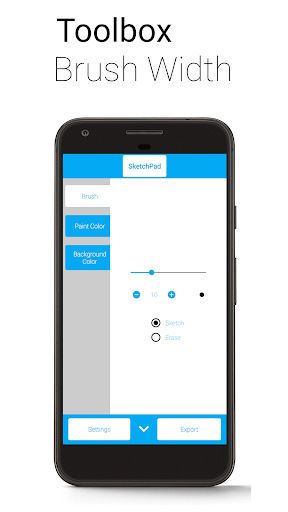
• Customizable Brush Width with Instant Preview, for those bold strokes and fine details
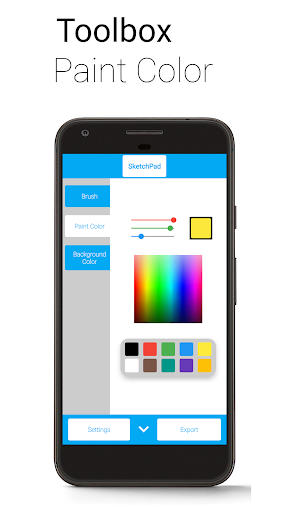
• Multiple ways to pick colors: Palette, Spectrum, and RGB Sliders
• Unlimited Undo/Redo, because it's okay to make mistakes (still limited by device capabilities)
• Optional Shake to Clear feature - just shake your device to clear the Canvas (requires accelerometer)
• Export as PNG or JPEG image
• Directly share image from SketchPad (automatically exports image to device)
"Shake to Clear" is good for when there are no sudden movements, so don't use it in the bus for serious Sketching. However, it is great when scribbling to pass the time.
SketchPad is capable of working offline. However, sharing your Sketches with others might not work without a network connection. The Storage permission is required only to save your Sketches to your device. I do not steal your precious files.
Exported images are saved to "/Pictures/SketchPad/" by default. The Storage path can be changed to a directory of your choice in Settings to suit your needs. Saving Sketches to "/DCIM/Camera/" should make the images show up in most Gallery apps. On Android 10 onwards, due to changes in how storage works, all pictures are saved to "/Android/data/com.kanishka_developer.SketchPad/files/Pictures", irrespective of the setting.
The focus of the SketchPad Project has always been on the User Experience. Do share your feedback, or just come say "hi" in the Kaffeine Community Discord server at https://discord.gg/dBDfUQk or email me at kanishka.developer@gmail.com. :)
What's New
Redesigned. Remade. Reloaded.
This is a major release that completely overhauls the app to prepare for the future. Some rough edges are expected - we are trying to make it exist first, and make it good later with your feedback.
We hope you like it - SketchPad 3 has been a long time coming.
Version Information
- Version
- 3.0.0
- Downloads
- 1M+
- Updated on
- Jan 1, 2026
- Released
- Jan 21, 2018
- Requires
- Android 5.0
Statistics
Google Play Rating History
Rating Distribution
Downloads Over Time
SketchPad – Doodle & Draw has been downloaded times. Over the past 30 days, it averaged downloads per day.
Shaded area shows 30-day prediction based on historical trends
Historical data collection started recently. More data points will be available over time.
SketchPad – Doodle & Draw - Google Play Rankings
Top Rankings
| Rank | Country | Category | List | Change |
|---|---|---|---|---|
| — |
Ranking History in
No ranking data available yet. Rankings are updated daily.
#44 in Top Free Art And Design in United Kingdom


SketchPad – Doodle & Draw users say on Google Play
 Nicholas
It's simple, useful, and havent run into any ads (yet). I use this as a scratch sheet like the old days w/o the need of using a calculator along with a math app I downloaded to keep my mind sharp. I have it set up the way I wanted to sketch by using finger and erase by shaking my phone. Hence, it is simple, useful, and no interrupting during tasks. I will also use the app to practice my signature since my leases and contract are done on the phone nowadays to electronic signature.
 Gabrielle Rickman
Fun! My fingers can hurt sometimes but it's really not bad it's like drawing in a book but withe multiple possibilities. I draw different characters from YouTubers to friends and even items in real life ♡☆
 MufinMcFlufin
It looks like it'd be useful, but I'm specifically looking for one such app that supports grid lines as a background and preferably supports pen strength. This app doesn't support either (at the time of review) so it's not what I'm looking for.
 Barbara Storbeck
it is cool but where the eraser??
 Zainah Ahmed
Ah... Definitely not good bcz all U can do is draw and not colour Ur fab drawings in it also freezes my drawings and doesn't let me draw and when I went on the game there was an Add!! how worse could it get I lit spammed the save button and it didn't SAVE.... , also while I was pressing the bin button U don't wanna know but I wasn't drawing it WOULD NOT LET ME DRAW DONT GET THEIS GAME I WOULD SAY IS SUPER DUPER RIGGED MAN..... REMINDER-I WOULD HATE THIS GAME ITS THE WORST I WOULD RATE IT ZERO<
ApkTrusted Ratings & Reviews
Similar Apps
Easy Draw Animals
Free
Finger Paint Coloring Book
Free
Coloring Pages for Kids
Free

Yamo Doodle - Kids Drawing Pad
Free
iDraw
Free
Busy Kids! Coloring pages book
Free
Kids 7 Minute Workout
Free
Rito Kids: Learn to Write
Free

Magic Board - Doodle & Color
Free

Kids Drawing Games & Coloring
Free
Rudolph: Coloring book
Free
Color Kids
Free
ABC Magic Writer: Trace, Write
Free
Christmas Coloring Pages
Free

Find It: AI Word Hunt
Free
Car Coloring Book: Fun & Learn
Free
Scan this QR code to download

Forwarding you to the page at Google Play market in seconds...
Open Google Play market now