
KBC Brussels Mobile vVARY
KBC Global Services




About this app
Developer Description
Manage your banking and insurance with ease.
Looking to take care of your banking and insurance needs quickly and securely? Want to make payments, transfer funds or check your account balance without using a card reader? Well you can, whenever and wherever you want with KBC Brussels Mobile on your smartphone or tablet. It's not for nothing that independent research agency Sia has again named KBC Brussels Mobile the best banking app in the world!
Even if you don't have a current account with us, you can still use KBC Brussels Mobile to do things like buy public transport tickets or keep your loyalty cards together.
If you already have a current account with us, you can use our Mobile app to the full. You’ll get access to MyMobility, your very own hub for everything mobility-related. If you already own a car or are looking for a new or second-hand model, you’ll find a clear overview, inspiration and useful tools for your mobility in this one place. Our app will also help you every step of the way with your home plans, whether that’s buying a property, renovating or making energy-efficient improvements. For example, you can get an idea of all your renovation costs with the help of ‘Setle’ or have solar panels installed through ‘Impact us Today’.
KBC Brussels Mobile also has lots of other neat features that you can use for doing things, such as personalising your accounts by adding a photo, hiding amounts on screen for more privacy and customising your start screen to suit your needs. If you’re keen to learn more about financial matters, the app has informative articles on key financial topics – concise, clear and relevant to you. And, of course, our digital assistant Kate is also on hand to assist you. Just tap the search bar at the top of the app’s screen and ask your question.
You can even check your account balance on your smartwatch (Wear OS).
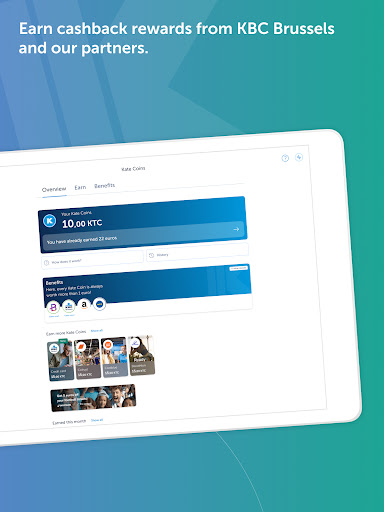
If you opt for our ‘Personalised’ service, you can use the Kate Coins you earn to get great discounts, cashback rewards and other benefits from KBC Brussels and our partners.
If you're curious to find out more, download KBC Brussels Mobile for free now or visit www.kbcbrussels.be/en/mobile.
What's New
• MyMobility: Manage your car and find your next dream car
• You can now do more with your Kate Coins
• Your KBC Brussels credit card available in your favourite wallet
• Wero will replace Payconiq starting in December
Share your thoughts and ideas with us on Facebook or X @KBCBrussels.
In-app purchases
$0.99 per item
Version Information
- Version
- -
- Downloads
- 100K+
- Updated on
- Nov 28, 2025
- Released
- Dec 11, 2016
- Requires
- Android 10
Statistics
Google Play Rating History
Rating Distribution
Downloads Over Time
KBC Brussels Mobile has been downloaded times. Over the past 30 days, it averaged downloads per day.
Shaded area shows 30-day prediction based on historical trends
Historical data collection started recently. More data points will be available over time.
KBC Brussels Mobile users say on Google Play
 Riccardo Attilia
The app is amazing. Other than the usual banking services, it is the best because it is so well tailored to life in Brussels and Belgium. Payment methods like payconic are well implemented in the app, you can buy train and bus tickets, bike sharing and car sharing too. Keep up with the good work!
 Konstantinos Kokosis
The app is very good and all in all quite easy experience, all put together in a nice app. BUT the parking app 4411 connected to the kbc account is close to a scam. It does not inform you that the parking rules are in effect or not due to the time, it does not keep any notification on your phone, only if you open the app. And the best part, it keeps charging you till you remember to stop it or open it to re-Park. It charged me an amount of 12 euros for a whole day... Kbc, this is a disgrace.
 O DM
O DM
Interface is a bit overloaded, a good redesign wouldn't hurt. Bug report: whichever account I choose to do a QR code scan from ends up taking the money from the first account listed at the top of the landing screen. Supports told me it is possible to select the account for the QR code transaction but it's not.. That's a really dumb bug, could you test the fundamentals before rolling out useless features? Otherwise great service at KBC
 C
C
I really do not find the new updated version a success. The interface is not pratical or fast as the previous one, even worse, I can't input the figures (values) in the dedicate field as the "big minimalist blank space" cannot read the numbers I type! The result is disastrous: I am prevented to conclude any money transfer due to the absence of values! What to do now??Absolutelly not a must have. I wonder why is the need for changing this app so often...
 Richard Klimovics
One crucial UI mistake ruins the experience. Your balance is displayed in an incredibly misleading way. The largest font number upon opening the app is not how much money you have - it is the reserved amount of money that is no longer able to be used for payment. Your balance is in a tiny text when you TAP ON THIS NUMBER. The most important thing about your bank account is how much money is in it, and a core function of the app is to show you this. Instead, it shows an almost useless number.
ApkTrusted Ratings & Reviews
More from KBC Global Services
See more apps





Scan this QR code to download

Forwarding you to the page at Google Play market in seconds...
Open Google Play market now