
Connect v1.2.7 2024.7.8.0
Stillwater Designs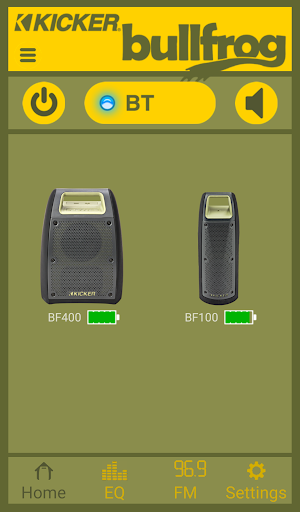


About this app
The Connect app, developed by Stillwater Designs, aims to enhance the user experience for Bullfrog owners, but its below-average rating of 2.3/5 raises concerns about its effectiveness. Despite being free and ad-free, the app's limited downloads and poor user reviews suggest it may not be meeting user expectations. In the Entertainment category, Connect faces stiff competition from more popular and highly-rated apps, making it essential for the developer to address user concerns and improve the app's overall quality. The app's unique selling point is its focus on Bullfrog products, but it falls short in terms of user satisfaction.
Pros
- The Connect app is free to download and use, with no ads or in-app purchases, providing a seamless user experience without any monetary commitments.
- With no permissions required, the app ensures a high level of user privacy and security, which is a significant advantage in today's data-driven world.
- The developer, Stillwater Designs, has a dedicated website and email support, indicating a level of commitment to user support and feedback.
- The app's small size and minimal system requirements make it accessible to a wide range of Android devices, including those with limited storage and processing power.
- The developer's regular updates, as indicated by the version history, suggest a ongoing effort to improve and refine the app's features and performance.
Cons
- The app's below-average rating and limited downloads suggest significant issues with user satisfaction, which may be due to poor performance, lack of features, or unmet expectations.
- The lack of transparency about the app's functionality and features, beyond the brief official summary, makes it challenging for users to understand its value proposition and potential benefits.
- The app's limited compatibility, requiring Android 7.0 or higher, may exclude some users with older devices, potentially limiting its reach and adoption.
- The developer's reputation and credibility are not well-established, with limited information available about their experience and expertise in developing high-quality Android apps.
Best for: The ideal user for the Connect app is a Bullfrog owner who is technically savvy, familiar with Android devices, and seeking to enhance their product experience through a dedicated mobile app, with a focus on ease of use, performance, and seamless integration with their device.
Developer Description
The Kicker Connect app has what you need to get the most from your Bullfrog.
Compatibility:
One app works with all the Kicker Bullfrog speakers. No need to download different apps for different speakers.
Features:
- Use the app to turn your speaker on and off.
- Double-Kick: Connect a second Kicker Bullfrog to take your party up a notch.
- Your speaker, your sound. Top off your sound with extra bass or choose one of the preset EQs. With the controls in your hand, you have the power to choose.
- Tune in: A digital FM tuner in the app lets you select your favorite radio station. Your favorite talk show, song and sporting event at the swipe of your finger.
- Remember that station: Set your favorite FM stations with the app. Then, use the app or the Kicker Bullfrog to change the station to match the occasion. Tailgate, backyard BBQ, pool party, lake or campsite. Whatever, whenever, wherever, Kicker Bullfrog goes where you go.
Privacy
Given the app's zero-permission policy, users can be relatively confident in its privacy and security. However, it is essential to monitor the app's behavior and watch for any unexpected data collection or transmission. To ensure safe usage, users should regularly review the app's terms and conditions and provide feedback to the developer about any concerns.
Tips
To get the most out of the Connect app, users should first ensure their Bullfrog device is compatible and properly configured. Next, they should explore the app's features and settings to understand its full potential. Finally, users can provide feedback to the developer through the dedicated support email to help improve the app's performance and functionality.
What's New
Version Information
- Version
- 1.2.7 2024.7.8.0
- Downloads
- 10K+
- Updated on
- Jul 22, 2024
- Released
- Nov 29, 2016
- Requires
- Android 7.0
Statistics
Google Play Rating History
Rating Distribution
Downloads Over Time
Connect has been downloaded times. Over the past 30 days, it averaged downloads per day.
Shaded area shows 30-day prediction based on historical trends
Historical data collection started recently. More data points will be available over time.
Connect users say on Google Play
 A Google user
Awesome app, well designed. If you are having connection problems put the unit in pairing mode by pressing the source button until it flashes blue. Once it is flashing you can pair it up to your device. be sure to pick (BF400 KICKER) NOT (LE_BF400 KICKER) that is the app connection. Be sure to delete from your device if it was already connected before you start.
 Viktor Forsberg
Okay. So I had to speak to a technician to figure this speaker out but it does stream audio via Bluetooth ofc it does. You have to hard connect first pairing your phone WITHOUT the app downloaded. I might not even use the app. But trust me it works. And sounds good.
 Adam Clark
For connecting to one speaker, don't use the app. On the speaker itself, press the little button on the right until the blue light flashes (pairing mode). On your phone, in the bluetooth section, DO NOT select "LE_BF200 KICKER", this gives you a message to use an app. Wait a few seconds for "BF200 KICKER" to appear, select this and you will connect like you would any other "normal" bluetooth device. My guess is this app is only useful to "connect" two speakers together for simultaneous use. 🤔
 Christopher Langer
Will not remain connected to device. Takes multiple attempts after crash to restart app. App crashes during every use, sometimes a few seconds sometimes a few minutes. App disrupts audio playback if just used as a controller for sound and equalizer, and not using it as the source for audio play. When it is working properly, it's fantastic. But that's a whopping 30% of the time, if I'm lucky.
A Google user
the app works as described. my problem withit lies its need to have gps location data to use it. there's nothing in connecting my phone with Bluetooth to my speaker to play audio the requires that you know where I am. even if I need to want to listen to local radio, you still have no need to have access to my location data.
ApkTrusted Ratings & Reviews
More from Stillwater Designs
See more apps



Scan this QR code to download

Forwarding you to the page at Google Play market in seconds...
Open Google Play market now