
Satellite Finder with GPS v28.1
GameChief FZ-LLC


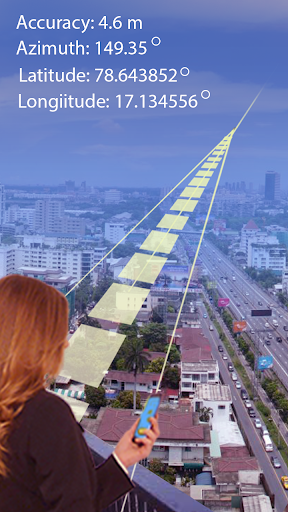

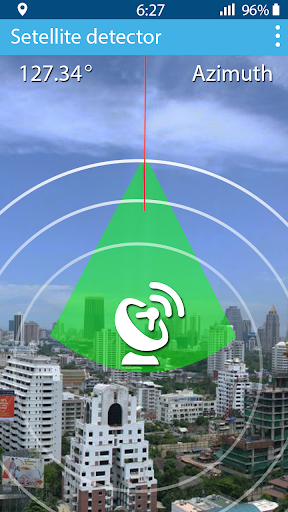


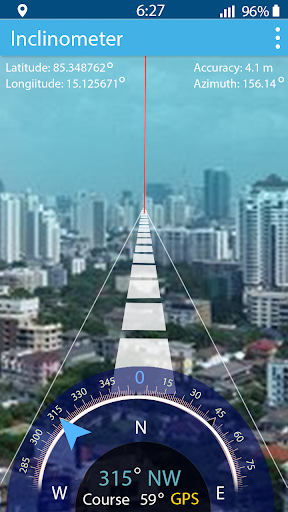
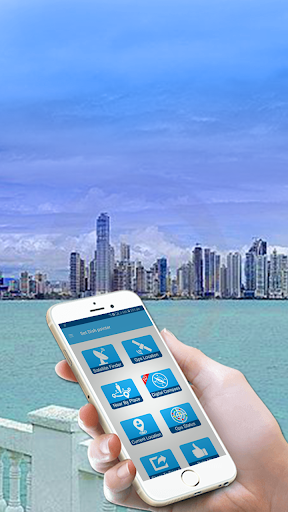


About this app
The Satellite Finder with GPS app solves the problem of manually adjusting TV satellite dishes by providing a compass and satellite direction guide, benefiting individuals who frequently travel or live in areas with limited satellite coverage. Compared to alternatives in the Tools category, this app stands out with its GPS integration but falls short with its below-average user rating and significant issues reported. The app's simple concept and moderate download numbers suggest it has found a niche audience, but its overall quality and user experience need improvement. With a developer committed to updates, there's potential for growth and improvement.
Pros
- The app's free download and moderate price range for in-app purchases make it an accessible option for those seeking a satellite direction guide.
- The integration of GPS technology provides a more accurate and convenient experience for users compared to traditional methods.
- With over 100,000 downloads, the app has a level of social proof, indicating that many users find it useful despite its current limitations.
- The lack of required permissions is a notable advantage, suggesting a more secure and private experience for users.
- The developer's commitment to updates, as evidenced by the recent version 28.1 release, shows a dedication to improving the app's performance and addressing user concerns.
Cons
- The below-average user rating of 2.7/5 and reports of significant issues are concerning, suggesting that the app may not meet the expectations of all users, particularly in terms of reliability and performance.
- The presence of ads and in-app purchases may detract from the user experience, especially if not implemented thoughtfully, potentially leading to frustration or unintended purchases.
- The app's functionality is somewhat limited to satellite direction and does not offer a comprehensive suite of tools that might be found in other apps within the Tools category, potentially limiting its appeal to users seeking more versatile solutions.
- The lack of transparency regarding the data collected through the app, despite not requesting permissions, raises questions about user privacy and how data might be utilized.
Best for: The ideal user for the Satellite Finder with GPS app is likely an individual who frequently travels, especially to remote areas, or someone living in a region with limited and variable satellite coverage, and who possesses a basic understanding of how satellite dishes work, allowing them to effectively utilize the app's guidance for manual adjustments.
Developer Description
Setting TV satellite, azimuth help of compass and satellite direction help
Compass
Need to find accurate precise location with your antenna so you have to need a compatible compass with your device so you find your TV satellite with compass azimuth is the best FREE app for finder.
You need a real compass because some of compass is totally fake and useless so you need to find accurate value with this compass so use real and accurate find of compass.
Quality of Accuracy
Need to accurate value for satellite you need to take some measures with your Android mobile phone.
Remove any cover on your phone
Casing is effect of measurement
Metal and other thing that cover the device remove it
Try to take measurement outside the room or near the window
This is the best taking of measurement.
How it Works
It works with compass behavior. You need to accurate with best GPS Location with the best accuracy and the pointer cursor and step need to take accurate measurements with the best and accurate location. You move your antenna with the help of pointer and GPS azimuth.
Extra Features
Satellite dish antenna setting is available
Augmented reality
Selectable audio tone
Camera preview
Color Picker
Taking Screenshots
Photos
You get all the satellite antenna measurements from Agi’s database. This database contain the information of all satellite working on TV network so this is the best database and you fetch the information from this database.
Near Places
Find with the help of this app and the help of GPS you find the nearby places and your favorite places for your help and save your time.
Current Location
Save your current location and send your location via mail text massage and share on social media.
GPS Status
With the Help of setfinder app you check your GPS status and correct your GPS status.
Dish Pointer
You can get the accurate placement of your app with the help of Dish pointer and set your antenna with cursor movement.
Warning: warning of app user is that you can use the app and calculate measurements so you can remove all metals on your mobile and remove casing and any material cover your mobile phone. Some variations occur like magnetic variations etc.
Satellite position derived from Agi’s database. So some calculations are seems like not accurate but its accurate measurement.
Privacy
Given that the Satellite Finder with GPS app does not request any permissions, it appears to prioritize user privacy. However, users should still be cautious about the data that might be collected through in-app purchases or advertisements. To ensure safety, users should review the terms of service and privacy policy provided by the developer, and consider using a VPN or adblocker to minimize potential data collection.
Tips
To get the most out of the Satellite Finder with GPS, users should first ensure their device's GPS is enabled and calibrated for the most accurate readings. Additionally, users can optimize the app's performance by closing unnecessary background apps and ensuring a clear view of the sky for the GPS to function correctly. For better integration, users might also consider pairing this app with other tools or maps that can provide complementary information.
What's New
Bugs fixed
Performance Improved
In-app purchases
$0.99 - $1.99 per item
Version Information
- Version
- 28.1
- Downloads
- 100K+
- Updated on
- Dec 24, 2025
- Released
- Nov 15, 2018
- Requires
- Android 6.0
Statistics
Google Play Rating History
Rating Distribution
Downloads Over Time
Satellite Finder with GPS has been downloaded times. Over the past 30 days, it averaged downloads per day.
Shaded area shows 30-day prediction based on historical trends
Historical data collection started recently. More data points will be available over time.
Satellite Finder with GPS users say on Google Play
 A Google user
Satellite Finder with GPS Director 2018 here is an amazing tool for find GPS with the help of satellite when I get this application I think this application deserve our way to get it. I appreciate developer for this perfectly fine working tool usefull and easy app all must be installed.
A Google user
very usefull
A Google user
Asia Sat 17 is unavailable hence I am giving 3star.Add more Satellites to this app.
A Google user
not upto the level
A Google user
Waste of time only. Adds only at every click
ApkTrusted Ratings & Reviews
More from GameChief FZ-LLC
See more apps
Speaker Cleaner - Remove Water
Free
House Design 3D Floor Plan App
Free

Mic to Speaker Bluetooth Mic
Free

AR Drawing: Trace & Paint
Free

Cat Language DIY Wallpaper
Free

Art Draw & Sketch Magic Doodle
Free

Edge Lighting Border Animation
Free

Flowers Speak - Love Language
Free

Funny Ringtones - Ai Sound App
Paid

Lock Screen Drawing Wallpaper
Free

Bubble Level Spirit Level Tool
Free

Leafplant: AI Plant Identifier
Paid

Pdf Speaker: Text to Speech
Free

Home Design AI - Room Planner
Free

Bedtime Stories for Loved One
Free
Similar Apps







Scan this QR code to download

Forwarding you to the page at Google Play market in seconds...
Open Google Play market now