BlueDriver OBD2 Scan Tool v8.5.1
Lemur Vehicle Monitors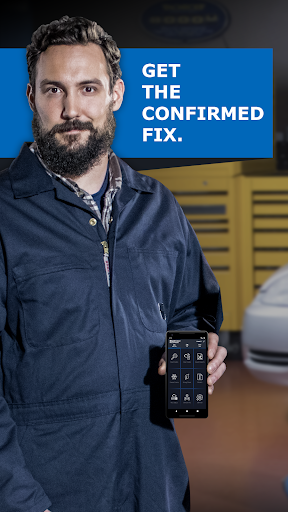
About this app
Developer Description
BlueDriver® is a Premium Diagnostic OBD2 Scan Tool. www.BlueDriver.com
Whether you're checking a check engine light, running a smog test, or diving into enhanced diagnostics like ABS or transmission codes, BlueDriver gives you the tools you need to understand your vehicle and make smarter repair decisions – with clear, easy-to-understand information.
What You Can Do with BlueDriver
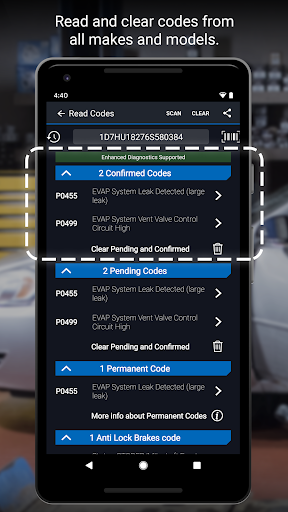
· Read and clear trouble codes - including check engine, ABS, airbag, transmission, and more
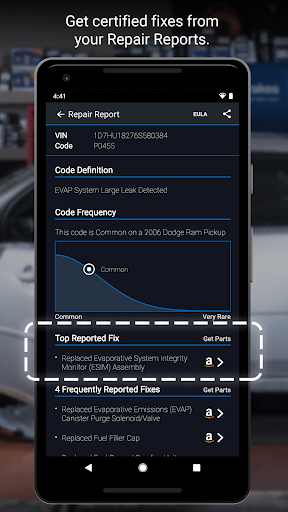
· Generate, save, and share professional-grade Repair Reports based on your exact vehicle and trouble code
· Access Mode 6 on-board monitoring test results
· Check smog readiness and freeze frame data
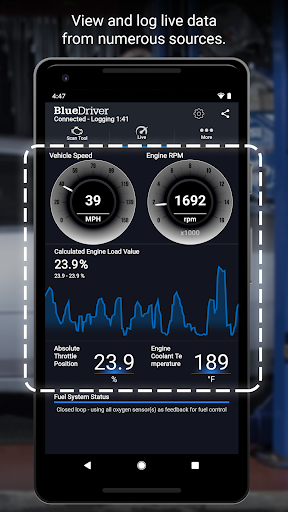
· View live data with multi-PID interactive graphing
· Scan your vehicle wirelessly with Bluetooth—no cables required
· Choose between metric and imperial settings
· Get likely fixes for your vehicle’s issues, explained in plain language
Enhanced Diagnostics Coverage
· GM, Ford, Chrysler, Toyota, Nissan, Mazda, Mercedes (2005+ models)
· Mitsubishi (2008+), Hyundai/Kia (2012+) – available worldwide
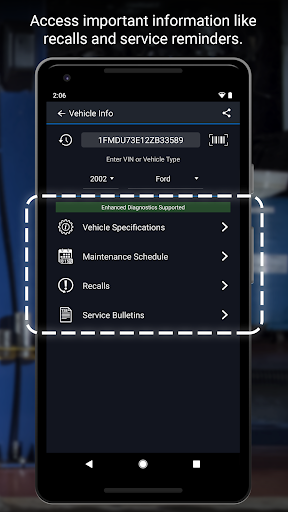
· BMW/Mini, Honda/Acura, Volkswagen/Audi – available in North America
· Subaru – available in the United States
What Makes BlueDriver Different?
· No subscription required
· Backed by a database of millions real-world fixes
· Repair Reports are specific to your vehicle’s year, make, and model
· Works globally with the BlueDriver Sensor
· App is free to install—just pair with the Sensor to start scanning
You can even preview a Repair Report without a Sensor by entering your VIN and a trouble code.
Account Setup Made Easy
You’ll create a BlueDriver account during setup—it’s quick and easy, and gives you secure access to all your scans, reports, and new features across any device.
Important Info
The BlueDriver Sensor plugs into your vehicle’s data port (found in every car built since 1996). It connects to the app via Bluetooth® to deliver full diagnostic functionality.
Sensor sold separately in-app or at www.BlueDriver.com
What's New
Version Information
- Version
- 8.5.1
- Downloads
- 1M+
- Updated on
- Jan 8, 2026
- Released
- Jan 20, 2014
- Requires
- Android 8.0
Statistics
Google Play Rating History
Rating Distribution
Downloads Over Time
BlueDriver OBD2 Scan Tool has been downloaded times. Over the past 30 days, it averaged downloads per day.
Shaded area shows 30-day prediction based on historical trends
Historical data collection started recently. More data points will be available over time.
BlueDriver OBD2 Scan Tool - Google Play Rankings
Top Rankings
| Rank | Country | Category | List | Change |
|---|---|---|---|---|
| — |
Ranking History in
No ranking data available yet. Rankings are updated daily.
#43 in Top Free Auto And Vehicles in United States


#13 in Top Free Auto And Vehicles in Canada

#88 in Top Free Auto And Vehicles in Australia


BlueDriver OBD2 Scan Tool users say on Google Play
 Zach Palmero
As a shady tree guy there is no better option in scan tool, while it may take 5-10 minutes on a full system scan (engine love data is instant and so it check engine and dash light reads) the range is good. I'm usually too lazy to leave reviews but I want continued success for this service and their product. I kicked around buying one for 3 years and my only regret is that I didn't buy it sooner.
 J N
J N
UPDATE: I can now use this app "as a guest", whatever that means. Anyway, functionality has been restored. I confiigure google to NOT auto-update apps. somehow, that got reset, and bluedriver updated ans is now unusable. i do NOT want or need yet another online account. it worked fine for years, but now it does not. please remove the requirement for an account.
 Tim Kerns
I am happy to see Blue driver revised it's policy and again allows the tool to function without an account. Good tool but does lack bidirectional control functionality. Tool is also slow but that has been a problem from day one, hopefully that will get addressed.
 Farang Ding Dong
Can now use the app without an account. Can you please make it a setting to be in offline or guest mode permanently so that it does not ask to login or continue as guest every time the app is open? Values that once were available to monitor are no longer available. Why are you going backwards? Are you wanting users to seek another scanning tool? Another frustrated user!
 Dustin Schyberg
This didn't need an account before. You can't USE the tool without one now. I don't trust that they will lock features behind a paywall in the future. I don't trust they won't unilaterally decide to sell my diagnostic data in the future either. This was an expensive tool, I was GREATLY displeased to suddenly find it non functional until I signed up for yet another "service". The product itself is functional, though the repair reports are of questionable value.
ApkTrusted Ratings & Reviews
Scan this QR code to download

Forwarding you to the page at Google Play market in seconds...
Open Google Play market now