PrinterA Paid Version v3.9.3
Kenzie Tech

About this app
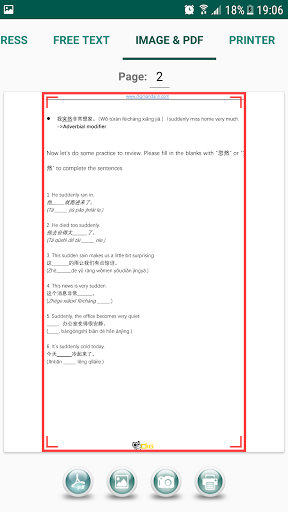
The PrinterA Paid Version app solves the problem of printing documents directly from mobile devices to mobile printers, benefiting professionals and individuals who need to print on-the-go. Compared to alternatives in the Productivity category, PrinterA stands out with its straightforward functionality, but may fall short due to its limited user base and lack of rating data. As a paid app with no ads or in-app purchases, it offers a clean user experience, but its high price point may deter some users. Overall, PrinterA's simplicity and ease of use make it a solid choice for those willing to pay for a hassle-free printing experience.
Pros
- The app's ability to print directly from any application makes it a convenient tool for users who need to print documents, emails, or photos on the go, without having to transfer files to a computer or use a cloud printing service.
- With no ads or in-app purchases, the app provides a clean and uninterrupted user experience, allowing users to focus on printing their documents without distractions.
- The developer, Kenzie Tech, provides a professional website and email support, indicating a level of commitment to customer service and support.
- The app's small size and low system requirements make it accessible to a wide range of Android devices, including older models or those with limited storage space.
- As a paid app, PrinterA is less likely to collect user data for advertising purposes, providing a more private printing experience.
Cons
- The high price point of $26.00 may be a deterrent for some users, especially considering the limited user base and lack of rating data, which may make it difficult for potential buyers to gauge the app's effectiveness.
- The app's limited user base and lack of rating data make it challenging to assess its performance and reliability, which may lead to uncertainty among potential buyers.
- The app's functionality may be limited compared to more comprehensive printing solutions, which may offer additional features such as scanning, faxing, or printing to multiple devices.
- The app's compatibility with various mobile printer models is unknown, which may lead to issues with printing quality or compatibility.
Best for: The ideal user for PrinterA is a professional or individual who frequently needs to print documents, emails, or photos on-the-go, such as a sales representative, contractor, or event planner, and is willing to pay for a convenient and hassle-free printing experience, with a moderate level of technical skill and familiarity with Android devices.
Developer Description
Print Directly to Mobile Printer From Any Application
Trial version has all function in this paid version, except for Plugin Service and PDF Files Printing
Trial version :
https://play.google.com/store/apps/details?id=com.logistara.printera
Privacy
Since the app requests no permissions, it is unlikely to collect sensitive user data, providing a relatively safe printing experience. However, users should still be cautious when printing sensitive documents, and consider using a secure printing method, such as printing to a password-protected printer. Additionally, users should ensure that their mobile printer is properly configured and secured to prevent unauthorized access.
Tips
To get the most out of PrinterA, users should first ensure that their mobile printer is properly configured and connected to their Android device. Additionally, users can optimize the app's performance by closing other resource-intensive apps and ensuring that their device has sufficient storage space. Finally, users can take advantage of the app's ability to print from any application by using the 'Share' feature to print documents, emails, or photos from other apps.
What's New
Version Information
- Version
- 3.9.3
- Downloads
- 1K+
- Updated on
- Feb 6, 2025
- Released
- Nov 14, 2020
- Requires
- Android 6.0
Statistics
Google Play Rating History
Rating Distribution
Downloads Over Time
PrinterA Paid Version has been downloaded times. Over the past 30 days, it averaged downloads per day.
Shaded area shows 30-day prediction based on historical trends
Historical data collection started recently. More data points will be available over time.
PrinterA Paid Version users say on Google Play
 Ananda Nur
Such a great app, but please make another one for windows version 😭
 Sieny Tjioe
Hi mau bertanya, sebelumnya saya pakai printerA biasa tapi mendadak diminta upgrade ke yang berbayar, apakah memang ada batas free trialnya? Dan untuk yg paid version ini, bayarnya hanya 1 time saja kan ya? Mohon penjelasannya. Thank you.
 Nicholas Chen
kenapa setelah update g ad pilihan untuk mengatur lebar panjang kertas yg mau di print ya soalny sya mau pake 150mm dan 100mm, sya tdak bisa refund hanya ad uninstall tdak ad tulisan refund lagi
 mayenta athien
Masa percobaan free selama 7 hari sdh selesai,di suruh berbayar,gw ud bayar potong Dr gopay gw tapi malah ga bisa di pake,, mksdnya apaan???
ApkTrusted Ratings & Reviews
More from Kenzie Tech
See more apps
Similar Apps




Scan this QR code to download

Forwarding you to the page at Google Play market in seconds...
Open Google Play market now