Color Grab (color detection) v3.9.2
Loomatix





About this app
Color Grab is an innovative photography app that solves the problem of identifying and extracting colors from the world around us, benefiting graphic designers, artists, and DIY enthusiasts who need precise color matching. With its high user rating of 4.5/5 and over 1 million downloads, it stands out in the Photography category for its simplicity and effectiveness. Compared to alternatives, Color Grab's lack of permissions requests is a significant advantage, indicating a strong focus on user privacy. However, its reliance on ads and in-app purchases may detract from the user experience for some.
Pros
- Color Grab's high user rating of 4.5/5 and over 1 million downloads demonstrate its effectiveness and popularity, making it a trustworthy choice for users.
- The app's zero-permission policy is a significant advantage, ensuring that users' personal data remains private and secure.
- Color Grab's simple and intuitive interface makes it accessible to users of all skill levels, from beginners to professionals.
- The developer's reputation, as evident from their website and email support, suggests a commitment to user satisfaction and app maintenance.
- The app's regular updates, as indicated by its current version 3.9.2, demonstrate the developer's dedication to improving and expanding its features.
Cons
- The presence of ads may be distracting or annoying for some users, potentially disrupting the app's overall user experience.
- The in-app purchase model, with items priced at $3.49, may be perceived as expensive by some users, especially considering the app's free availability.
- The lack of advanced features, such as color palette generation or image editing capabilities, may limit the app's appeal for professional users.
- Some users may experience performance issues or battery drain due to the app's reliance on device camera and processing power.
Best for: The ideal user for Color Grab is a creative individual, likely between the ages of 18 and 45, with a basic understanding of color theory and design principles, who needs a simple and effective tool for identifying and extracting colors from their surroundings, such as graphic designers, artists, DIY enthusiasts, or hobbyists looking to enhance their projects with precise color matching capabilities.
Developer Description
"Take Colors From The World Around You"
Leading and worldwide used by designers, artists, professionals, developers, scientists and color-blinds.
#1 MUST HAVE APP FOR DESIGNERS & ARTISTS. FREE!
KEY FEATURES:
● Real-time color measurement (color metering)
● Color Palette Generator.
● Extract colors and maps from your photos.
● Color recognition (color-2-name).
● Real-time calibration mode - use reference white object.
● Custom white balance.
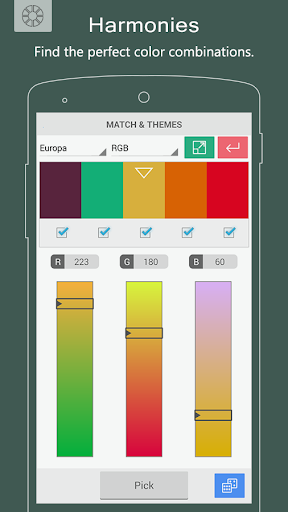
● Color palettes and harmonies themes generation tool.
● Colors blending tool - mix colors.
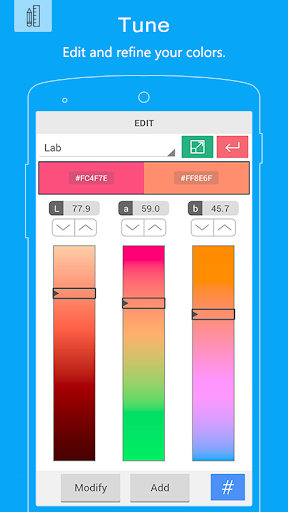
● Tune tool - refine your colors.
● Find the perfect color combinations.
● Discover and reveal matching colors.
● Color locking indication.
● "Instant Picking" - tap-2-capture.
● Viewfinder smart processing.
● Supports most-common color models (RGB, HEX, HSV, LAB, see below).
● After-shot color analysis.
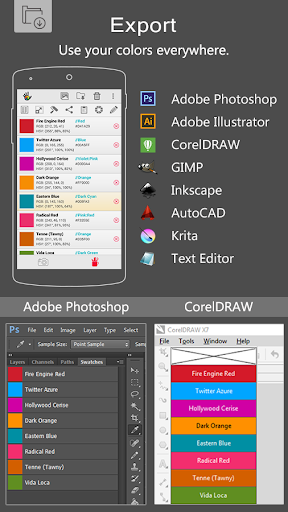
● Export to popular applications such as Photoshop, Illustrator, Excel, CSV, PaintShop, Gimp, Inkscape, AutoCAD, Datasheets, etc.
● Color conversions.
● Accessibility; hear the color by pressing the volume buttons.
● Copy color to clipboard.
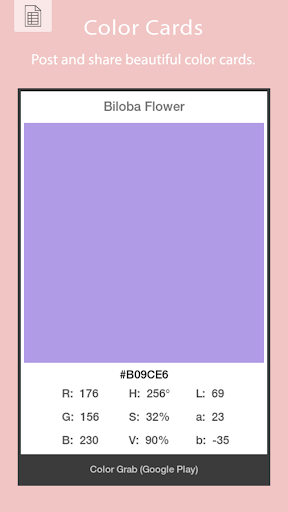
● Share and post color cards as image or text.
● Paint your wallpaper background with a solid color.
ADDITIONAL CONTROLS:
● Turn flash light in low-light conditions.
● Smart color stabilizer.
● Smart color locking mechanism.
● Motion-sensed auto-focus.
● Zoom control.
● White-balance control.
● Camera switching (use rear or front).
SUPPORTED COLOR PALETTES:
● Analogous, Monochromatic, Triad, Triad Pro, Complementary, Compound, Pentagram, Tetrad, Tetrad Pro, Shades, Hues, Inca, Gaudi, Butterfly, Europa.
SUPPORTED COLOR REFERENCES:
● RAL Classic
● RAL Design
● RAL Effect
● NCS® 1950
● Federal Std. 595C
● Australian AS2700
SUPPORTED COLOR MODELS:
● RGB & Hex
● HSV / HSB
● HSL
● Lab
● Greyscale, Lightness & Darkness
● Web-Safe
● CMYK
● CIE XYZ
● CIE xyY
● Hunter-Lab
● LUV
● LCH(uv)
● LCH(ab)
● YIQ
● YUV SD & HD
● YCbCr SD & HD
● YPbPr SD & HD
Just grab it,
- Loomatix Team.
Privacy
Given Color Grab's zero-permission policy, users can be confident that their personal data is not being collected or shared. However, as with any app, it's essential to be cautious when using the camera and processing power-intensive features, as they may impact device performance and battery life. To minimize potential risks, users should ensure their device is updated with the latest security patches and use the app in accordance with the developer's guidelines.
Tips
To get the most out of Color Grab, users should start by familiarizing themselves with the app's simple interface and exploring its various features, such as color detection and palette creation. For optimal performance, users should ensure their device's camera is clean and free of obstructions, and consider using the app in well-lit environments to improve color accuracy. Additionally, users can experiment with different angles and compositions to capture unique and inspiring colors.
What's New
- camera exposure control
- share color as card
- additional color interpretation languages
- few enhancements
- more sharing options
- prominent colors extraction from photos
Please help keep Color Grab app alive and totally free by rating and sharing the app with your friends.
In-app purchases
$3.49 per item
Version Information
- Version
- 3.9.2
- Downloads
- 1M+
- Updated on
- Feb 9, 2021
- Released
- Oct 20, 2012
- Requires
- Android 4.1
Statistics
Google Play Rating History
Rating Distribution
Downloads Over Time
Color Grab (color detection) has been downloaded times. Over the past 30 days, it averaged downloads per day.
Shaded area shows 30-day prediction based on historical trends
Historical data collection started recently. More data points will be available over time.
Color Grab (color detection) users say on Google Play
 Carlo “Kappa” Piana
The best color calibration I've found around. Using a phone camera is always a bad idea, since it's by definition uncalibrated and the software does a lot of unwanted, unpredictable correction which is impossible to turn off without access to raw data and a camera profile. This app has a nifty white calibration which neutralizes most of this and, for a ballpark color finding, it is more than enough.
 1860Sky Gypsy
If I get it just right, I get a true picture of how real-life colors look on my camera. The problem is in "getting it just right." It takes a long time. I don't really understand what I'm doing. Instructions are way above my head, written, maybe, for someone more savvy than I. Plus, there're so many color palette choices, and I have to coordinate with settings on my phone's camera. It just seemed easier in the beginning. Still, I'm keeping it on my phone, because it works when I work for it.
 Dillon Lankford
I can't wait for a 64 bit version of this app.
 Roy Klein
gives me wrong color
 Frances Hodgkins
too difficult to navigate, won't access my photos
ApkTrusted Ratings & Reviews
More from Loomatix
See more apps
Similar Apps
ColorWiz Cam
Paid
Paint my Room - Try wall color
Free
Jazeera Paints
Free
Show My Colors: Color Palettes
Free

Via Capitale Camera
Free

Apowersoft Background Eraser
Free

Image Toolbox - Edit & Convert
Free

Photobook: Photo Books & Gifts
Free
Photo Studio: Edit Photos App
Free
Presets For LR - Photo Filters
Free

HiPaint: Sketch & Draw art
Free
Ink Cards
Free

Homestyler - Home Design Game
Free
PICNIC - photo filter for sky
Free
KIRI Engine: 3D Scanner App
Free
Photo Editor by BeFunky
Free
Scan this QR code to download

Forwarding you to the page at Google Play market in seconds...
Open Google Play market now