AI Transcribe. Speech to Text v1.12.0
MeetGeek: AI Note Taker. Transcribe Speech to Text






About this app
The AI Transcribe app effectively solves the problem of manual note-taking during meetings by automatically transcribing speech to text in over 50 languages, making it an invaluable tool for professionals and students alike. This app stands out from other productivity tools due to its language versatility and automated note-taking feature. However, its effectiveness compared to alternatives depends on the accuracy of its transcription and the quality of the audio input. Given its moderate download numbers and high user rating, it seems to be well-received by its target audience.
Pros
- With over 100,000 downloads and a 4.4-star rating, the app has demonstrated social proof and a high level of user satisfaction, indicating its effectiveness in meeting the needs of its users.
- The app's ability to transcribe speech to text in multiple languages makes it an excellent tool for multinational teams, international students, and travelers, enhancing its utility and versatility.
- The developer's reputation, as evidenced by their website and support email, suggests a commitment to customer support and updates, which is crucial for maintaining the app's performance and security.
- The absence of ads and minimal permissions required by the app contribute to a distraction-free and secure user experience, allowing users to focus on their work without interruptions or privacy concerns.
- The option for in-app purchases provides users with the flexibility to upgrade their experience according to their needs, although the range of prices from $18.99 to $349.99 per item may impact affordability for some users.
Cons
- The high-end pricing of some in-app purchases, up to $349.99, may be a barrier for individual users or small businesses, limiting the app's accessibility to a broader audience.
- Despite the app's high rating, some users may experience variability in transcription accuracy depending on the quality of the audio input, which could affect the app's overall usefulness.
- The lack of detailed information about what data the app collects and how it is used may raise privacy concerns, especially considering the sensitive nature of meeting notes and transcripts.
- The requirement for Android 10 may exclude users with older devices, potentially limiting the app's adoption among users who cannot or prefer not to update their operating system.
Best for: The ideal user for the AI Transcribe app is a professional, student, or individual frequently involved in meetings, lectures, or interviews who values efficiency, accuracy, and organization, and is comfortable with technology, including those who may have difficulty taking notes manually due to disabilities or language barriers.
Developer Description
AI meeting note taker in 50+ languages. Take meeting notes automatically
✓ face-to-face conversations
✓ online meetings
✓ training courses
✓ interviews & more
From today onward, your meetings can end with an accurate transcript & an AI-generated summary in your inbox that includes key highlights, decisions, and action items discussed.
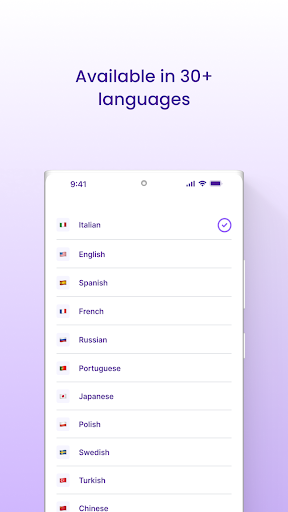
Supported languages: Afrikaans, Albanian, Arabic, Armenian, Azerbaijani, Bengali, Bosnian, Bulgarian, Burmese, Chinese, Croatian, Czech, Danish, Dutch, English, Estonian, Filipino, Finnish, French, Georgian, German, Greek, Hebrew, Hindi, Hungarian, Icelandic, Indonesian, Italian, Japanese, Kazakh, Korean, Latvian, Lithuanian, Macedonian, Malay, Maltese, Mongolian, Nepali, Norwegian, Persian, Polish, Portuguese, Punjabi, Romanian, Russian, Serbian, Slovak, Slovenian, Spanish, Sundanese, Swahili, Swedish, Tamil, Telugu, Thai, Turkish, Ukrainian, Urdu, Uzbek, Vietnamese, Zulu.
MeetGeek Works With the Major Video Calling Apps
MeetGeek is a versatile notetaking app for meeting automation that you can use on multiple platforms to help you record audio & get AI-generated summaries. You can easily transcribe speech to text, take notes & summarize meetings conducted on:
✓ Zoom,
✓ Google Meet
✓ Microsoft Teams
Record face-to-face conversations
MeetGeek is a speech-to-text app that allows you to record audio with just one touch of a button, get voice transcription & a summary of the chat shortly afterward inside the app and via email. This is especially useful if you need to keep records of your business meetings, talks from conferences, or offline meetings with clients.
Record & Transcribe speech to text
✓ Record audio & transcribe speech to text for meetings with just one click.
✓ Automatically take meeting notes so you can focus on the conversation.
✓ Have speakers labeled with tags for easy navigation.
✓ Simply invite MeetGeek to meetings on your calendar & you are ready to go
Get a Smart AI Summary of Your Meetings
✓ Get a 5-min summary out of a 1-hour meeting.
✓ MeetGeek detects action items, important moments, facts from your meetings & automatically tags them.
✓ Use AI Highlights to quickly review the transcripts of your past conversations.
✓ Send an AI summary over email to other participants of the offline meeting or video call.
Highlight & Share Transcripts
✓ Scroll back through the transcript to recall important details.
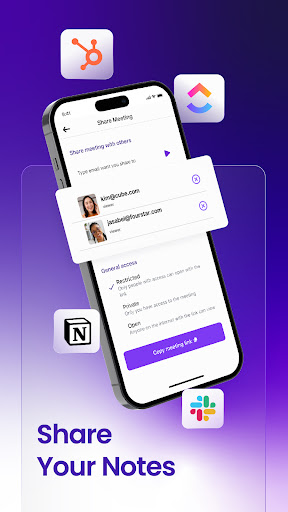
✓ Share voice, video & text notes with others.
✓ Search past recordings for keywords.
✓ Export transcripts of your conversations as docs.
✓ Integrate with apps like Notion, Slack, ClickUp, Pipedrive, HubSpot, and others.
Why Choose MeetGeek?
MeetGeek isn't just a voice recorder or a notes app; it's an all-in-one solution designed to enhance your productivity. With MeetGeek, you can effortlessly record audio during any video call & get comprehensive AI summaries, making it easier than ever to keep track of key information & action items.
This voice to text app supports over 50 languages & provides 300 minutes of free transcription.
Using MeetGeek during your Zoom, Google Meet, or Microsoft Teams video calls is straightforward. Similarly to Otter AI, Fireflies, Sembly AI, Fathom, Minutes, Transcribe, or Notta, the app provides automatic transcription & note-taking, ensuring you can focus on the discussion rather than worrying about missing important points. The notes app functionality means you can easily organize & review your meeting notes anytime.
In addition to its core features, MeetGeek offers detailed & descriptive summaries highlighting key points from your meetings. The app can also transcribe descript face-to-face conversations, making it a versatile tool for various settings.
With the MeetGeek AI notetaker, your offline meetings & online video calls become more productive & efficient.
Privacy
Given that the AI Transcribe app requires no permissions, it presents a low-risk profile in terms of data privacy and security. However, users should still be cautious about the content they transcribe, especially if it involves sensitive or confidential information. To maintain privacy, users are advised to review the developer's privacy policy and consider the potential implications of storing transcripts locally or in the cloud.
Tips
For optimal performance, users should ensure they have a stable internet connection when using the app, especially for real-time transcription. Additionally, positioning the microphone correctly and minimizing background noise can significantly improve transcription accuracy. Users can also explore the app's settings to customize their experience, such as choosing the transcription language and managing stored transcripts.
What's New
- Resolved video player and transcript issues on meeting details page
In-app purchases
$18.99 - $349.99 per item
Version Information
- Version
- 1.12.0
- Downloads
- 100K+
- Updated on
- Nov 24, 2025
- Released
- Dec 4, 2023
- Requires
- Android 10
Statistics
Google Play Rating History
Rating Distribution
Downloads Over Time
AI Transcribe. Speech to Text has been downloaded times. Over the past 30 days, it averaged downloads per day.
Shaded area shows 30-day prediction based on historical trends
Historical data collection started recently. More data points will be available over time.
AI Transcribe. Speech to Text users say on Google Play
 Omar - Personal Abdelrehim
I really like the mobile app. I was at a business conference and it was full of speakers for 2 days so rather than taking notes I tried your app. it was very easy to record any meeting, just press the button and it starts recording. It also gives you the option to pause, restart and then you can have the AI analysis do it's magic. I'm also able to change the recording type based on my account profiles. It syncs with my account. Would really like the ability to rename the recording in app
 Chinese Bob Evans II
Still new to this app but it transcribes fairly accurately and fairly well. Its summaries could be a little more in-depth, but no major complaints! For a free resource, it's wonderful and well-worth it
 DOUG SE7EN
This APP shouldn't exist as an extension of the online product (which is FANTASTIC). ** This APP does NOT sync with your account online. ** The ONLY benefit is that you can record your voice for ideas and brainstorming I suppose. ** You cannot UPLOAD files or past audio/video recordings. ** You cannot access your meetings or files in your account. I'm only keeping it in hopes that the devs are writing these functions into this APP DO NOT judge their online product based on this app!
 Gilbert Yeo
meetgeek was working fine until a recent meeting. it was a meeting in English, but it transcribed everything and provided a summary in malay, despite it being English (SG). there are no options to have the meeting notes refreshed or regenerated too.a
 Arnaud Jacquin
Any app that imposes that you sign-up with a Google account or a Microsoft account (or an Apple account as suggested by their web interface) exclusively is an automatic pass for me. Allow singing up with an email address with the domain of my choosing and I will reconsider my rating. For now, there are alternatives out there that aren't as restrictive (and that work very well). Moving on.
ApkTrusted Ratings & Reviews
Similar Apps

Notta-Transcribe Audio to Text
Free
AI Transcribe Speech to Text
Free

ideaShell: AI Voice Notes
Free

Smart Noter - AI Note Taker
Free

Transcribe Speech to Text
Free
RecCloud - AI Speech to Text
Free

TicNote: AI Recorder & Agent
Free
Recorder AI:Voice&Meeting Note
Free

Plaud: AI Notetaker
Free

Speechify – Voice AI Assistant
Free

OtterAI Transcribe Voice Notes
Free

NaturalReader - Text to Speech
Free

Voice Memos: Braindump
Free

Hedy AI Meeting Coach
Free

ElevenReader - Voice Reader
Free

Teleprompter.com
Free
Scan this QR code to download

Forwarding you to the page at Google Play market in seconds...
Open Google Play market now