
Super Voice Recorder v2.3.50
MeiHillMan




About this app
Developer Description
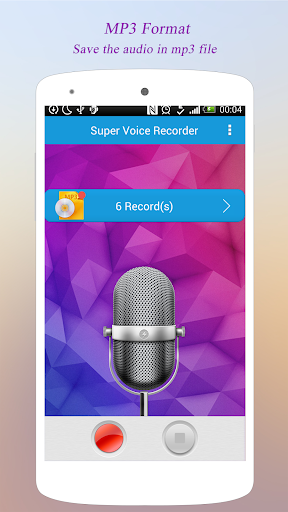
Great audio recorder. Make the clear sound mp3 file.
Compared to other apps, Super Voice Recorder has the following advantages:
1. Easy to use, start recording on the press of a button. You can pause and continue the recording when you want. After finished recording, you can easily use the built-in player to play, pause, rename, send, share, etc.;
2. Clear sound recording, support for 7 recording quality rates so you can switch at any time according to your needs. Note: the higher the recording quality the bigger the audio file;
3. Uses the widely supported MP3 format to save audio files so that you can view, share, play on most devices without transcoding again;
4. Perfect background recording mode, very smart, so you can keep recording while doing something else, even if the screen is turned off;
5. Audio recording files are stored into “AllVoiceRecords” in your SD card root folder. In addition to using the built-in player, you can use your device’s file browser or a USB PC connection to view, copy or share the files in the directory.
What's New
Version Information
- Version
- 2.3.50
- Downloads
- 1M+
- Updated on
- Dec 14, 2025
- Released
- Dec 25, 2014
- Requires
- Android 5.0
Statistics
Google Play Rating History
Rating Distribution
Downloads Over Time
Super Voice Recorder has been downloaded times. Over the past 30 days, it averaged downloads per day.
Shaded area shows 30-day prediction based on historical trends
Historical data collection started recently. More data points will be available over time.
Super Voice Recorder users say on Google Play
 Anees Aluva
Very good. able to record mp3 with less file size. But Ads added recently is horrible. Unable to use. Please make an Ad free version, for that we are free to pay, if it is affordable.
 Muhammad Sulaiman
I like it works very well. No adding but there's noise when recoding
 Solly Matshopa
Good
 Akidu Huseni
After recording there is an error of missing auido files in my internal storage
 Garry Curro
I downloaded this app after having bad experiences with several others, one was a paid for phone recordeer. I needed a DEPENDABLE record of business transactions and very important transactions and timelines pretaining to the affairs of a family members estate. This app never did anything. it was disturbing when i learned there were no recordings.
ApkTrusted Ratings & Reviews
More from MeiHillMan
See more apps






Scan this QR code to download

Forwarding you to the page at Google Play market in seconds...
Open Google Play market now