MetaMoJi Note Lite v3.1.13.0
MetaMoJi Corp.





About this app
Developer Description
Award winning cross platform note taker, sketchbook and whiteboard
We have confirmed that the following phenomena occur on Android 10 or later.
- Unable to select objects with a tap or the Lasso tool.
- Unable to re-edited the Text Unit and a new Text Unit is inserted.
*The above phenomena do not occur in environments up to Android 9, and operation is not guaranteed for Android 10 or later use.
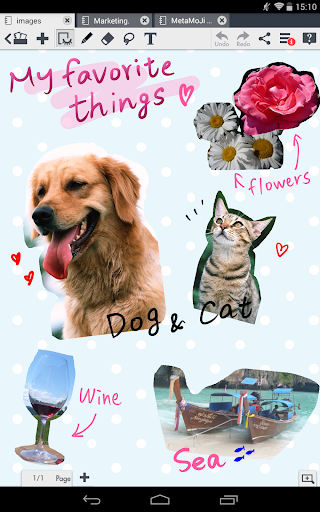
MetaMoJi Note is a cross platform note taker, sketchbook and whiteboard app for all Android enabled devices. Take notes or To Do lists, or import files in PDF format. Use the app as a high resolution sketchbook with a vast color wheel palette, pastel colors and advanced calligraphy pens. MetaMoJi Note is a highly visual virtual whiteboard for sketching, annotation, scrapbooking or digital mashup.
MetaMoJi Note is the only note-taking app available across all major mobile platforms. Winner of multiple awards: Tabby Award for Best Personal Productivity App - Silver Stevie® Award for International Business - Finalist for Appy Award for Productivity - #1 Productivity App in Japan
Capture, share, and access your inspiration anywhere, anytime!
Key Features
• Write, sketch or draw notes with a variety of pens, paper layouts and graphics, including calligraphy pens and special inks from a vast color palette
• Scale your document up to a whiteboard or down to a sticky note while still maintaining 100% visual integrity with up to 50X zoom capability and vector graphic resolution quality
• Share creations by email or upload to Twitter, Facebook or Tumblr
• Easy file storing and sync files and folders to MetaMoJi Cloud, a cloud service that allows you to save and manage your documents (up to 2GB for free)
• Save drawings as individual JPEG graphics in the items library for later use
• Scale, rotate, or move text boxes anywhere in your work space
• Interactively browse the web from within the app and mark up sites
• Built-in spell checker
Here are some ways to use MetaMoJi Note for your personal and business life:
• Generate quick notes and to-do lists
• Capture and markup website pages
• Sketch drawings
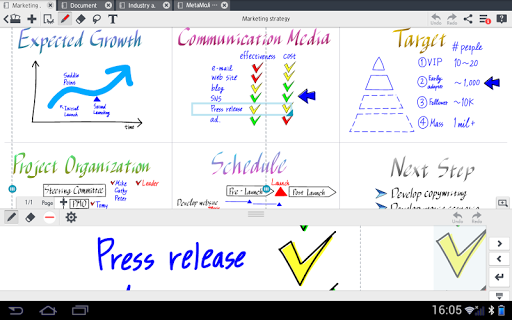
• Use as an interactive whiteboard to brainstorm and present during team meetings
• Photo annotation
• Review/edit documents and share feedback through email
• Outline an essay, article or story
• Create your own “Pinterest” board and share via social networks
• Digital scrapbooking
• Play games
• Design flyers or greeting cards
• Draw a flowchart
• Maintain a digital calendar
• Compile recipes
• Create a party invitation
Learn more:
More about MetaMoJi Note: http://noteanytime.com
Support: http://noteanytime.com/en/support.html
Twitter: https://twitter.com/noteanytime
Facebook: https://www.facebook.com/NoteAnytime
YouTube: http://www.youtube.com/user/NoteAnytime
USTREAM: http://www.ustream.tv/channel/note-anytime-tv
Contact us: http://noteanytime.com/en/contact.html
EULA: http://product.metamoji.com/en/anytime/android/eula/
What's New
In-app purchases
$0.99 - $4.22 per item
Version Information
- Version
- 3.1.13.0
- Downloads
- 1M+
- Updated on
- Oct 31, 2018
- Released
- May 13, 2013
- Requires
- Android 5.0
Statistics
Google Play Rating History
Rating Distribution
Downloads Over Time
MetaMoJi Note Lite has been downloaded times. Over the past 30 days, it averaged downloads per day.
Shaded area shows 30-day prediction based on historical trends
Historical data collection started recently. More data points will be available over time.
MetaMoJi Note Lite users say on Google Play
 nur ain athirah
Love this app so much. Really help for my study and learning process. Hope for more in future. My suggestion to developer: try to include palm rejection in this app. Thank you so much
 Nur Alia
I wish i found this app earlier.. i can import pdf and there are multiple colour pen.. n very organize folder. It would be much better if there is shape option such as circle, oval line arrow and etc.. I cannot use the write using keyboard option, my keyboard stop working, not sure if it is uncompatible with my device.. edited 4/3/22: i cannot import the notes in pdf form anymore. It keeps saying unsupported attachment
 Anuja Jangam
I was using this app for last 3 years. But since I updated my phone with version 10, my favourite selection tool isn't working. Yeah, I have read disclaimer they posted about the same issue. But here, I am requesting- please do update your app for higher android version. Because this is the best app I ever seen for note taking in android system.
 Mieke Hugo
It won't install on my device
 Krystal Pollard
Outdated. As soon as I downloaded this it immediately told me it was outdated and while the aspect of using the app seemed nice I see no point in seeing anything up because eventually this will no longer function. Over 2 years and no update is bad programming on the developers side. I immediately deleted the app. Don't even waste your time in my opinion. The developers don't seem to care since they haven't done anything in years so as a consumer you shouldn't either.
ApkTrusted Ratings & Reviews
More from MetaMoJi Corp.
See more apps
mazec3 (jp) -Handwriting
Paid

mazec3 Handwriting Recognition
Paid
![mazec3(手書きによるカンタン日本語入力)[体験版] icon](https://play-lh.googleusercontent.com/SldStkrH_lJFcYairnlHSOfFHwhGcLIn_apwwhsAeoNm5dbvJ9DwLDwIL5NRWmnUyBMW)
mazec3(手書きによるカンタン日本語入力)[体験版]
Free

MetaMoJi Extension Kit
Free

Palu - Handwriting Calendar -
Free
MetaMoJi Note
Paid
MetaMoJi Share Lite
Free
MetaMoJi Note Business Lite
Free

eYACHO for Business 7
Free

MetaMoJi Share for Business 3
Free

MetaMoJi ClassRoom
Free
MetaMoJi Share
Paid

eYACHO for Business 6
Free
Scan this QR code to download

Forwarding you to the page at Google Play market in seconds...
Open Google Play market now