
Micromizer: Photo Compressor v0.4.9
Flow-Apps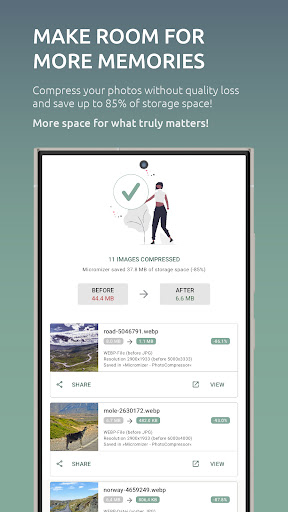


About this app
Developer Description
Compress photos • Resize images • Convert formats • Save storage space!
Your benefits with the Micromizer Photo Compressor:
• Save storage space on your smartphone
• Reduce cloud storage costs and make room for more photos
• Send photos via email or SMS that would otherwise be too large
• Share photos abroad with weak Wi-Fi or limited data
• Speed up your smartphone by freeing up storage
With Micromizer, you can compress photos and reduce image size. Our image compression algorithm combines multiple compression techniques to minimize file size while preserving image quality, letting you save maximum storage without visible quality loss.
🚀 Save space & speed up your smartphone
Micromizer allows you to compress photos and reclaim valuable storage space. Perfect for boosting your smartphone's performance, reducing load times, and sharing images faster!
1️⃣ Versatile options and features:
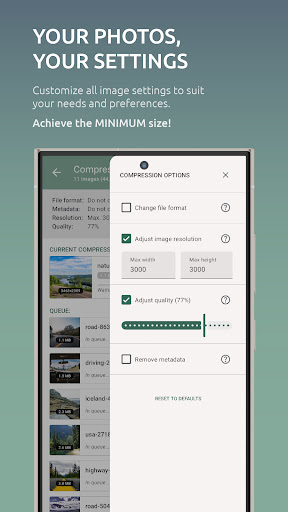
» Adjust image resolution individually
» Convert image formats in a flash (JPG, JPEG, PNG, WEBP)
» Compress images losslessly or maximize space savings
» Optionally remove metadata to protect your privacy
» Replace the original image or save a copy
» Choose a custom output folder
» Share or send compressed images directly
» 🔜 Sync with Dropbox or FTP folders
2️⃣ Single and batch compression
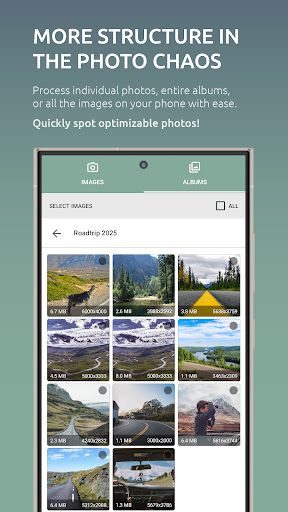
Compress individual photos or save time with automatic batch processing to optimize entire albums in one go. Ideal for compressing many images at once and saving significant storage space with minimal effort.
3️⃣ Before-and-after comparison
Compare compressed images directly in the app with the originals to find the perfect balance between quality and storage. Save up to 85% of storage without noticing a difference.
4️⃣ Automatic background compression
Let Micromizer handle new photos on your smartphone automatically in the background. Take pictures, and Micromizer compresses them instantly, freeing up storage without needing to open the app manually.
6️⃣ Fast, accessible support
Have a question, a request, or an issue with photo compression? Our support team works six days a week and responds quickly to your messages. Use the contact form in the app or email us at support@micromizer.com.
🛡️ Your privacy. Your control.
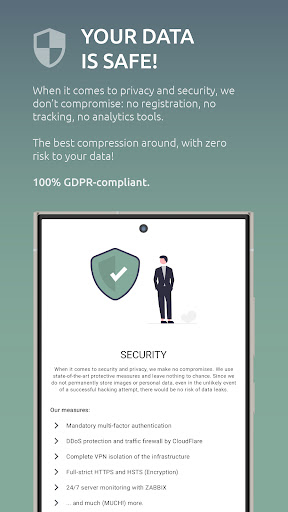
We respect your data and avoid tracking, analytics, user accounts, or unnecessary permissions. Fully GDPR-compliant and secured with state-of-the-art measures. You can compress your photos with peace of mind.
🚀 Online or offline? Your choice.
» Online mode: Use powerful cloud compression for even better results.
» Offline mode: Compress images directly on your device—no internet required.
💸 100% free!
All image compression features are available for free under a fair-use policy, and you won’t be bombarded with ads.
💾 Make room for more memories!
Discover the easiest way to save storage. Download Micromizer now for free and start compressing your photos!
What's New
- Slightly faster photo compression
- Minor bug fixes
- New features
- Improved Duplicate-Finder
- Improved Translations
In-app purchases
$1.49 - $20.99 per item
Version Information
- Version
- 0.4.9
- Downloads
- 10K+
- Updated on
- Apr 26, 2025
- Released
- Dec 29, 2024
- Requires
- Android 5.0
Statistics
Google Play Rating History
Rating Distribution
Downloads Over Time
Micromizer: Photo Compressor has been downloaded times. Over the past 30 days, it averaged downloads per day.
Shaded area shows 30-day prediction based on historical trends
Historical data collection started recently. More data points will be available over time.
Micromizer: Photo Compressor users say on Google Play
 Chris Links
I paid because it does the job properly. The deciding factor was that this app preserves the metadata, and you can set it to replace the original files. Other apps I tried just output the compressed files to a new folder. Only complaint is that you have to give permission for every 250 items; I would prefer if it let me spam all the permissions once and then let it run while I sleep.
 Ranuga Edirisinghe
Amazing photo compression tool , quick and efficient , sometimes eventhough its set to save in a different file format it still saves in the file format as the original. A dark mode is highly appreciated.
 ivan
ivan
can't set a max compress resolution below 3000px, tried to set width and height to 2000px but didn't work
ApkTrusted Ratings & Reviews
More from Flow-Apps
See more apps
Similar Apps




Scan this QR code to download

Forwarding you to the page at Google Play market in seconds...
Open Google Play market now