엠틱 v3.8.13
Mobilians. Co., Ltd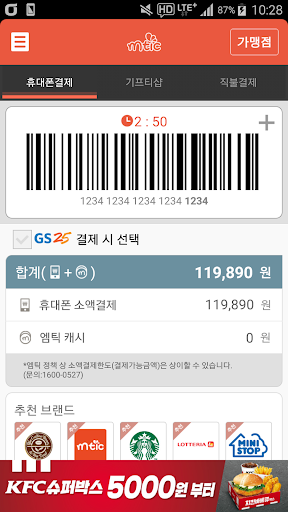

About this app
Developer Description
KG Mobilians offline mobile phone payment service
1. What is MTIK?
M-Tic is a mobile payment service that allows you to easily purchase items with your smartphone without cash or card. After running MTIK, request payment at the MTIK affiliated store using the barcode you created. The amount paid will be billed as part of the next month's mobile phone bill or transferred in real time to your registered debit account.
2. Instructions on how to use
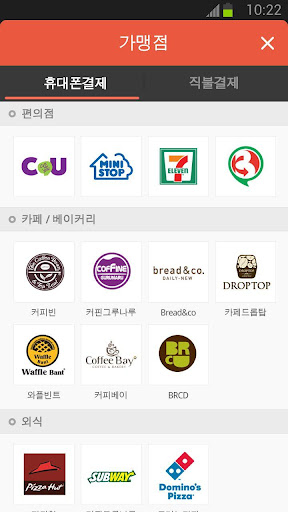
1) Barcode method (when used at offline affiliated stores - CU/Ministop/Kyobo Bookstore, etc.)
① When purchasing a product at an Mtic affiliated store, present the barcode created after running Mtic to the cashier and request ‘Mtic payment’
② Payment is completed the moment you scan the Mtik barcode with a barcode reader.
2) Simple payment authentication method (when used at online affiliated stores - Interpark Books/Domino's Pizza/Culture Land, etc.)
① Select ‘Mtic Payment’ as the payment method on the affiliated store’s online website, then run Mtic and create a barcode.
② Complete the payment by entering the ‘last 4 digits of MTI barcode’ on the merchant payment screen.
3. Where to use MTIK - CU convenience store, KFC, post office
(However, not available in some special stores - inside hospitals, schools, etc.)
4. Inquiry information
-Mtic Customer Center: ☏1800-0678 (Weekdays 09:00~18:00, excluding weekends/public holidays), help119@kggroup.co.kr
-Homepage: http://www.m-tic.co.kr
[Information on app access permission consent]
In accordance with the enforcement of Article 22-2 (Consent to Access Rights) of the Information and Communications Network Act, we will inform you of the access rights required to use the service as follows.
[Required access rights]
- Phone: Membership registration verification, payment verification
[Optional access rights]
- Storage space: Temporary storage of image files
[How to revoke access permission]
- Android 6.0 or higher: Settings > App > Select permission item > Select agree or withdraw access permission
-Under Android 6.0: Upgrade the operating system to revoke access rights or delete the app.
* The app may not provide individual consent functionality, and access permission can be revoked using the method above.
We will continue to do our best to become a convenient MTIK.
thank you
What's New
Version Information
- Version
- 3.8.13
- Downloads
- 500K+
- Updated on
- Jul 30, 2025
- Released
- Apr 5, 2011
- Requires
- Android 5.0
Statistics
Google Play Rating History
Rating Distribution
Downloads Over Time
엠틱 has been downloaded times. Over the past 30 days, it averaged downloads per day.
Shaded area shows 30-day prediction based on historical trends
Historical data collection started recently. More data points will be available over time.
엠틱 users say on Google Play
 A Google user
지갑없이 핸드폰으로 편의점에서 살 수있어 편함
A Google user
아직안써봣자만ㅋㅋㅋ느낌이좋음ㅌㅋㅋ
 김철수
김철수
Gs25만 갑자기 결제가 안되네여
ApkTrusted Ratings & Reviews
More from Mobilians. Co., Ltd
See more apps


Scan this QR code to download

Forwarding you to the page at Google Play market in seconds...
Open Google Play market now