
Change of Faces v1.4.0
monois Inc.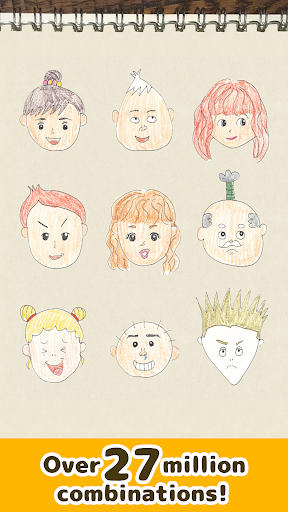


About this app
Developer Description
Change of Faces is a game of creating faces by combining parts!
Change of Faces is a "dress-up" game of faces that you create by combining all kinds of parts.
Make laughing faces, angry faces, sad faces, happy faces, weird faces, and many more by combining parts!
Features of the app
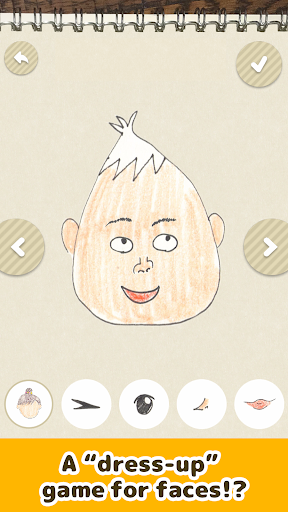
Create whatever face you like by selecting five parts: face, eyebrows, eyes, nose, and mouth.
The parts can be positioned freely. Just changing the positions of the same parts creates different expressions for even more fun!
You can also name the faces you've made and record voices. There's a lot you can play with in Change of Faces!
"A cute girl with a runny nose...?"
"A feudal lord with a unibrow and a topknot...?"
"Are you a human? Or a robot...?"
What sort of funny face will you create?
How to play
==============
Create
--------------
First, choose a "base face" from among 44 faces.
After selecting a face to play with, choose the five parts lined up beneath, tapping the "<" and ">" buttons to slide through the selections.
The position of every part can be changed with your fingers.
Once you've made your face, finish it by pressing the “✓” button at top right! (The faces you make show up in the main menu.)
Select a face from the main menu to record a name and your voice.
Press the keyboard icon at top, enter a name of your choice, and press the “✓” button at bottom right to show the name.
Press the microphone button at bottom to start audio recording.
Press the button again to hear the recorded audio. You can also change the playback speed by tapping the “↑” and “↓” buttons at right, or delete the audio by tapping the trash can icon at left.
To delete a face you've made, select it from the main menu and tap the trash can button at top right.
Play
--------------
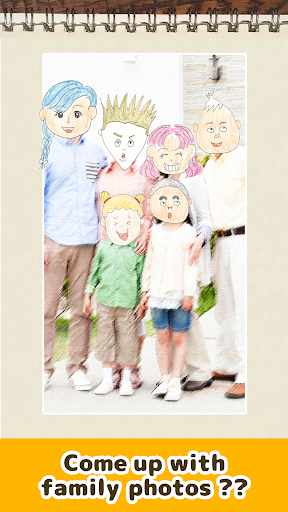
You can apply faces you've made to photos.
First, choose a photo.
Next, choose the face to add to the photo. (You can pick as many faces as there are people in the photo. Picking just one face might be fun as well!)
After selecting a face, press the “✓” button at top right to see the face in the photo. Save the creations that you like by pressing the "Save to smartphone" button below!
What's New
Version Information
- Version
- 1.4.0
- Downloads
- 1K+
- Updated on
- Oct 21, 2025
- Released
- Apr 25, 2020
- Requires
- Android 7.1
Statistics
Google Play Rating History
Rating Distribution
Downloads Over Time
Change of Faces has been downloaded times. Over the past 30 days, it averaged downloads per day.
Shaded area shows 30-day prediction based on historical trends
Historical data collection started recently. More data points will be available over time.
Change of Faces users say on Google Play
 Sheila Mesias
This game is funny
ApkTrusted Ratings & Reviews
More from monois Inc.
See more apps
Living Coloring
Free

Train Go - Railway Simulator
Free

Easy Train Game
Free
Sling Game
Free

Wiggly racing
Free
Pocket Marble Runs
Free

Train Maker - train game
Free

The Galaxy Wanderer Game
Free

Origami Paper SnipSnap
Free
Easy Toppling Dominoes
Free

Pinball Monsters
Free

Food Match
Free

Great Ant Adventure
Free

Donuts claw game
Free

Car tag - Play tag with servic
Free
Monte Puzzles
Free
Similar Apps

SGZ. Jeep Driving Game
Paid

Labubu Doll Merge Challenge 3d
Paid
Complete it・Draw One Part
Paid

Dream Town: Merge Game
Paid

Anime Life High School Games
Paid

Train Sort Jam Puzzle
Paid

My Crane & House Builder Game
Paid

BirdSurvival
Paid

Train Simulator 2026
Free

No More Rainbows
Paid

Adopt Me : Zoaria
Paid

Split Second Sprint
Paid

Robot Fighting Game Robot 3D
Free

Capsule Critters
Paid

Animix - AI Mix Animal Games
Paid

Bustin' Nuts
Paid
Scan this QR code to download

Forwarding you to the page at Google Play market in seconds...
Open Google Play market now